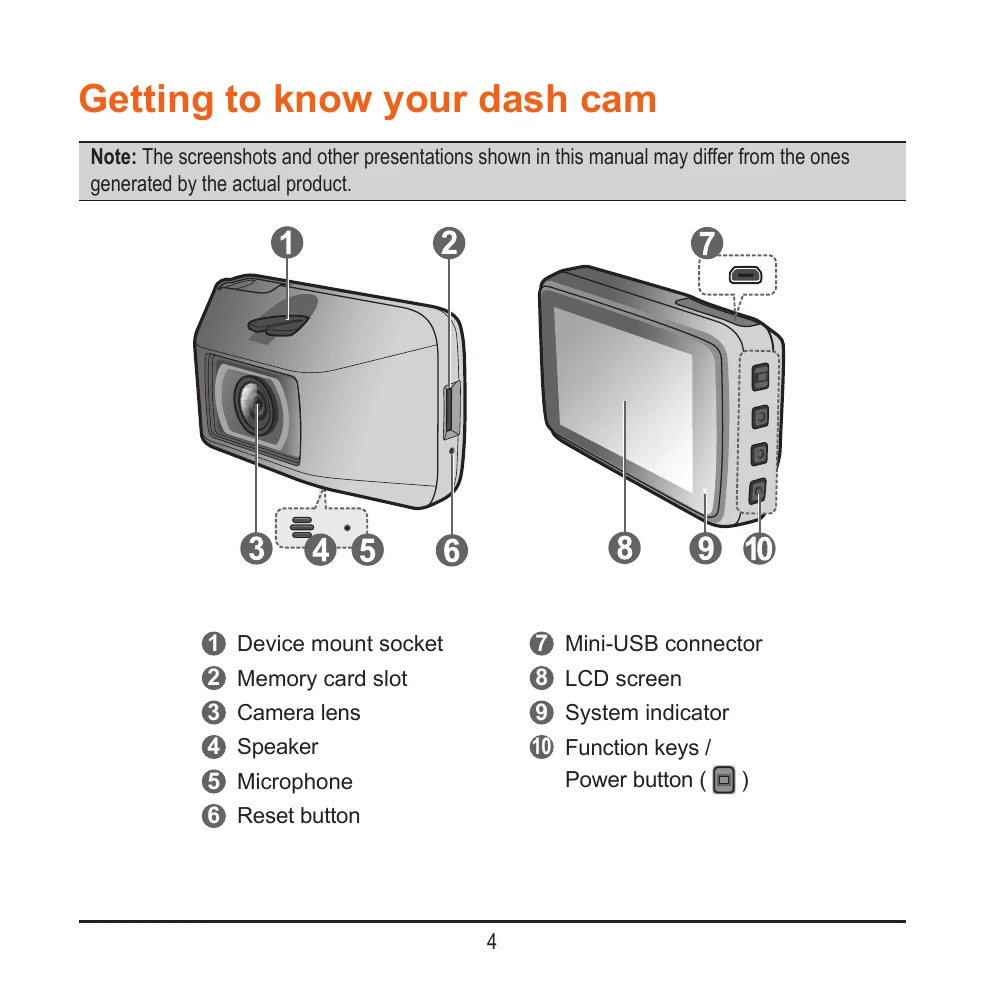
Familiarize yourself with the device's components: mount socket, memory card slot, camera lens, speaker, microphone, reset button, mini-USB connector, LCD screen, system indicator, and function/power button.
Using Your Dash Cam in a Vehicle:
Mount securely using the provided mount. Ensure the camera lens is unobstructed and clean.
Route cables to avoid interfering with driving or safety features.
Adjust the camera angle for a 50/50 ground/sky split.
Insert a MicroSD card (U3/V30 or above recommended, 8-256GB). Format the card before first use.
Turn on the device after mounting and follow on-screen prompts for language, date/time, and units.
Recording Modes:
Continuous Recording: Starts automatically. Manually stop/start with specific buttons. Overwrites oldest files when storage is full.
Event Recording: Automatically triggered by G-sensor (impacts, sudden stops, etc.). Also manually triggerable.
Parking Mode: Records triggered by G-sensor and/or motion detection when parked. Two modes: Smart Mode (requires power source) and Passive Powered Mode (uses internal battery).
Playback and Connectivity:
Access recordings via MiVue Manager software on your computer.
Connect to your smartphone via Wi-Fi using the MiVue Pro app for viewing, sharing, and backup.
Update firmware and safety camera data via OTA or website downloads.
System Settings:
Customize recording settings (clip length, resolution, EV, etc.), sound recording, safety camera alerts, parking mode, and system preferences (language, display, etc.).