Brand: Mio
Category: Automotive Electronics
Document Type: Manual
Language: EN
Brand: Mio
Category: Automotive Electronics
Document Type: Manual
Language: EN
Uploaded: Aug. 10, 2025, 12:45 a.m.
Manual Publish Date: 2023-08-01
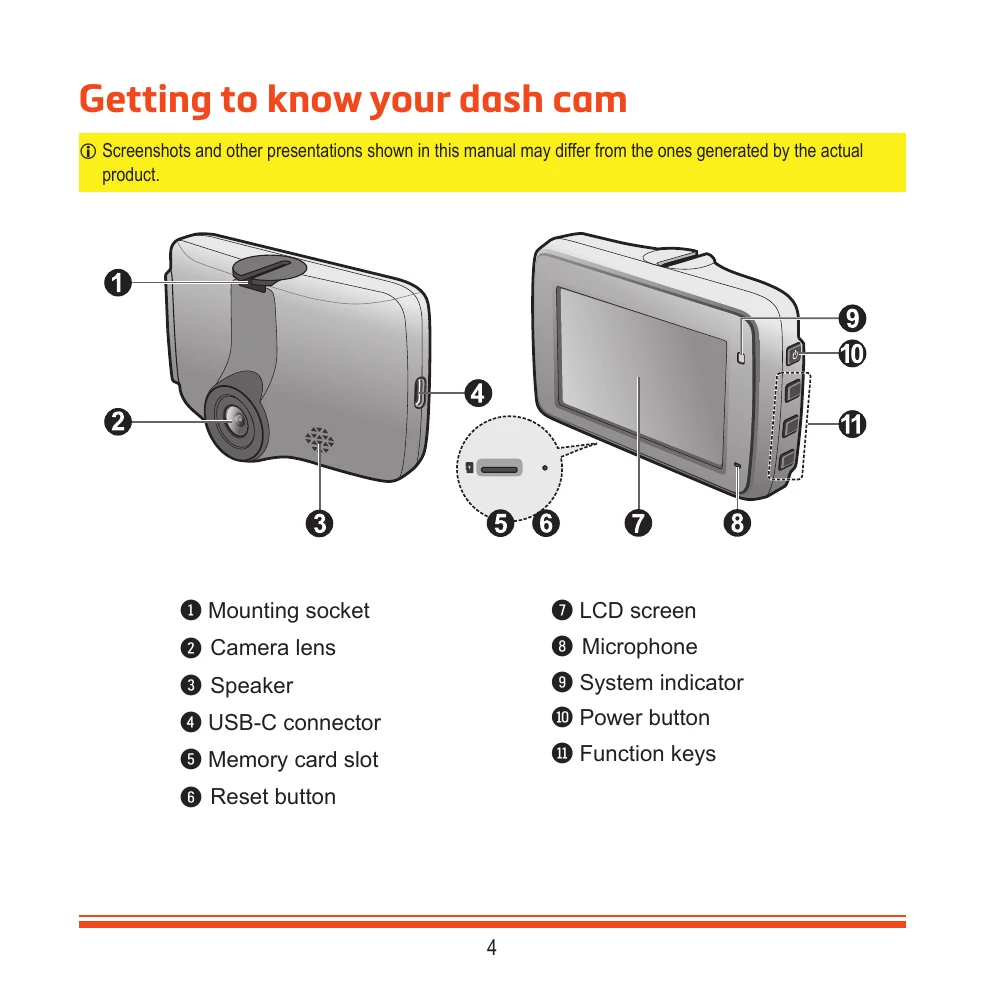
The dash cam has a mounting socket, camera lens, speaker, USB-C connector, memory card slot, and reset button. It also features an LCD screen, microphone, system indicator, power button, and function keys.
Insert a MicroSD card before powering on. Format the card via the settings menu to avoid malfunctions. Do not remove the card during recording.
Mount the dash cam securely on the windshield, ensuring it doesn't obstruct the driver's view or airbags. Clean the area before mounting. Route cables carefully. Adjust the angle for a 50/50 ground-to-sky split.
The dash cam turns on automatically when connected to a power source. Press and hold the power button for 2 seconds to manually turn it on/off. Restart by pressing the reset button with a pointy object.
The interface displays recording status, time, microphone status, GPS signal, and speed. Function keys control menu options, photo capture, and emergency recording.
Continuous recording starts automatically. Event recording is triggered by impact or sudden changes detected by the G-sensor. Recordings are saved in 'Normal' or 'Event' categories.
When enabled, the dash cam records movements or vibrations while parked. It requires an additional power source like the Mio SmartBox. Recordings are saved in the 'Parking' category.
Take photos while recording or from the menu. Photos are saved in the 'Photo' category.
Select and play videos or photos. Navigate through files and delete them. Deleted files cannot be recovered.
Connect to your smartphone via WIFI using the MiVue Pro app. Download the app and follow the on-screen instructions.
Access settings via the menu to adjust file playback, camera, WIFI, sound recording, driving safety features (LDWS, Headlight Reminder, Driver Fatigue Alert, Eco Drive Indicator, FCWS, Stop and Go), parking mode, video recording settings, system settings, and format the memory card.