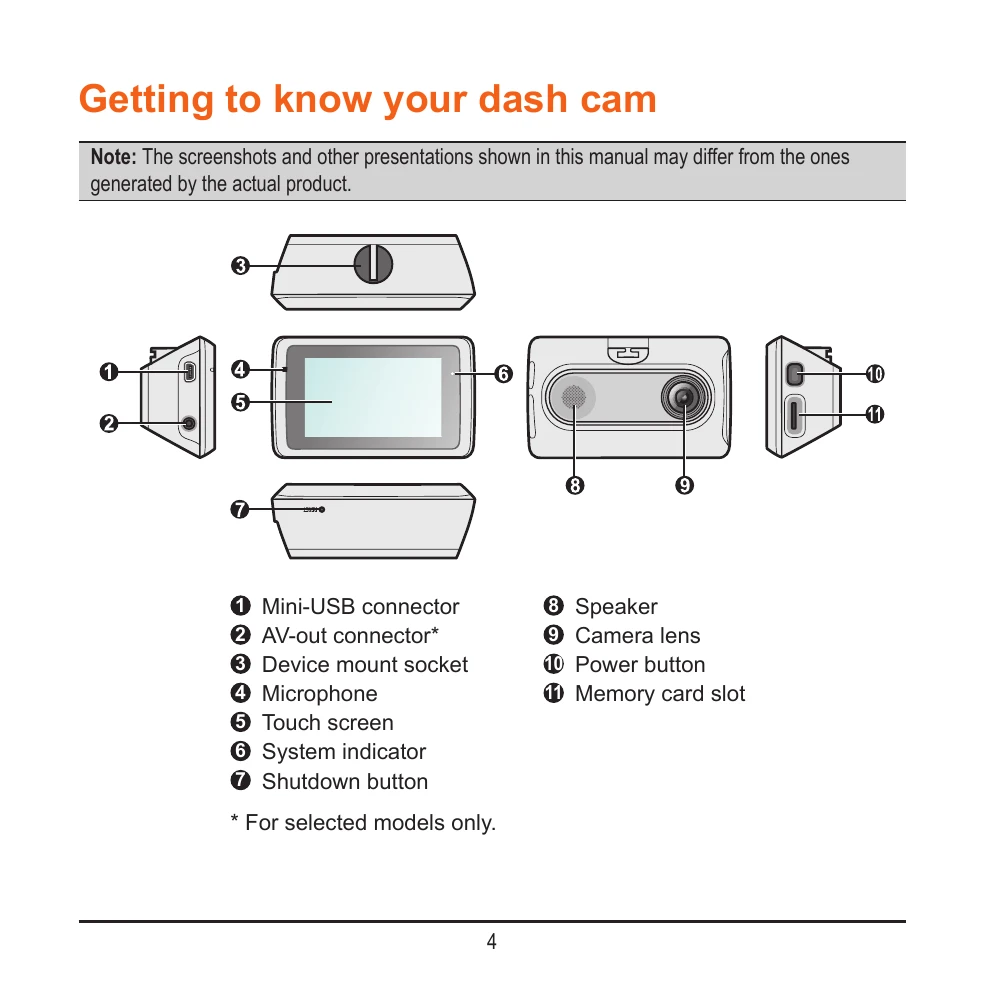
Getting to know your dash cam: Identify buttons and indicators.
Using your dash cam in a vehicle: Mount the device, connect cables, and adjust the lens for optimal recording.
Inserting a memory card: Insert and format a compatible memory card (Class 10, 8GB-128GB).
Connecting devices: Connect to a computer via USB or to an external AV device.
Powering on/off and restarting: Turn the device on/off using the power button and restart if unresponsive.
Using the touch screen: Navigate menus and settings using the touch interface.
Recording modes: Utilize continuous recording, event recording (triggered by G-sensor), and parking mode.
Camera and Playback modes: Take photos and review recorded videos and photos.
Safety camera alerts: Receive alerts for speed cameras and customize settings.
Connecting to smartphone: Set up Wi-Fi and Bluetooth connections for the MiVue Pro app.
Menu and System Settings: Access various functions like file playback, camera settings, connections, and driving safety features (LDWS, Headlight Reminder, etc.).
MiVue Manager: Install and use the software to view and manage recorded files on your computer.
Caring for your device: Follow instructions for cleaning, handling, and safety precautions.
Regulatory information: Compliance details and model identification.