Brand: Mio
Category: Automotive Electronics
Document Type: Manual
Language: EN
Brand: Mio
Category: Automotive Electronics
Document Type: Manual
Language: EN
Uploaded: Aug. 10, 2025, 12:46 a.m.
Manual Publish Date: 2015-10-01
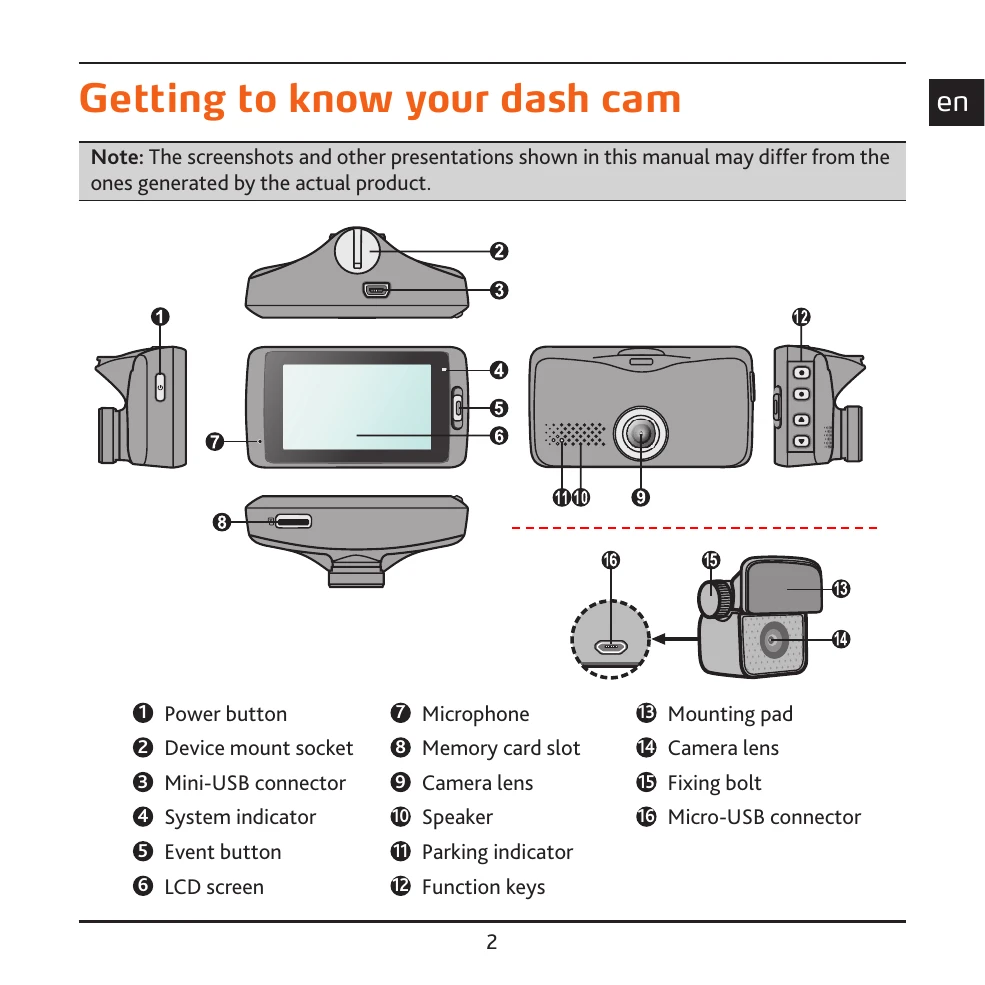
Familiarize yourself with the device's components: power button, mount socket, USB connector, indicators, event button, LCD screen, microphone, memory card slot, camera lens, speaker, parking indicator, and function keys. Learn how to mount the recorder and rear camera, adjust lens angles, and connect cables securely, ensuring they don't interfere with driving or safety features.
Insert a memory card (up to 128GB, Class 10 recommended) and format it. Connect the device to your computer via USB to access data. Understand how to turn the recorder on/off and restart it if unresponsive. Learn about function keys for menu navigation, parking mode, and taking photos. Recognize system icons for status information.
The device records continuously and can also record events triggered by the G-sensor. Parking mode allows recording when the vehicle is parked. Explore how to switch between front and rear camera views. Access playback mode to review videos and photos, with options to play, pause, change speed, and manage files. Use MiVue Manager software to view and manage recordings on your computer.
Configure system settings like date/time, sound recording, and driving safety features such as Lane Departure Warning, Headlight Reminder, and Driver Fatigue Alert. Customize safety camera alerts with options for sound, distance, and method. Add custom safety cameras and update safety camera data. Explore Eco Drive Indicator and Parking Mode settings.