Brand: Miele
Category: Oven
Document Type: Manual
Language: EN
Brand: Miele
Category: Oven
Document Type: Manual
Language: EN
Uploaded: Nov. 21, 2025, 8:10 p.m.
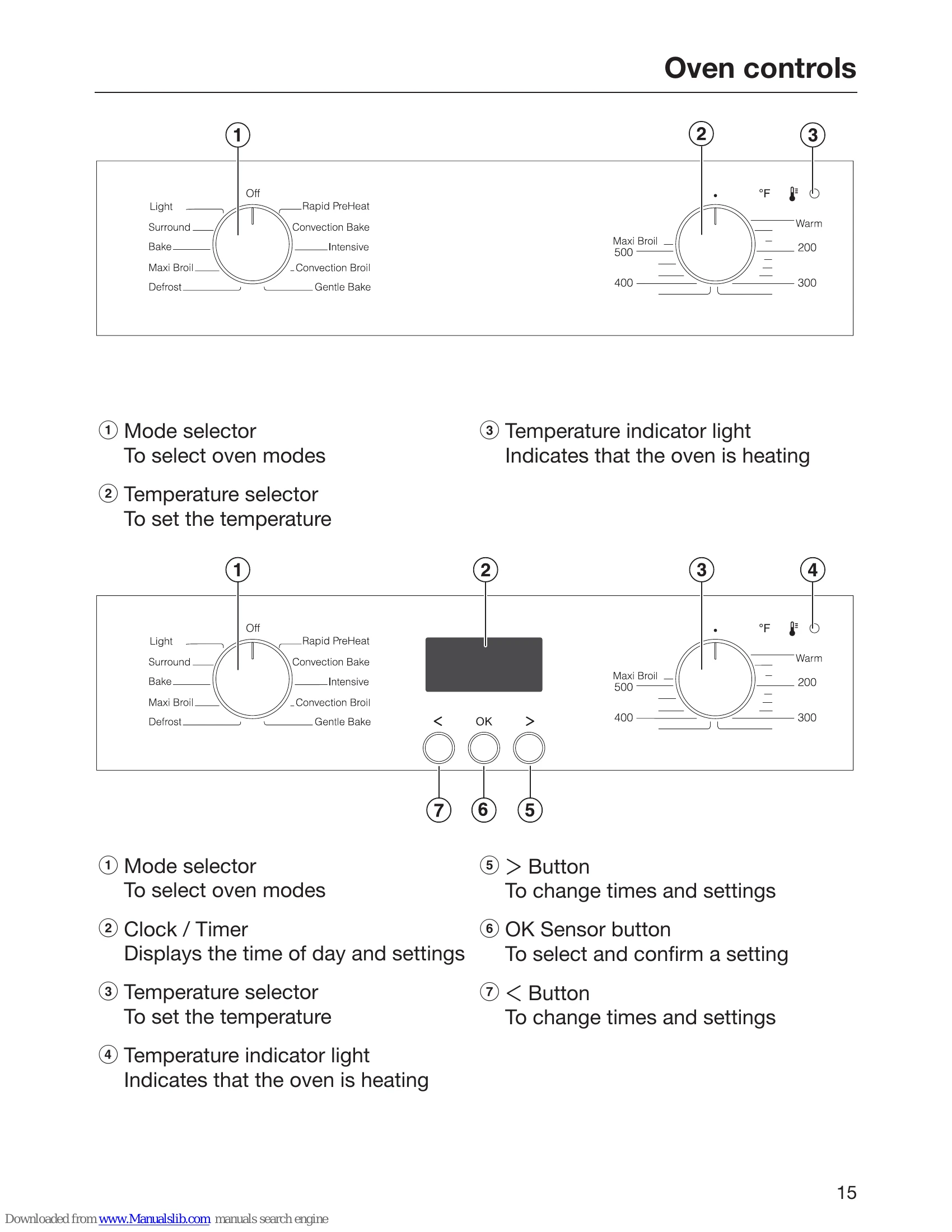
Familiarize yourself with the oven controls, including the mode selector, temperature selector, and clock/timer functions. The display shows the time of day and settings. Use the <, OK, and > buttons to navigate and confirm settings.
The oven offers various modes such as Bake, Roast, Slow Roasting, Broil, Defrost, Canning, Dehydrate, Frozen food, and Gentle Bake. Each mode is suitable for specific cooking tasks.
Regular cleaning is essential. Use mild cleaning agents and avoid abrasive materials. Specific instructions are provided for cleaning different parts of the oven, including the door, runners, and catalytic surfaces.
| Oven does not heat up. | The oven is not switched on. | Select an oven mode and temperature. |
| The temperature indicator light does not come on. | The oven is not heating. | Select an oven mode and temperature. |
| Oven door cannot be opened. | The oven door is locked. | Refer to the section on "Door lock". |
| The oven has a strange smell. | The oven is new. | Operate the oven empty for approx. 1 hour at 200 °C / 390 °F with Convection Bake. |
| The interior light does not work. | The bulb is faulty. | Replace the bulb. Refer to the section "Cleaning and care". |