Brand: Miele
Category: Oven
Document Type: Manual
Language: EN
Brand: Miele
Category: Oven
Document Type: Manual
Language: EN
Uploaded: Nov. 21, 2025, 8:30 p.m.
Please see the guarantee card supplied for warranty information.
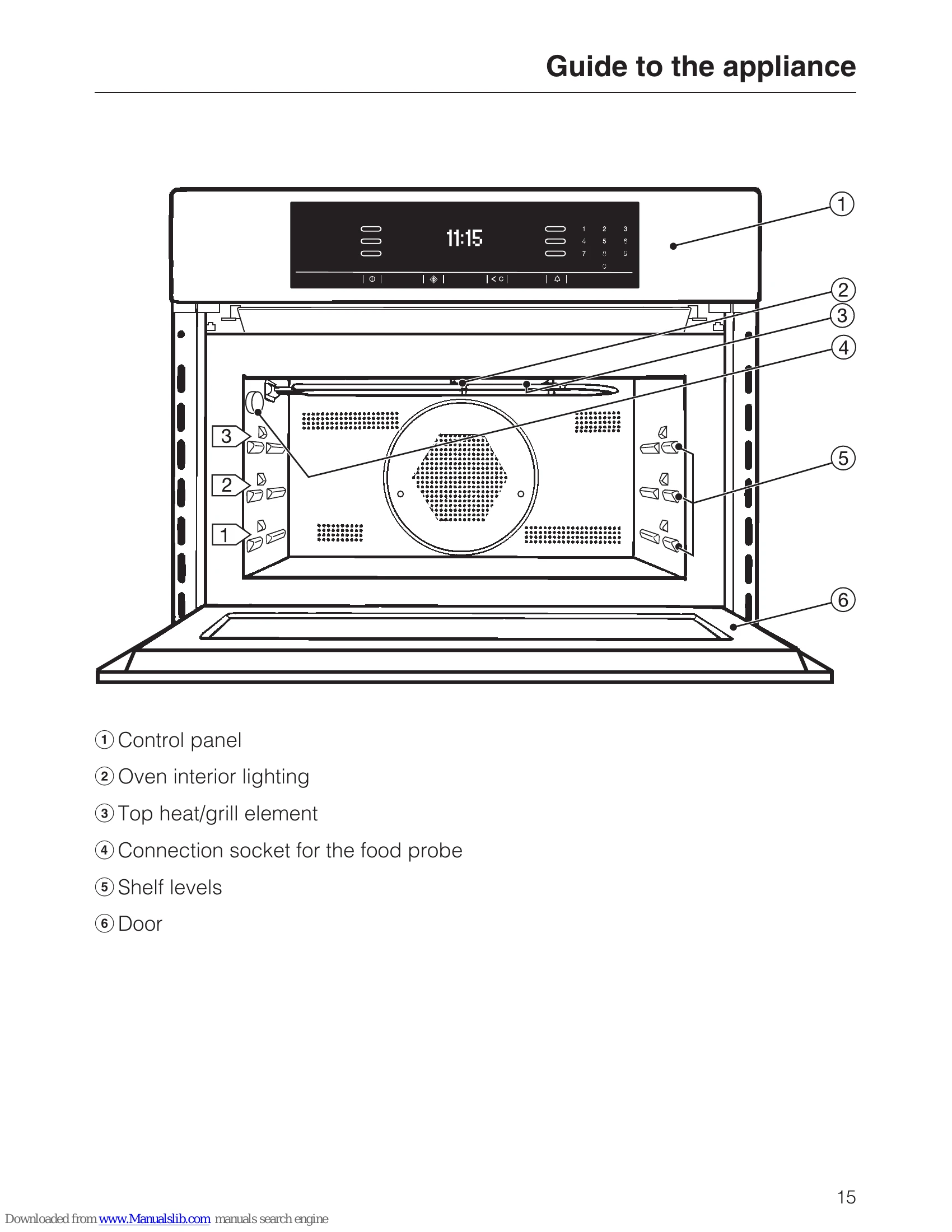
To operate the oven, first select the desired function (e.g., Microwave, Grill, Bake). Then, set the power level or temperature and the cooking duration. Use the numerical keypad to enter values. Automatic programmes are available for specific food types, where the appliance automatically selects the optimal settings. The food probe can be used for precise temperature monitoring during roasting. Ensure correct containers are used, especially for microwave functions. Refer to the manual for detailed instructions on specific functions, settings, and safety precautions.
| Problem | Possible cause and remedy |
|---|---|
| The display is dark. | Check whether the time of day is set so that it does not show in the display or so that it switches off after 60 seconds (see "Settings - Time - Display"). Check that the appliance is plugged is switched on at the mains supply. Check whether the mains fuse has tripped. If it has, contact a qualified electrician or Miele. |
| A programme will not start. | Check that, if using a programme with microwave power, the door is shut properly. Check that a power level and duration have been entered if operating in microwave mode. Check that, if operating with a combination programme, the following have been entered: a power level, a cooking duration, a temperature or a grill level. |
| The appliance has switched itself off automatically during use and a message has appeared in the display. | This is a safety feature to protect the oven if it has been operating for an exceedingly long period. The length of time depends on the function and temperature selected. The appliance will be ready for use again after it has been switched off and then back on again. |
| The oven has automatically switched itself off during a cooking programme. | The oven switches off automatically to save energy if, at the end of an Automatic programme or a cooking programme with Automatic switch-off, no other cooking function is selected within a certain time period. The oven is ready for use again when you switch it on. |
| If the door is opened whilst the oven is operating (except on microwave solo), the oven stops making a noise. | This is not a fault. If the door is opened during a programme, the door contact switch causes the oven heating, and the fan if on "Fan" setting, to be switched off. |
| A noise is heard after a programme has finished. | The cooling fan continues to run for a while after a programme has finished to prevent any humidity building up in the oven, on the control panel or on the oven housing unit. Depending on the setting, it switches off once the oven has dropped to a certain temperature or after a certain length of time. If the door is opened during the run-on period, the fan will switch off and will continue to run again once the door is closed again.(See "Settings - Cooling fan run-on"). |
| An abnormal sound is heard when the oven is operating in microwave mode. | Check if there are sparks caused by using metal dishes (see "Suitable containers for microwave ovens"). Check if the food is covered with aluminium foil. If so, remove it. Check if the rack is inside the oven. Always use the glass tray when using the oven in Microwave solo mode. |
| The microwave works and the oven heats up, but the interior lighting does not come on. | Check whether the oven interior lighting has been set to come on for only 15 seconds (see "Settings - Lighting"). If this is not the case, the halogen lamp is defective and needs to be replaced: Disconnect the appliance from the electricity supply: switch off and unplug at the socket, or remove the fuse, or switch off at the isolator as appropriate. The lamp cover consists of two parts: a glass piece and a mounting. Hold the lamp cover securely when removing it so that it does not fall. Place a tea towel over the floor of the oven and the open door to protect them. Remove the screw from the lamp cover using a T20 Torx screwdriver, and then take the cover off. Pull the halogen lamp out. Replace the halogen lamp. Specification: 12 V, 10 W, heat resistant to 300 °C, cap G4, Osram, type 64418. Do not touch the halogen lamp with bare fingers. Please follow the manufacturer's instructions. Replace the glass piece in the mounting, and refit the lamp cover. Make sure that the lug on the mounting is correctly located in the notch in the roof of the oven, then screw the mounting back into place. Reconnect the appliance to the mains supply. |
| Fault code in display: Fault 54 | The food probe is defective. Remove the probe from its socket and the message will disappear. |
| Another fault code shown in the display as "F + numbers" | Contact Miele. |