Manual for Z2 PLUS

Manual for Z2 PLUS

Brand: Lenovo

Category: Smartphone

Document Type:

Language: EN
Uploaded: Aug. 10, 2025, 12:06 a.m.

Manual Publish Date: 2016-06-07

Warranty Information

Lenovo Limited Warranty notice applies; check website for details. No International Warranty Services.

Getting Started:
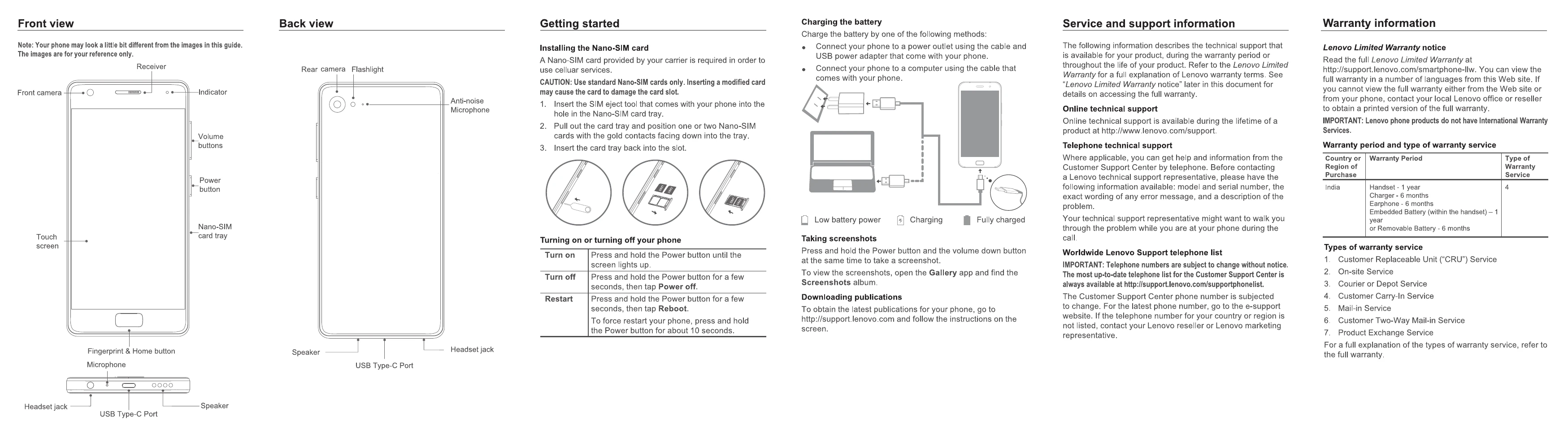
Installing SIM Card: Insert the SIM eject tool into the tray hole, pull out the tray, position Nano-SIM cards with gold contacts facing down, and insert the tray back.
Turning On/Off: Press and hold the Power button to turn on. Press and hold for a few seconds and tap "Power off" to turn off. Tap "Reboot" to restart.
Charging: Connect the phone to a power outlet or computer using the provided cable and adapter.
Taking Screenshots: Press and hold the Power button and Volume Down button simultaneously. View screenshots in the Gallery app.

Troubleshooting and error codes

Header 1 Header 2 Header 3 Header 4
Row 1 Data 1 Row 1 Data 2 Row 1 Data 3 Row 1 Data 4
Row 2 Data 1 Row 2 Data 2 Row 2 Data 3 Row 2 Data 4
Row 3 Data 1 Row 3 Data 2 Row 3 Data 3 Row 3 Data 4
Privacy Policy