Brand: Lenovo
Category: Smartphone
Document Type:
Language: EN
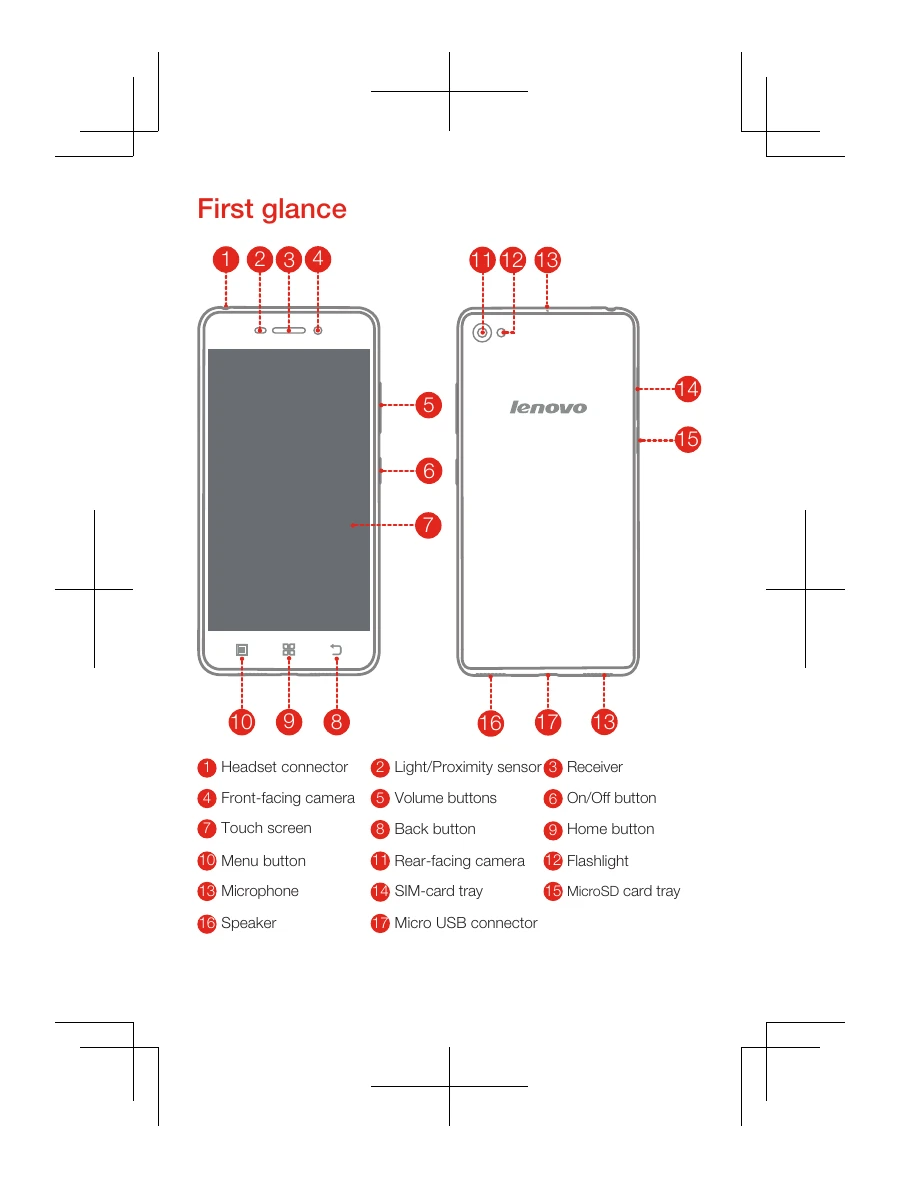
Brand: Lenovo
Category: Smartphone
Document Type:
Language: EN
Uploaded: Aug. 10, 2025, 12:06 a.m.
Manual Publish Date: 2015-03-01
Read the full Lenovo Limited Warranty (LLW) at http://support.lenovo.com/smartphone-llw.
Step 1: Insert SIM eject tool into the SIM-card or MicroSD card tray hole.
Step 2: Pull out the tray, position SIM card or MicroSD card correctly.
Step 3: Carefully insert the tray back into the slot.
Method 1: Connect to a power outlet using the cable and USB power adapter.
Method 2: Connect to a computer using the cable.
Turn on: Press and hold the On/Off button until the Lenovo logo appears.
Turn off: Press and hold the On/Off button, then tap 'Power off'.
Restart: Press and hold the On/Off button for about 10 seconds.
| Position | The highest SAR value | Regulation |
|---|---|---|
| Head | 0.671 | India 1g SAR Limit (1.6 W/kg) |
| Body-worn | 1.083 | India 1g SAR Limit (1.6 W/kg) |