Brand: Lenovo
Category: Smartphone
Document Type: Quick Start Guide
Language: EN
Brand: Lenovo
Category: Smartphone
Document Type: Quick Start Guide
Language: EN
Uploaded: Nov. 21, 2025, 7:57 p.m.
Manual Publish Date: 2015-01-01
None
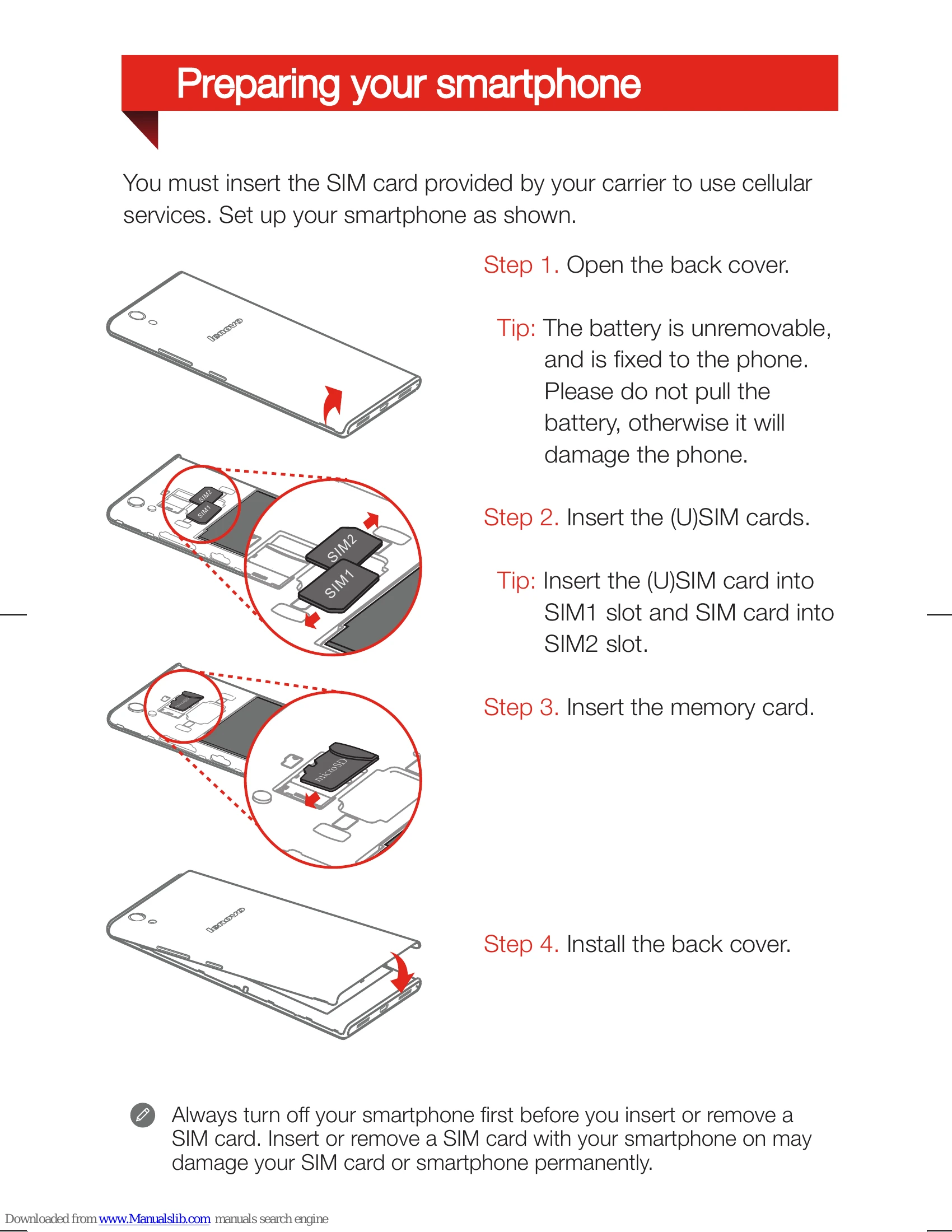
You must insert the SIM card provided by your carrier to use cellular services. Set up your smartphone as shown.
Tip: The battery is unremovable, and is fixed to the phone. Please do not pull the battery, otherwise it will damage the phone.
Tip: Insert the (U)SIM card into SIM1 slot and SIM card into SIM2 slot.
Always turn off your smartphone first before you insert or remove a SIM card. Insert or remove a SIM card with your smartphone on may damage your SIM card or smartphone permanently.
Charge the battery as shown.
Connect your smartphone to a power outlet using the cable and USB power adapter that come with your smartphone.
Connect your smartphone to a computer using the cable that comes with your smartphone.
Low battery power | Fully charged | Charging
Turn on: Press and hold the On/Off button until the Lenovo logo appears.
Turn off: Press and hold the On/Off button for a few seconds, then tap Power off.
Your smartphone has a rechargeable battery. For more information about battery safety, see the "Rechargeable battery notice" in the Important Product Information Guide shipped with your smartphone.