Brand: Lenovo
Category: Smartphone
Document Type:
Language: EN
Brand: Lenovo
Category: Smartphone
Document Type:
Language: EN
Uploaded: Aug. 10, 2025, 12:06 a.m.
Manual Publish Date: 2014-05-01
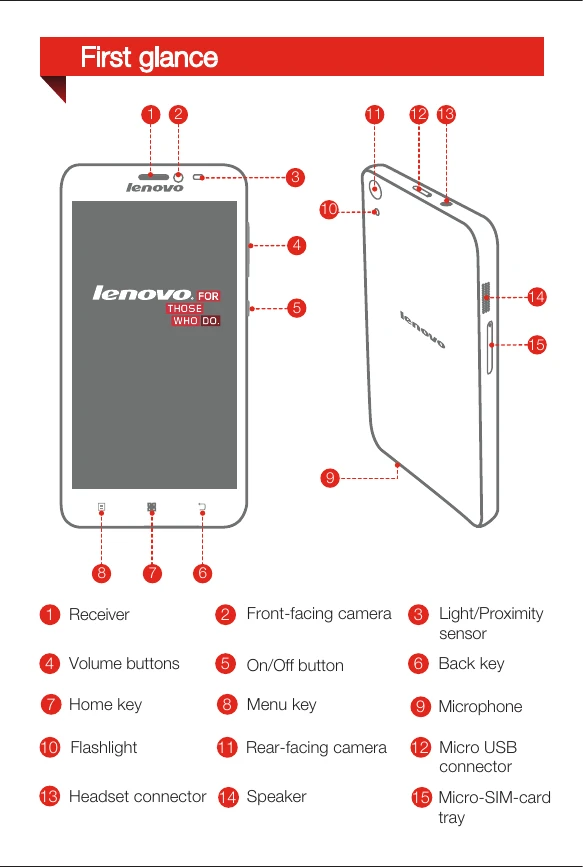
Familiarize yourself with the various buttons and components of your Lenovo S850 smartphone. Key elements include the receiver, front-facing camera, light/proximity sensor, volume buttons, on/off button, back key, home key, menu key, microphone, flashlight, rear-facing camera, micro USB connector, headset connector, speaker, and micro-SIM card tray.
To use cellular services, insert a Micro SIM card provided by your carrier. Use the SIM eject tool to open the tray, position the Micro SIM card correctly, and then reinsert the tray.
Charge your smartphone using the provided USB cable and power adapter. Connect to a power outlet or a computer. The battery indicator shows charging status.
To turn on, press and hold the On/Off button until the Lenovo logo appears. To turn off, press and hold the On/Off button and tap 'Power off'. To restart, press and hold the On/Off button for about 10 seconds.