Manual for K320t

Manual for K320t

Brand: Lenovo

Category: Smartphone

Document Type:

Language: EN
Uploaded: Aug. 10, 2025, 12:05 a.m.

Manual Publish Date: 2018-05-31

Warranty Information

Warranty periods vary by region, with common terms for handset and charger ranging from 12 to 24 months.

Getting Started:
  • Insert SIM/microSD: Open the back cover, insert the Micro-SIM and microSD cards as shown, then replace the cover.
  • Charging: Connect the smartphone to a power outlet or computer using the provided cable and adapter.
  • Powering On/Off: Press and hold the Power button to turn on or off.
Key Features:
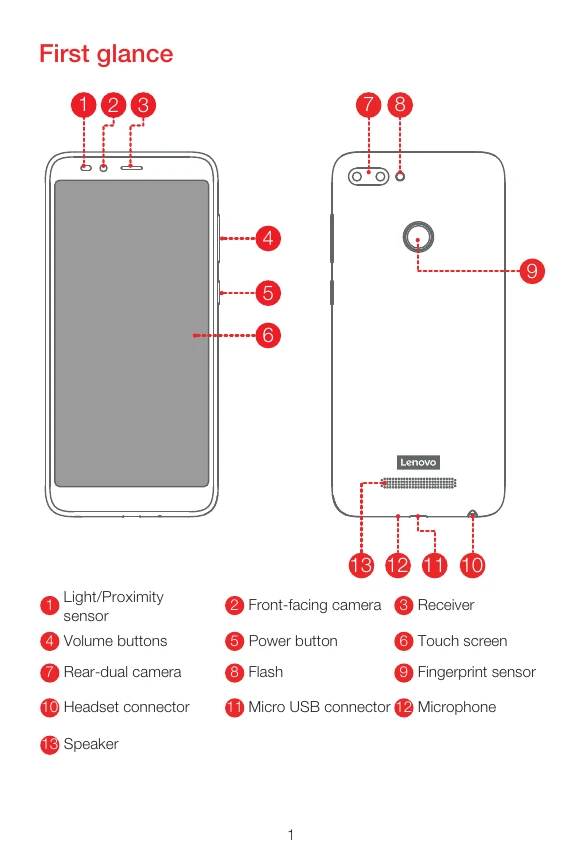
  • Buttons & Ports: Includes volume buttons, power button, headset connector, and Micro USB connector.
  • Cameras: Features front-facing and rear-dual cameras.
  • Sensors: Equipped with a light/proximity sensor and fingerprint sensor.

Troubleshooting and error codes

Problem Solution
Device unresponsive Press and hold the Power button, Volume up button, and Volume down button until the screen goes dark and the device restarts.
Privacy Policy