First glance
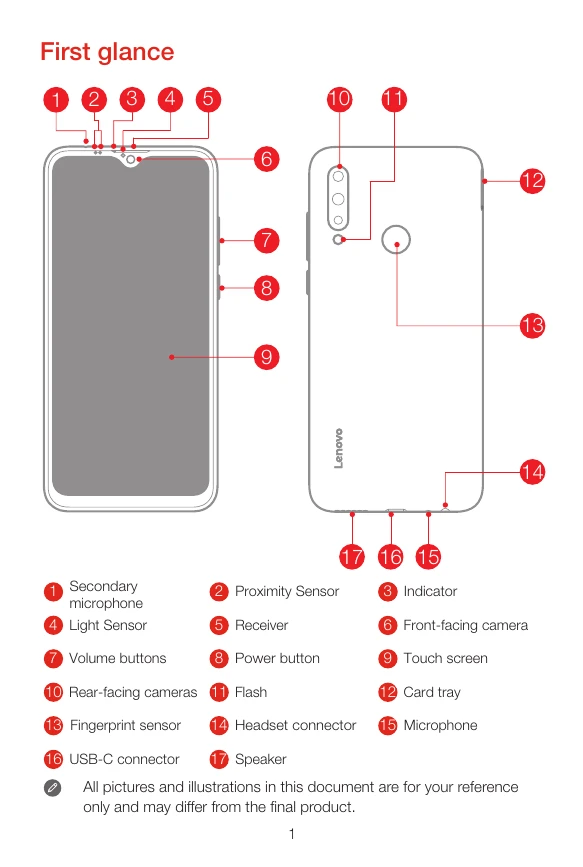
This section shows a diagram of the phone with labeled parts: Secondary microphone, Proximity Sensor, Indicator, Light Sensor, Receiver, Front-facing camera, Volume buttons, Power button, Touch screen, Rear-facing cameras, Flash, Card tray, Fingerprint sensor, Headset connector, Microphone, USB-C connector, Speaker.
Installing the Nano-SIM & microSD cards
1. Insert the eject tool into the hole in the card tray.
2. Pull out the card tray and insert a Nano-SIM card in Slot 1 and a microSD card in Slot 2, or another Nano-SIM card in Slot 2.
3. Carefully insert the tray back into the slot.
Charging the battery
Connect the smartphone to a power outlet using the provided cable and USB power adapter, or connect it to a computer using the USB cable.
Turning on or turning off your smartphone
Turn on: Press and hold the Power button until the Lenovo logo appears.
Turn off: Press and hold the Power button, then swipe down to Power off.
Restart: Press and hold the Power button, then swipe up to Reboot.