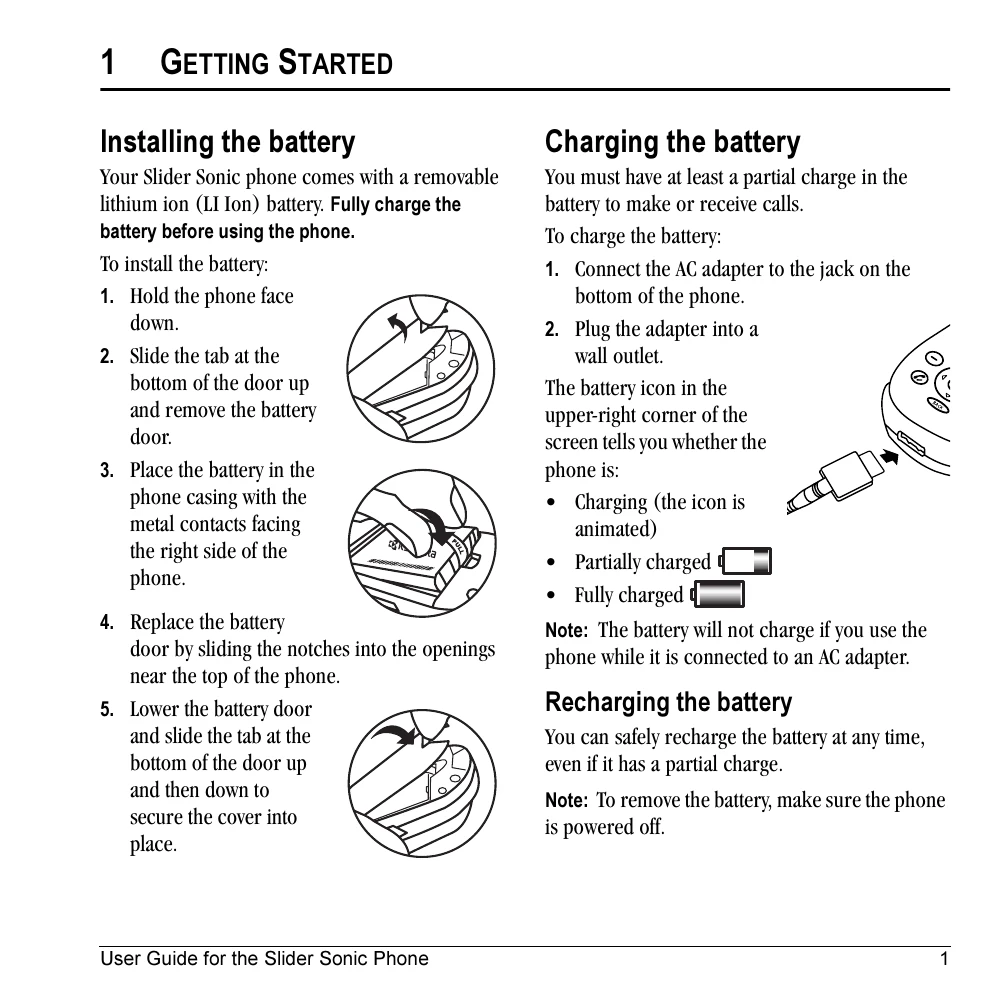
Installing the battery:
1. Hold the phone face down.
2. Slide the tab at the bottom of the door up and remove the battery door.
3. Place the battery in the phone casing with the metal contacts facing the right side of the phone.
4. Replace the battery door by sliding the notches into the openings near the top of the phone.
5. Lower the battery door and slide the tab at the bottom of the door up and then down to secure the cover into place.
Charging the battery:
1. Connect the AC adapter to the jack on the bottom of the phone.
2. Plug the adapter into a wall outlet.
The battery icon in the upper-right corner of the screen indicates the charging status.
Making a call (slide open):
1. Open the slide.
2. Enter the phone number and press Send/Talk key.
3. Press Send/Talk key or close slide (if "Close to End" is enabled).
Answering a call (slide open):
1. Press Send/Talk key to answer the incoming call.
2. Alternatively, press Send/Talk key to answer and turn on the speakerphone.
Accessing menus:
1. From the home screen, press the left softkey to select Menu.
2. Use the navigation key to scroll through menus and options.
3. Press OK to select a menu item.
4. Press Back key to go back a menu level.
5. Press End/Power key to return to the home screen.
Using the Camera:
1. Activate Picture mode by pressing and holding the side camera key.
2. Take a picture by pressing the left softkey to select Capture.
3. Record a video by pressing and holding the side camera key to switch to Video mode, then pressing the left softkey to select Record.