Brand: KYOCERA
Category: Cell Phone
Document Type:
Language: EN
Brand: KYOCERA
Category: Cell Phone
Document Type:
Language: EN
Uploaded: Aug. 10, 2025, 12:08 a.m.
Manual Publish Date: 2010-01-01
No warranty information is available in the provided document excerpt.
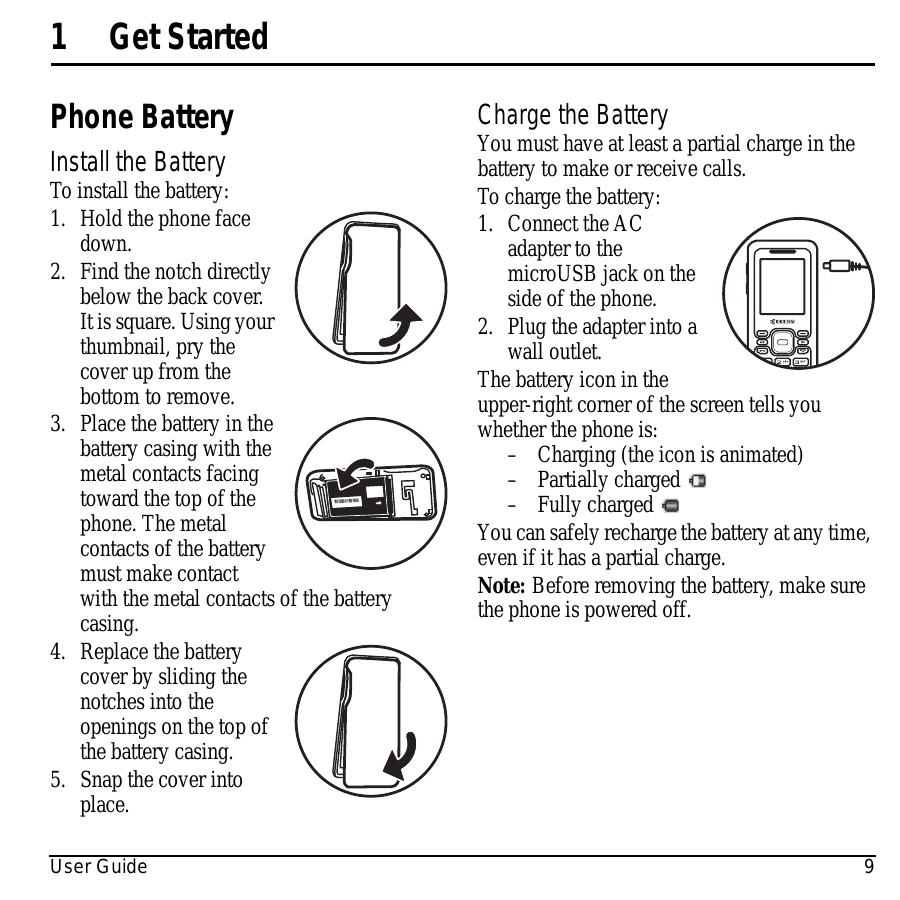
To install the battery, hold the phone face down, find the notch below the back cover, pry it open with your thumbnail, place the battery with contacts facing up, replace the cover by sliding notches into openings, and snap it shut.
\nTo charge, connect the AC adapter to the microUSB jack and plug into a wall outlet. The battery icon indicates charge level. Recharge anytime.
\nFamiliarize yourself with the phone's layout:
\n| Problem | Solution |
|---|---|
| Screen frozen, keypad unresponsive |
1. Remove battery cover. 2. Remove and replace battery. If persists, contact dealer. |
| Phone not functioning properly due to magnets | Keep phone away from magnets. |
| Phone getting wet | Keep phone dry. Water damage is not covered under warranty. |