Brand: KYOCERA
Category: Cell Phone
Document Type:
Language: EN
Brand: KYOCERA
Category: Cell Phone
Document Type:
Language: EN
Uploaded: Aug. 10, 2025, 12:08 a.m.
| Problem | Solution |
|---|---|
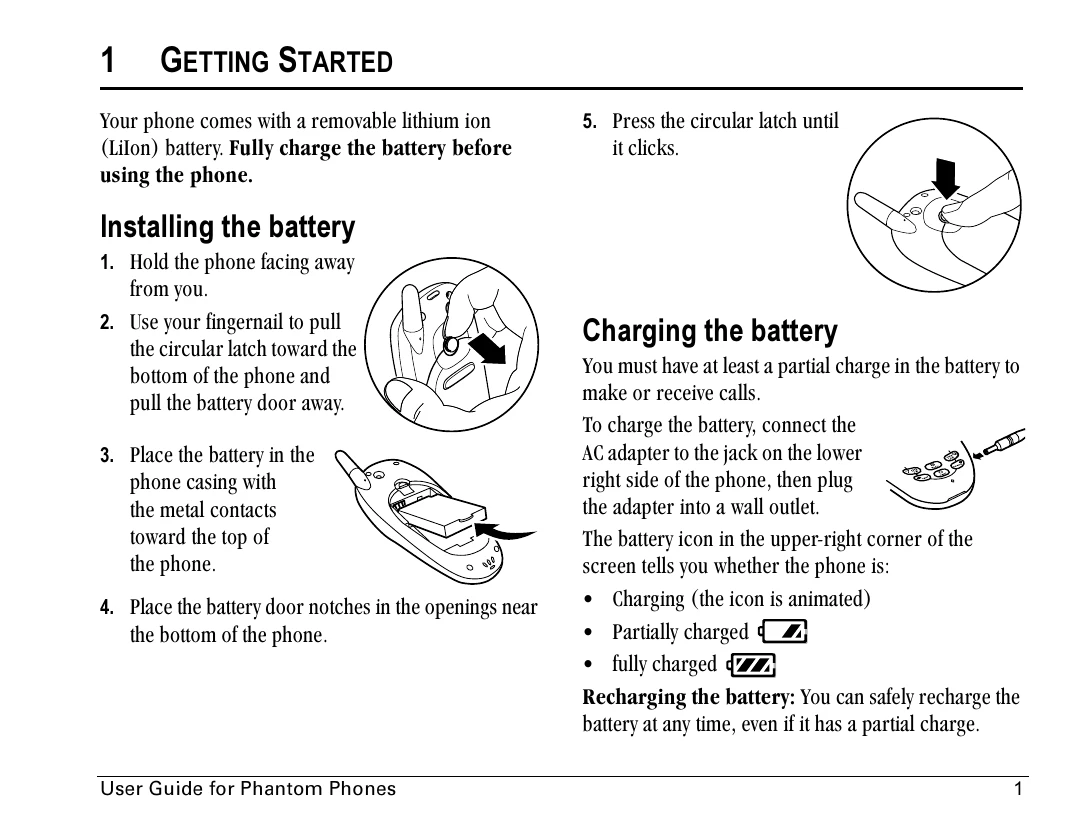
| Screen frozen, keypad unresponsive | Reset the phone by removing the battery door, then removing and replacing the battery. If the problem persists, return the phone to the dealer. |
| Phone gets wet | Turn the power off immediately and contact your dealer. Water damage may not be covered under warranty. |
| Phone does not charge | Ensure the AC adapter is securely connected to the phone and the wall outlet. Check the outlet. Try a different outlet. If the problem persists, contact your dealer. |
| Cannot make or receive calls | Ensure you are in an area with signal reception. Check the signal strength icon. Try moving to a different location. Ensure the phone is not in Airplane mode. Check your service plan. |