Manual for 3250

Manual for 3250

Brand: KYOCERA

Category: Cell Phone

Document Type:

Language: EN
Uploaded: Aug. 10, 2025, 12:08 a.m.

Warranty Information

None

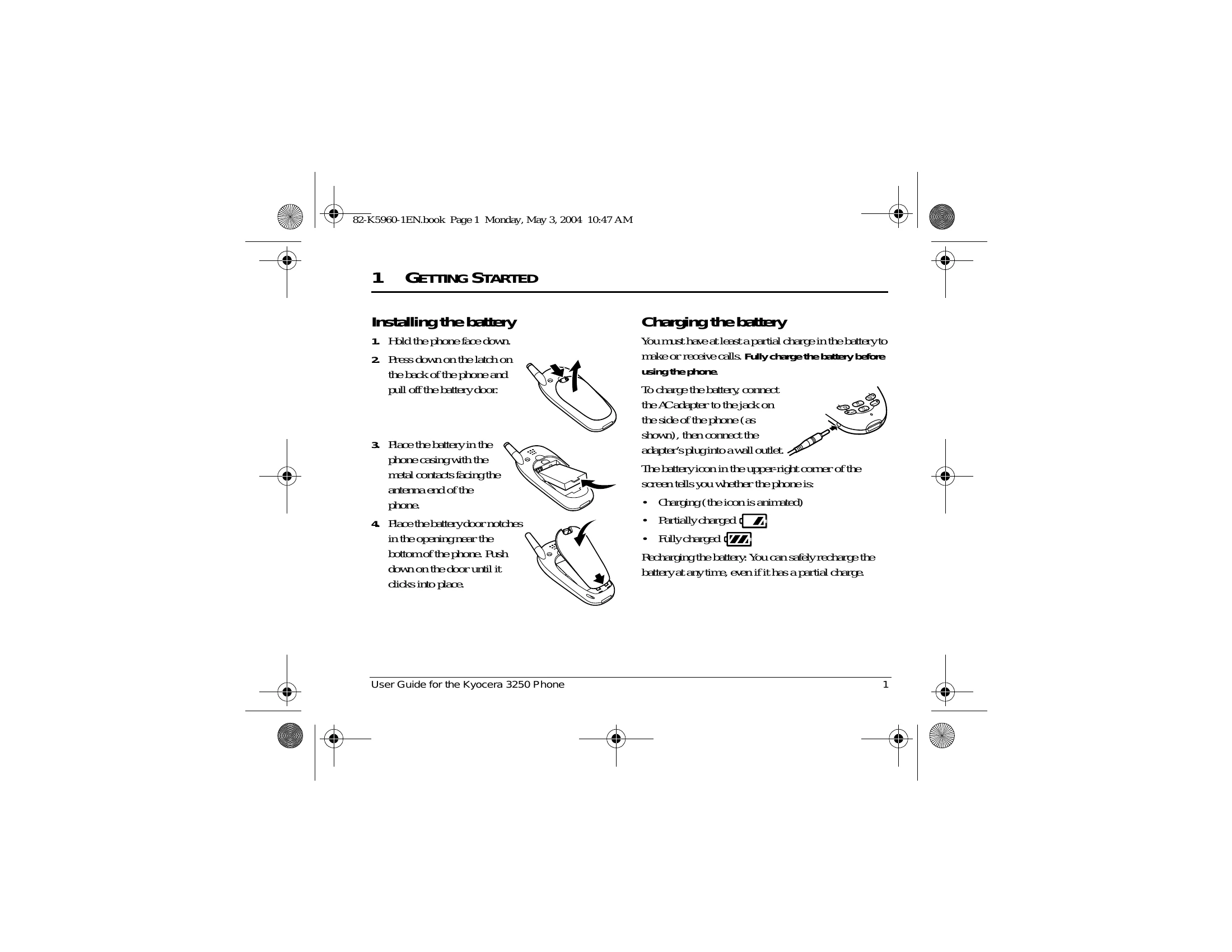
Installing the battery: Hold the phone face down, press the latch on the back, pull off the battery door, place the battery correctly, and push the door until it clicks. Charging the battery: Connect the AC adapter to the phone and plug it into a wall outlet. The battery icon indicates the charge level. Recharge anytime. Performing basic functions: Turn the phone on/off by pressing the end key. Make calls by entering the number and pressing talk. Answer calls by pressing talk. End calls by pressing end. Access voicemail by contacting your service provider. Silence the ringer, lock the keypad, access contacts, silence all sounds, and access messages using specified key presses.

Troubleshooting and error codes

Header 1 Header 2 Header 3 Header 4
Row 1 Data 1 Row 1 Data 2 Row 1 Data 3 Row 1 Data 4
Row 2 Data 1 Row 2 Data 2 Row 2 Data 3 Row 2 Data 4
Row 3 Data 1 Row 3 Data 2 Row 3 Data 3 Row 3 Data 4
Privacy Policy