Brand: KitchenAid
Category: Microwave Oven
Document Type: Manual
Language: EN
Brand: KitchenAid
Category: Microwave Oven
Document Type: Manual
Language: EN
Uploaded: Nov. 21, 2025, 7:13 p.m.
One year limited warranty on parts and labor, with extended warranties on specific components.
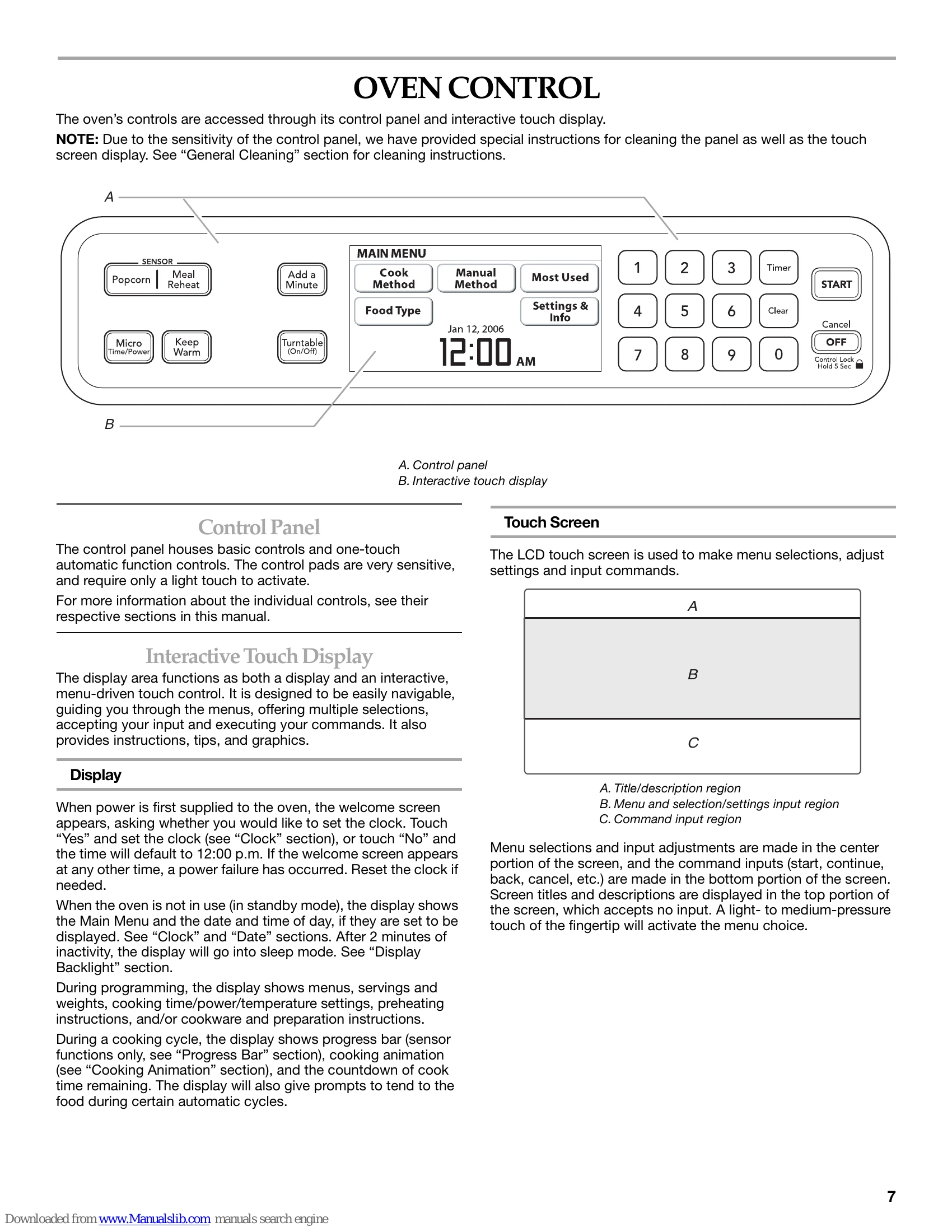
The oven is operated via a control panel and an interactive touch display. The touch screen allows for menu selections, adjustments, and command inputs.
This oven offers various cooking methods including Manual Cooking (Micro Time/Power, Manual Method), Programmed Cooking (Sensor Cooking, Popcorn, Food Type, Cook Method), Keep Warm, and Cooking in Stages.
Key features include a TRUCAPTURE™ Vent Fan, Cooktop Lights, Turntable, Browning Pan, and a durable, nonstick oven cavity coating.
Regular cleaning of grease filters, oven cavity, control panel, and exterior is recommended. Specific instructions are provided for cleaning various parts.
A troubleshooting section is included to address common issues such as the oven not operating, turntable issues, and fan operation.
| Problem | Possible Cause | Solution |
| Nothing will operate | Blown fuse or tripped circuit breaker | Replace fuse or reset breaker. If problem continues, call an electrician. |
| Appliance not wired properly | See Installation Instructions. | |
| Oven will not operate | Door not completely closed | Firmly close door. |
| Spacer attached to inside of door | Remove spacer, then firmly close door. | |
| Electronic oven control not set correctly | See "Oven Control" section. | |
| Control Lock is set | See "Control Lock" section. | |
| Learning Mode activated | See "Learning Mode" section. | |
| Magnetron not working properly | Test by heating water. If water does not heat, call for service. See "Assistance or Service" section. | |
| Display shows message about opening the door | Door closed for extended period. Open and close door, then start cycle. | |
| Oven door looks wavy | Normal operation. | Will not affect performance. |
| Turntable will not operate | Turntable not properly in place | Ensure turntable is correct side up and on support. |
| Turntable support not operating properly | Remove, clean, and replace turntable support and rollers. Test with water. If not working, call for service. See "Assistance or Service" section. | |
| Turntable alternates rotation directions | Normal operation. | Depends on motor rotation at beginning of cycle. |
| Display shows time countdown, but is not operating | Timer in use | See "Timer" section. |
| Learning Mode in use | See "Learning Mode" section. | |
| Steam is coming from the vent screen | Normal operation. | Some steam is normal. |
| Fan running slower than usual | Oven stored in cold area | Fan will run slower until oven warms to normal room temperature. |
| Fan running during cooktop usage | Normal operation. | Oven's cooling fan operates automatically. Vent fan may also cycle on/off. |
| Cooking times seem too long | Cooking power set improperly | See "Microwave Cooking Power" section. |
| Large amounts of food being heated | Larger amounts need longer cooking times. | |
| Incoming voltage less than specified | Have electrician check electrical system. | |
| Radio, TV or cordless phone interference | Oven plugged into same outlet | Try a different outlet. |
| Radio or TV receiver near oven | Move receiver away from oven or adjust antenna. | |
| Oven door and sealing surfaces dirty | Ensure these areas are clean. | |
| Cordless phone frequency 2.4 GHz | Some cordless phones may experience static. Use corded phone or different frequency. |