Brand: KENWOOD
Category: Audio
Document Type: Manual
Language: EN
Brand: KENWOOD
Category: Audio
Document Type: Manual
Language: EN
Uploaded: Nov. 21, 2025, 7:15 p.m.
Refer to the warranty card for specific warranty details.
Power On/Off: Press the ON/STANDBY key. The system can also be turned ON by pressing the play key of the CD player, cassette deck, or the BAND key of the tuner.
Selecting Output: Use the INPUT key to select CD, Tape, or Broadcasts.
Volume Adjustment: Use the MULTI CONTROL/VOLUME knob. Quick turning adjusts volume more rapidly.
Listening Through Headphones: Plug headphones into the PHONES jack and adjust volume.
CD Playback: Load a disc, select it, and press the play key. Use TIME DISP. to view track or disc time information.
Tape Playback: Load a cassette, select the deck (A or B), and press the play key. Reverse mode and Dolby NR can be selected.
Tuner Operation: Select the band (FM/MW/LW) and use TUNING keys to select a station. Preset stations can be recalled using P.CALL.
Recording: Select the source, press REC/ARM, and then press PLAY.
Timer Operation: The system offers an "Easy To Use Timer" (O.T.T.) for simple timed playback and a Sleep Timer to turn off power automatically after a set duration. Two 24-hour timer programs (PROG.1, PROG.2) are available for scheduled playback or recording.
| Symptom | Cause | Remedy |
|---|---|---|
| Remote control unit | ||
| Remote control operation is not possible. | Batteries are exhausted. | Replace with new batteries. |
| The remote control is too far away from the system, the controlling angle is deviated or there is an obstacle in between. | Operate the unit inside the remote controllable range. | |
| There is no tape or CD set in the component to be played. | Set a tape or CD in the component to be played. | |
| An attempt is made to play the cassette deck which is recording something. | Wait until the recording ends. | |
| Receiver, speakers | ||
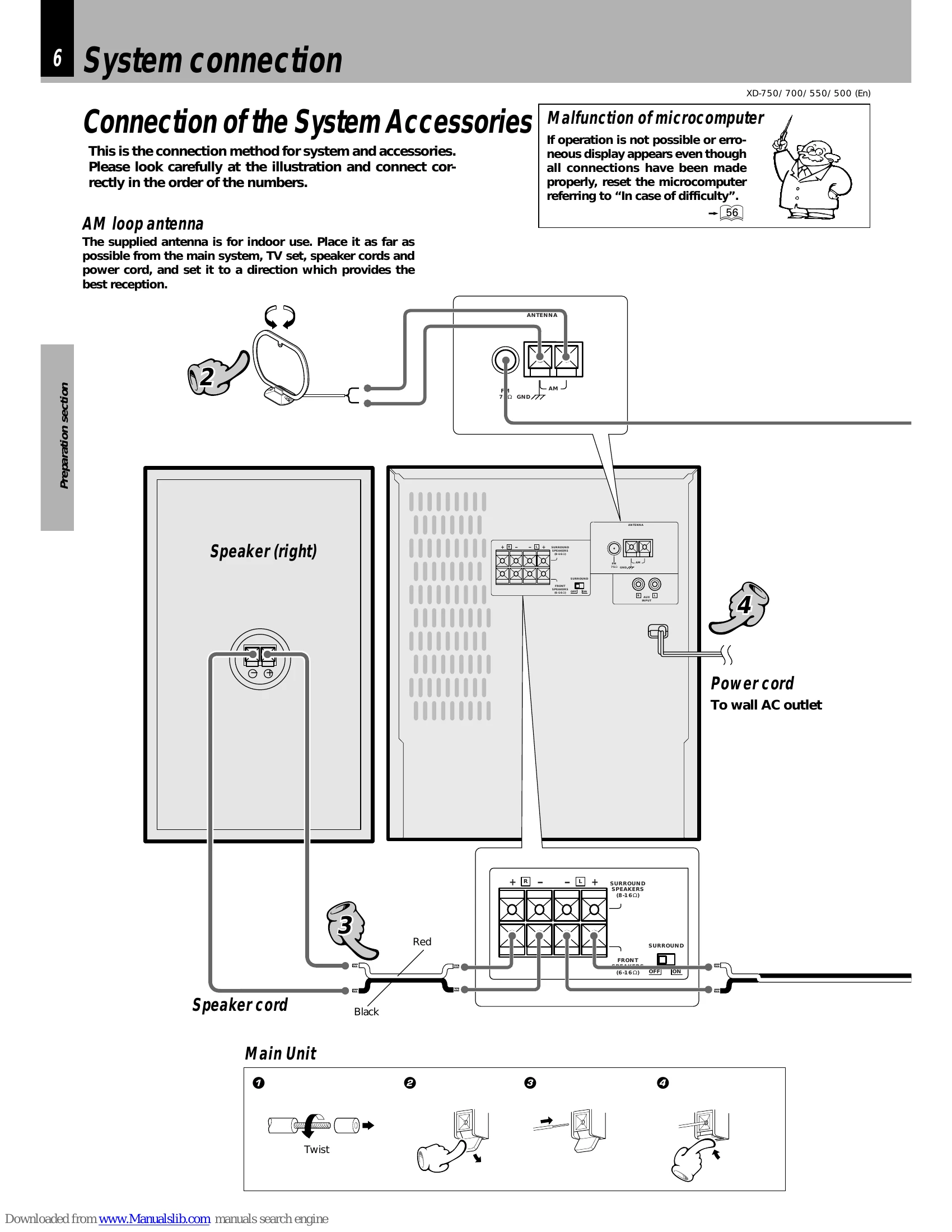
| Sound is not produced. | The speaker cords are disconnected. | Connect properly referring to "System connection". |
| The volume control is set to the minimum position. | Adjust to an required volume. | |
| The MUTE switch of remote control unit is switched ON. | Switch MUTE OFF. | |
| The headphone plug is inserted into the jack. | Unplug the headphone plug. | |
| The character display blinks and sound is not produced. | The speaker cords are short-circuited. | Turn the power OFF, remove the short-circuit and turn the power ON again. |
| Sound is not produced from the left or right speakers. | The speaker cords are disconnected. | Connect properly referring to "System connection". |
| The clock display blinks without changing the figures. | There was a power failure. | Adjust the present time again. |
| The power cord was unplugged from the outlet. | Adjust the present time again. | |
| Timer operation is not possible. | The present time has not been adjusted or there was a power failure. | Adjust the present time referring to "Clock adjustment". |
| The timer ON time and OFF time have not been set. | Set the timer ON time and OFF time. | |
| The timer execution was not set up. | Execute the timer program with the SRS 3D (SOURCE DIRECT)* key. | |
| Radio stations cannot be received. | The antennas have not been connected. | Connect antennas. |
| A proper broadcasting band has not been selected. | Select a band. | |
| The frequency of the station to be received is not tuned. | Tune to the frequency of the desired station. | |
| Noise interferes. | Car ignition noise. | Install the outdoor antenna in an apart position from the road. |
| Influence of an electric appliance. | Switch the suspected electric appliance OFF. | |
| A TV set is installed near the system. | Install the TV or the system at an increased distance between them. | |
| Cassette deck | ||
| Sound cannot be produced by pressing the play key or no operation occurs even when an operation key is pressed. | The head is dirty. | Clean the head referring to "Maintenance". |
| The tape is wound too tight due to irregular winding. | Try another tape. | |
| A nonrecorded tape is played. | Play a recorded tape. | |
| No operation occurs even when an operation key is pressed. | The cassette holder is not closed completely. | Close the holder completely. |
| The operation key is pressed immediately after closing the cassette holder. | Press operation keys in more than a few seconds after closing the holder. | |
| The operation key is pressed in less than 4 seconds after turning the power ON. | Press operation keys after waiting for more than 4 seconds. | |
| A tape is not inserted in the unit. | Insert a tape. | |
| The tape is wound too tight due to irregular winding. | Try another tape. | |
| The tape is fully wound to one of the reels. | Change the tape transport direction or reverse the tape insertion orientation. | |
| The DPSS malfunctions. | The tape used is not suitable for DPSS, for example the spaces between tunes may be too short. | Refer to "Searching for the desired music program (DPSS)". |
| In dubbing, the tape stops at different moments in decks A and B. | This is due to the difference in the tape length or characteristics of the mechanisms of two cassette decks. | Small time difference does not mean a malfunction. |
| The cassette holders cannot be opened by pressing the PUSH OPEN area. | The key is pressed during recording or playback. | Press in stop mode. |
| The microcomputer is malfunctioning due to external noise. | Reset the microcomputer. | |
| Sound is harsh or high frequencies are not reproduced. | The head is dirty. | Clean the head referring to "Maintenance". |
| The tape is stretched or shrunk. | Try another tape. | |
| Sound is distorted. | The tape being played was recorded with distorted sound. | Try another tape. |
| Noise is noticeable. | The head tape is magnetized. | Demagnetize the head referring to "Maintenance". |
| External noise is induced. | Install the system at a distance from other electric appliances and TV. | |
| A tape recorded with Dolby NR ON is played with Dolby NR OFF. | Set the Dolby NR to on. | |
| Sound vibrates. | The capstans or pinch rollers are dirty. | Clean the head referring to "Maintenance". |
| The tape is wound irregularly. | Wind the tape again by fast forwarding, rewinding or playing from an end to the other. | |
| Recording cannot be started by pressing the record key. | The recording protect tab of the cassette has been broken. | Use a cassette with an unbroken recording protect tab or block the hole. |
| The cassette holder is not closed completely. | Close the holder completely. | |
| The TAPE input is selected. | Select the source to be recorded with the input selector key. | |
| The tape is fully wound to one of the reels. | Change the tape transport direction of deck B or reverse the tape insertion orientation. | |
| Volume of the recorded track changed. | MIC MIX. control knob is moved during recording. | Fully turn the MIC MIX. control knob to the left. |