Brand: KENWOOD
Category: Audio
Document Type: Manual
Language: EN
Brand: KENWOOD
Category: Audio
Document Type: Manual
Language: EN
Uploaded: Nov. 21, 2025, 7:07 p.m.
Warranty information is not provided in this section of the manual.
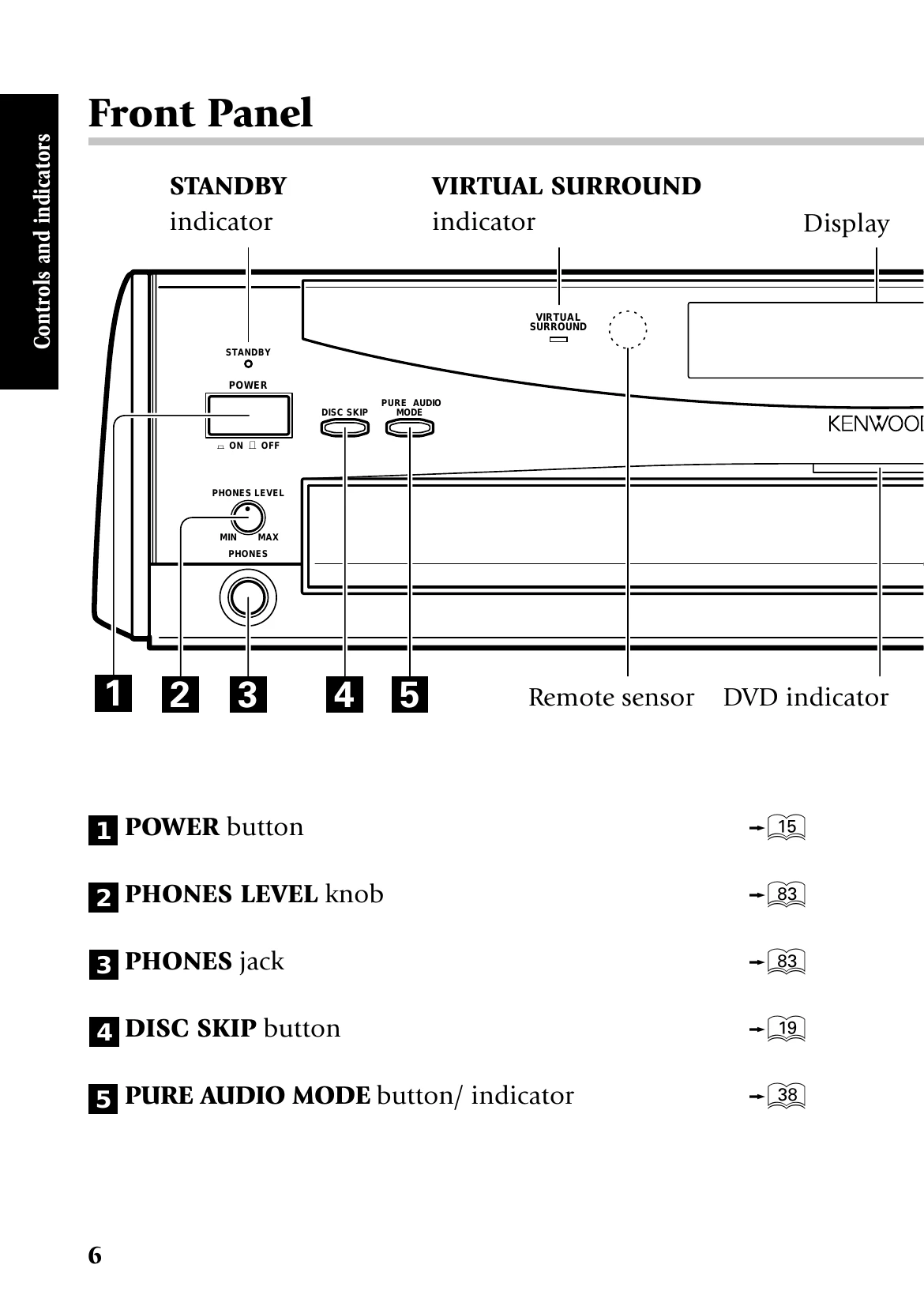
This chapter covers the front panel buttons, display panel, and the joystick remote control unit.
This chapter focuses on fundamental operations.
| Symptom | Possible Cause | Solution |
|---|---|---|
| Playback starts but the video is not output. | Pure Audio function is set to on. | Turn off Pure Audio function. |
| Playback starts but the video is not output. | Input selection of TV/AV amplifier is incorrect or devices are not turned on. | Check input selection and ensure devices are on. |
| Playback starts but the video is not output. | Connection cords are connected improperly. | Check and reconnect cables. |
| Playback starts but the audio is not output. | "Speaker Setting" is incorrect. | Adjust "Speaker Setting". |
| Playback starts but the audio is not output. | Input selection of TV/AV amplifier is incorrect or devices are not turned on. | Check input selection and ensure devices are on. |
| Playback starts but the audio is not output. | Volume of TV/AV amplifier is not adjusted properly. | Adjust volume. |
| Playback starts but the audio is not output. | Audio output cords are connected improperly. | Check and reconnect cables. |
| The picture is disturbed during forward search or reverse search. | Normal behavior. | This is not a malfunction. |
| The picture is not neat or the video or audio quality is poor. | Connection cords are connected improperly. | Check and reconnect cables. |
| The picture is not neat or the video or audio quality is poor. | A device generating noise is installed near the signal path. | Relocate the device or player. |
| The picture is not neat or the video or audio quality is poor. | The disc is dirty or damaged. | Clean or replace the disc. Handle discs carefully. |
| The picture is not neat or the video or audio quality is poor. | Condensation of dew on the optical lenses. | Leave the player with power ON for a few hours to dry. |
| It takes long time before playback starts. | Disc detection and motor rotation stabilization. | This is normal. |
| A warning is displayed on the TV screen and playback is not possible. | Disc surface is stained with fingerprints or dirt. | Clean the disc surface. |
| A warning is displayed on the TV screen and playback is not possible. | Disc is placed obliquely or on another disc. | Place the disc correctly. |
| A warning is displayed on the TV screen and playback is not possible. | Viewing restriction or region code problem. | Consult disc manual or contact support. |
| The top and bottom edges of the picture are cut off. | Video format of the played disc does not match that of the connected TV. | Adjust TV settings or use a different disc. |
| VCD cannot be played with menu playback. | P.B.C. is Off or sequential play mode is "SEQ.2". | Set P.B.C. to On or sequential play mode to "SEQ.1". |
| VCD cannot be played with menu playback. | Not a P.B.C.-compatible VCD. | Menu playback is only possible with P.B.C.-compatible VCDs. |
| DVD VIDEO cannot be played. | Sequential mode is set to "SEQ.2". | Switch to "SEQ.1". |
| Subtitles are not displayed. | DVD does not contain subtitles. | Check DVD for subtitle information. |
| Subtitles are not displayed. | Subtitle language is set to "Off". | Select an available subtitle language. |
| Audio (or subtitle) language cannot be changed. | DVD does not contain multiple audio/subtitle languages. | Language cannot be switched. |
| Viewing angle cannot be changed. | DVD does not contain multiple viewing angles. | Viewing angle cannot be switched. |
| The viewing restriction (Rating) cannot be changed. | Password lost. | Initialize the default setting to factory setting. |
| The selected audio or subtitle languages is not played. | DVD does not contain the default language set by the user. | The priority language specified for the disc will be selected. |
| The TV screen does not show any message when a button is pressed. | "On Screen Message" is set to "Off". | Switch "On Screen Message" to "On". |
| The messages in the menus are not displayed in the selected language. | DVD does not contain the recording of the default language set by the user. | The priority language specified for the disc will be selected. |
| Remote control with the joystick remote is impossible. | Batteries are exhausted. | Replace batteries. |
| Remote control with the joystick remote is impossible. | Controller position too far from sensor, angle deviated, or obstacle. | Adjust position, remove obstacle. |
| Remote control with the joystick remote is impossible. | Mode switch is not set to the proper position. | Set mode switch to the proper position. |
| An inhibition icon is displayed and no operation is accepted. | Disc operations are restricted by software producer or player status. | Operate in accordance with the software and player status. |
| DVD playback cannot be stopped by pressing the STOP button. | Disc inhibition. | Press DISC SKIP to select another disc, then press STOP. If only one disc, add another disc. |
| The player display shows nothing. | Player display is set to "FL OFF". | Change display setting. |
| Error code "E0102" is shown in the display and no operation is accepted. | More than 5 discs in the tray. | Remove one disc, then try closing the tray. Turn player off and on again. |
| Error code ("E" and 4 digits) is displayed. | Other error. | Turn player off then on again. If persistent, initialize settings or consult dealer. |
| The display shows "LOCKED" and no operation is accepted. | Player locked. | Perform the specific unlock procedure described. |
| The COMPONENT VIDEO OUTPUT jacks of the player do not output video signals. | "RGB" is set in the "SCART Output Select" setting. | Change "SCART Output Select" setting. |