Brand: KENWOOD
Category: Audio System
Document Type: Manual
Language: EN
Brand: KENWOOD
Category: Audio System
Document Type: Manual
Language: EN
Uploaded: Nov. 21, 2025, 7:45 p.m.
Manual Publish Date: 2001-08
1. Initializing the DVD Carrousel
Insert the AC power plug to AC wall outlet while pressing the "STOP" key. The unit will then power on. The "INITI " message will appear when initializing the mechanism. If an abnormal action occurs, "INITI NG " will be displayed; otherwise, "INITI OK " will be displayed.
2. Test Mode Setting
To enter Test Mode, turn the power on while pressing the "PAUSE" key. The display will show "TEST". Alternatively, turn the power on while pressing the "DISC1" key to display "INSPECTION".
Cancellation of Setting
Turn the unit power off.
Key vs Function
Various keys perform specific functions in Test Mode, such as Playback, Stop, Skip, disc selection, and tray control (open/close). For example, the "PLAY" key in Test Mode initiates disc playback, while "STOP" stops the operation and returns to the first step of the test mode.
Mechanism Error Codes
The unit displays error codes (e.g., E1001, E1101) for mechanism issues, indicating reasons like "Main processor doesn't work" or "Poor disc chucking". These can be canceled by specific key combinations or by turning the power off.
Circuit Self Check Mode
The "TEST MODE" also includes a circuit self-check function that displays error codes for various circuit malfunctions, such as "No CRCOK signal" or "MAS_ECC_ERR".
Disassembly Instructions
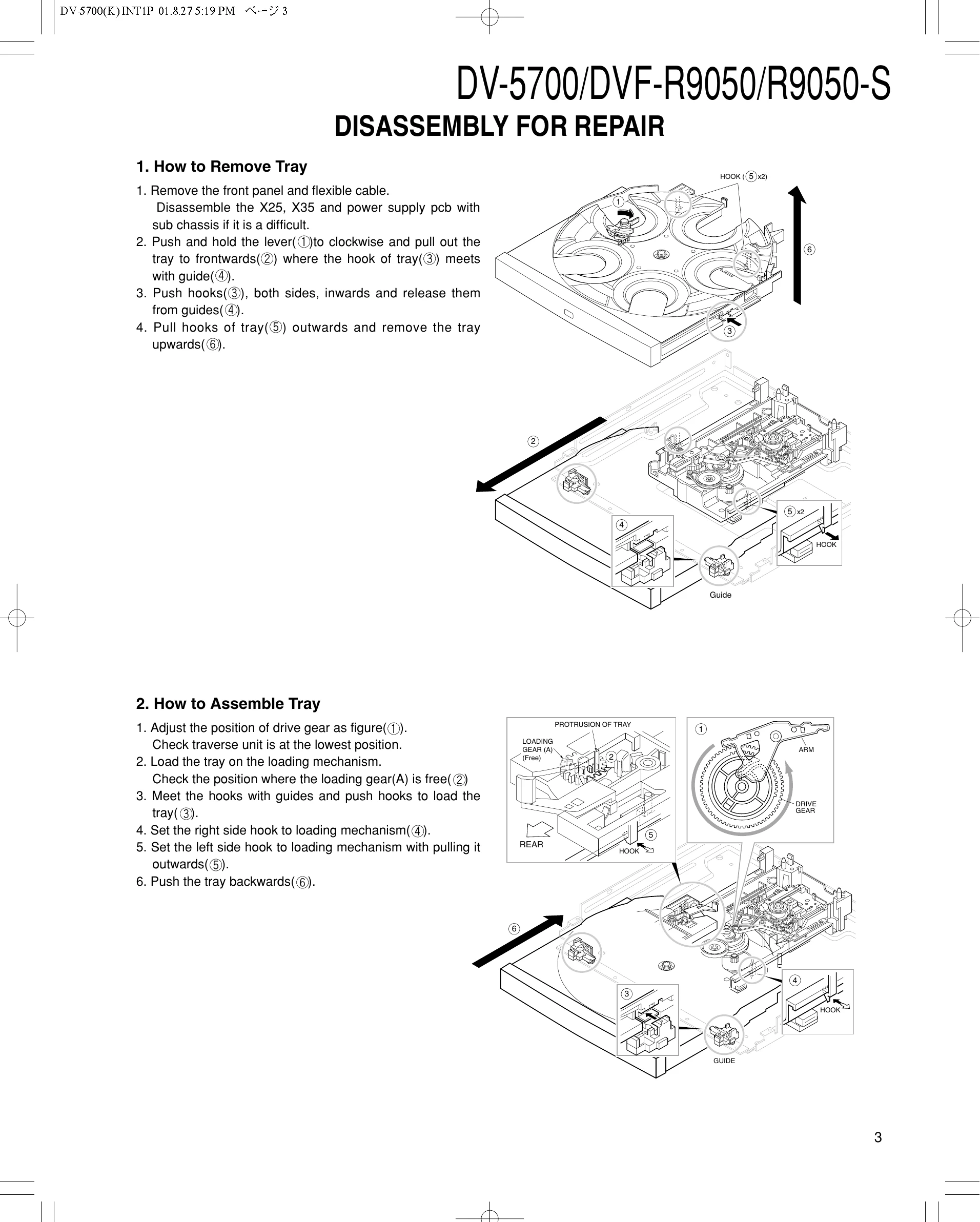
The manual provides step-by-step instructions for removing and assembling the disc tray, emphasizing care with the optical pickup and flexible cables due to static electricity sensitivity. It also covers disassembling the clamper assembly.
Static Electricity Countermeasures
Recommendations are given to ground yourself with an anti-static wrist strap and to lay a conductive material on the workbench to prevent damage from static electricity.
Parts List and Specifications
Detailed parts lists with part numbers, descriptions, and destination codes are provided, along with the device's electrical and mechanical specifications.
ERROR CODE OF MECHANISM
| DISPLAY | CONTENTS | REASON | CANCELING KEY | REMARKS |
|---|---|---|---|---|
| E1001 | No contact with main processor | Main processor doesn't work Sio-0 bus damaged |
No | |
| E1101 | Poor disc chucking | No right position of rotary Foreign matter inserted |
No | |
| E1102 | No cancellation of chucking | No right position of rotary Foreign matter inserted |
OPEN/CLOSE or DISC SKIP | |
| E0101 | No turn of rotary | Mechanism jam Mechanism jam |
CLOSE | Initialization |
| No show | No Close | Disc full load | CLOSE | Initialization |
| E0102 | Playing Disc inside | Not stop to turn the proper position | NO | Remove the one disc after turn power off. |
| E0103 | No detection of disc position | Load disc at no proper position Foreign matter inserted at sensor |
OPEN/CLOSE or DISC SKIP | Check the sensor of discs on the rotary. |
| No show | Waiting | Turn power off in open/close mode. | CLOSE | Press the CLOSE key after turn the power on again. |