Manual for DMX6523S

Manual for DMX6523S

Brand: KENWOOD

Category: Audio System

Document Type: Manual

Language: EN
Uploaded: Nov. 21, 2025, 7:37 p.m.

Warranty Information

Consult the manual for specific warranty information.

  • Before Use: Read manual, take precautions for safety and product care, and understand how to reset the unit and acquire GPS signal.
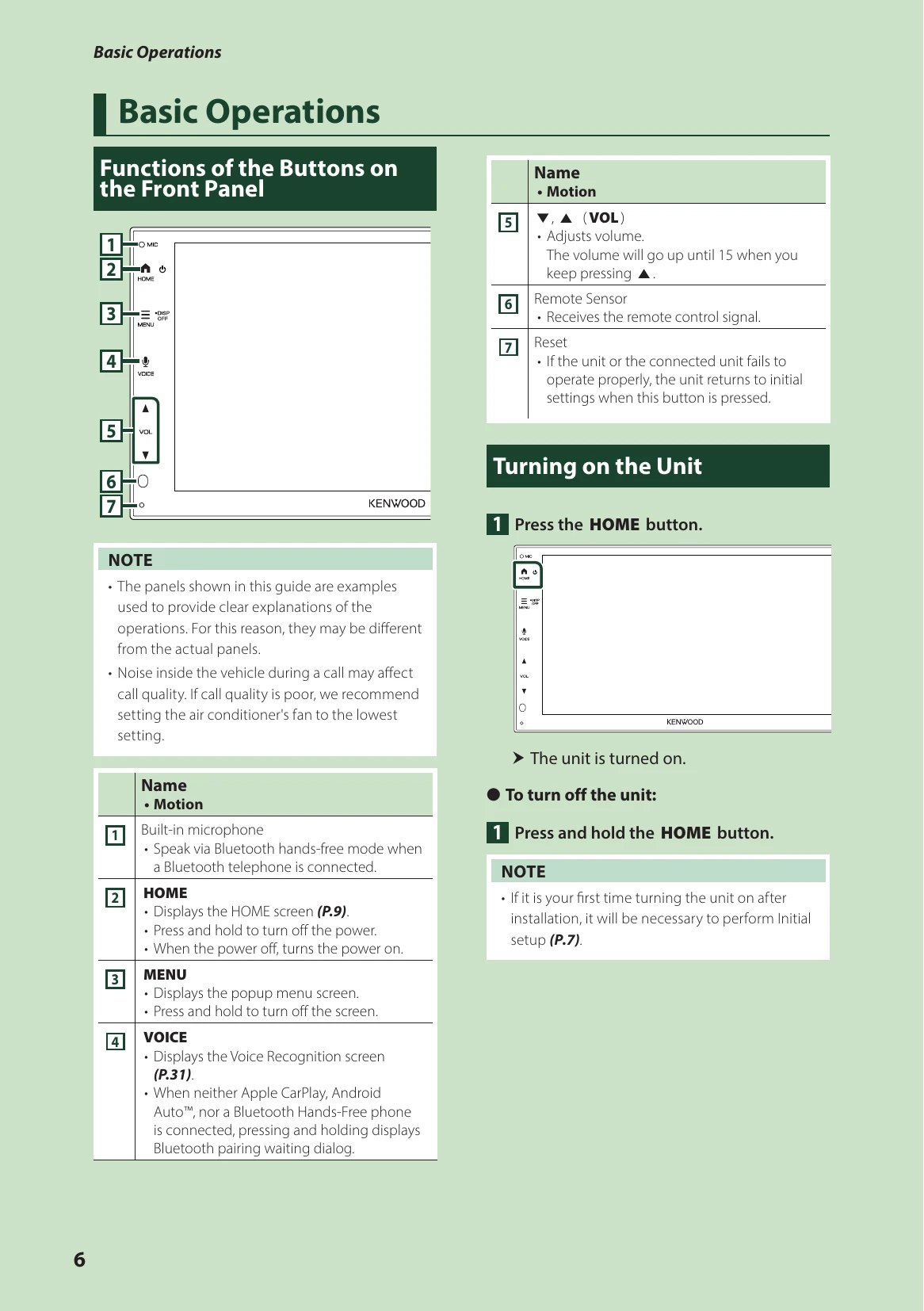
  • Basic Operations: Familiarize with front panel buttons, turning the unit on/off, and performing touch screen operations. Navigate HOME screen, source selection screen, customize shortcut buttons, and use the popup menu.
  • APPS: Connect and operate Apple CarPlay and Android Auto. Use Wireless Mirroring for iPhone and Android smartphones.
  • USB: Connect and disconnect USB devices, perform basic USB operations, and search for files.
  • Radio: Basic radio operations, memory operations (auto and manual), selecting and searching for stations, traffic information, and radio setup.
  • Bluetooth Control: Information on using Bluetooth devices, registering, connecting, switching, and deleting devices. Play Bluetooth audio, use hands-free functions (make calls, call records, phonebook, voice recognition), and set up hands-free options.
  • Other External Components: View camera input and setup, and Maestro features operation for vehicle integration.
  • Setting Up: Adjust monitor screen settings, system setup, user interface settings, special parameters, display settings, and AV parameters. Set up connection parameters.
  • Remote control: Battery installation, switching operation mode, and functions of remote control buttons. Direct search mode.
  • Connection/Installation: Before installation precautions, installing the unit, GPS antenna installation, and connecting wires to terminals. Connecting iPhone/Android.
  • Troubleshooting: Solutions for common problems and understanding error messages.
  • Appendix: Details on playable media and files, specifications, and copyright information.

Troubleshooting and error codes

Problems and Solutions
About settings
  • Cannot set up the subwoofer.
  • Cannot set up subwoofer phase.
  • No output from the subwoofer.
  • Cannot set up the low pass filter.
  • Cannot set up the high pass filter.
Subwoofer is not set to on.

→ Set the subwoofer to on. See Speaker/X'over setup (P.42).

About audio operations
Radio reception is poor. The car antenna is not extended.

→ Pull out the antenna all the way.

The antenna control wire is not connected.

→ Connect the wire correctly. See Connecting wires to terminals (P.52).

Cannot select a folder. The random play function is enabled.

Turn off the random function.

The sound skips when an audio file is being played. The recording condition is bad.

Record the file again or use another USB memory.

Other
The Touch Sensor Tone doesn't sound. The preout jack is being used. The Touch Sensor Tone cannot be output from the preout jack.
Privacy Policy