Brand: JVC
Category: Television
Document Type: Manual
Language: EN
Brand: JVC
Category: Television
Document Type: Manual
Language: EN
Uploaded: Nov. 21, 2025, 7:05 p.m.
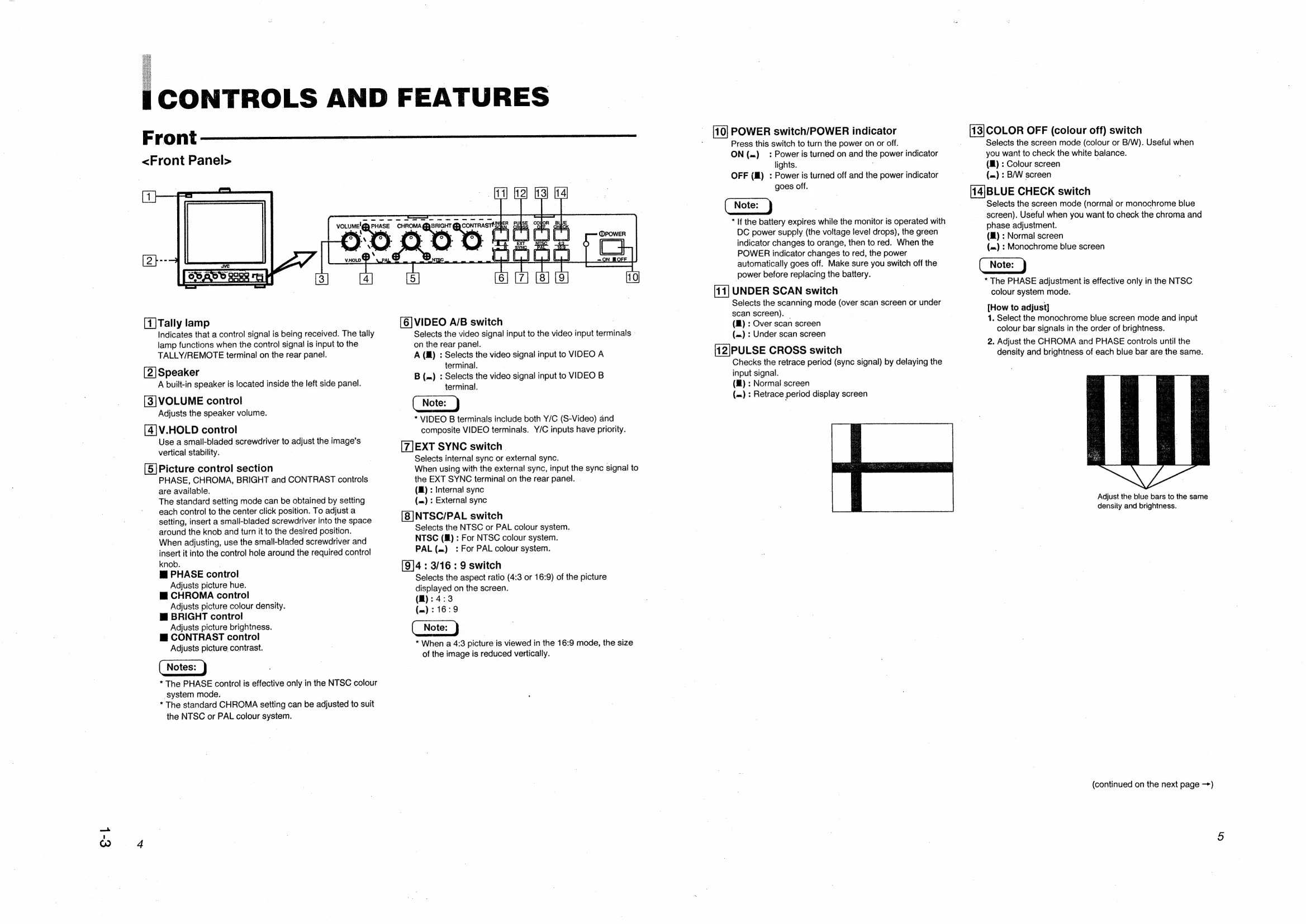
Tally lamp: Indicates control signal reception.
Speaker: Built-in speaker.
VOLUME: Adjusts speaker volume.
V.HOLD: Adjusts vertical stability with a screwdriver.
Picture controls (PHASE, CHROMA, BRIGHT, CONTRAST): Adjust hue, colour density, brightness, and contrast. Center click for standard settings. Use a small screwdriver.
VIDEO A/B switch: Selects video input (VIDEO A or VIDEO B).
EXT SYNC switch: Selects internal or external sync.
NTSC/PAL switch: Selects colour system.
4:3/16:9 switch: Selects aspect ratio.
POWER switch: Turns the unit on/off. Indicator lights up when on.
UNDER SCAN switch: Selects over scan or under scan screen mode.
PULSE CROSS switch: Delays signal to check retrace period.
COLOR OFF switch: Selects colour or black & white screen mode.
BLUE CHECK switch: Selects normal or monochrome blue screen mode for chroma/phase adjustment.
| Problems | Points to be checked | Measures |
|---|---|---|
| No power supply. | Is the AC or DC power plug loosened or disconnected? | Firmly insert the power plug. |
| Is the battery fully charged (when using DC power)? | Charge the battery, or replace it with a charged battery. (Refer to the instructions provided with the battery.) | |
| No picture with the power on. | Is the video signal output from the connected component? | Set the connected component correctly. |
| Is the input signal selected properly? | Select the required video signal input with the VIDEO A/B switch. (See page 4.) | |
| Is the video cable disconnected? | Connect the video signal cable firmly. (See page 8.) | |
| No sound. | Is the audio signal output from the connected component? | Set the connected component correctly. |
| Is the volume output set at the minimum position? | Adjust the VOLUME control. (See page 4.) | |
| Is the audio cable disconnected? | Connect the audio signal cable firmly. (See page 8.) | |
| Shaking picture. | Is the monitor close to a device generating a strong magnetic field (motor, transformer, etc.)? | Move the device away from the monitor until the picture stabilizes. |
| No colour, wrong colour, or dark picture. | Is the colour system selected properly? | Set the colour system correctly with the NTSC/PAL switch. (See page 4.) |
| Is the COLOR OFF (colour off) switch set properly? | Set the COLOR OFF (colour off) switch to the OFF() position. (See page 5.) | |
| Unnatural, irregularly coloured, or distorted picture. | Has the picture control setting (CONTRAST, BRIGHT, CHROMA or PHASE) been changed? | Set each picture control to the standard setting (center) position. (See page 4.) |
| Dark stripes at the top and bottom of the screen, picture vertically squeezed. | Is the monitor close to a speaker, magnet or any other device generating a strong magnetic field? | Move the device away from the monitor and turn the monitor's power off. Wait at least 30 minutes, then turn the power on again. |
| Is the aspect ratio set to 16:9 (-)? | Press the 4:3/16:9 switch to restore the normal 4:3 mode (1). (See page 4.) | |
| Picture flows. | Is the EXT SYNC switch set properly? | Set the EXT SYNC switch properly. (See page 4.) |
| Front panel switches do not function. | Is the monitor being controlled by an external control unit via the TALLY/REMOTE terminal? | Set the control on the external unit of the same function as that on the monitor's front panel to the OFF() position, or disconnect the unit from the TALLY/REMOTE terminal. (See page 7 and 8.) |
| External control not possible with the unit connected to TALLY/ REMOTE terminal. | Is the switch on the front panel of the same function as that on the external control unit to the ON (-) position? | Set the control on the front panel of the same function as that on the external control unit to the OFF() position. (See pages 4, 5, 7 and 8.) |