Brand: JVC
Category: Television
Document Type: Manual
Language: EN
Brand: JVC
Category: Television
Document Type: Manual
Language: EN
Uploaded: Nov. 21, 2025, 9:01 p.m.
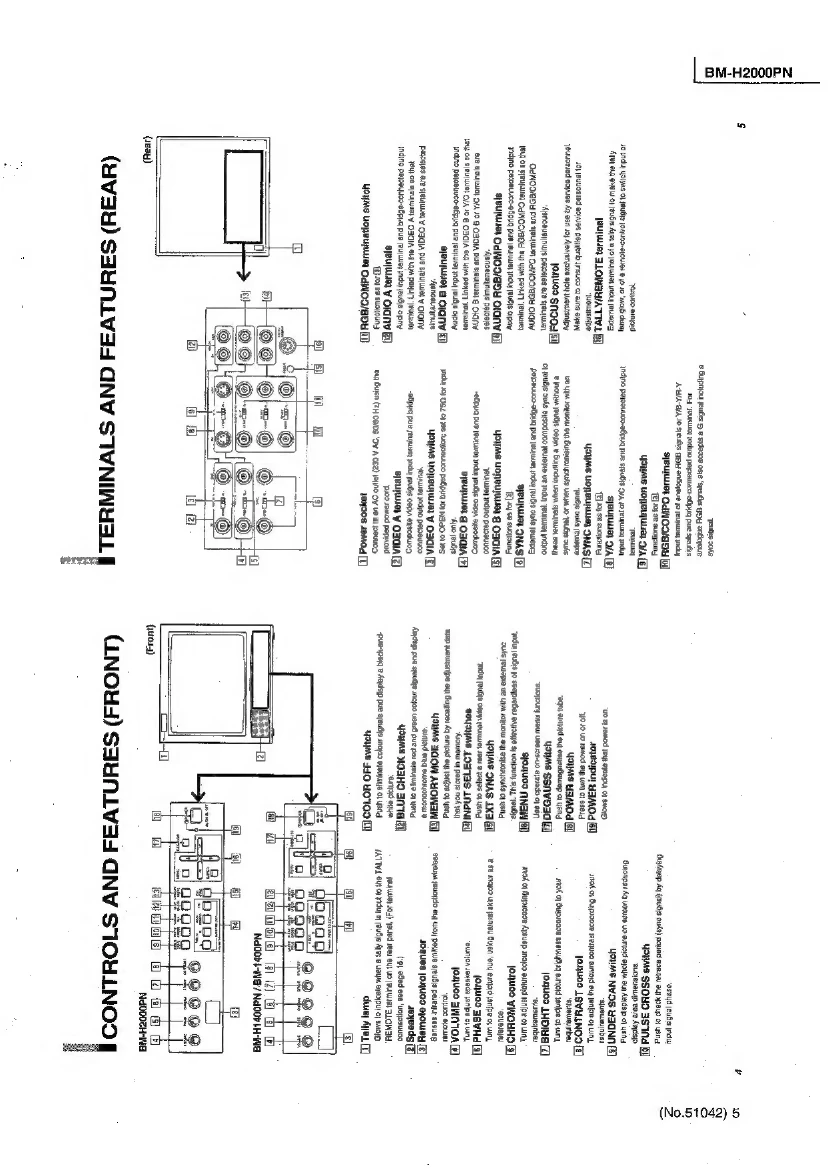
1. To turn the power on: Push the POWER switch. The POWER indicator glows green. The mode and colour system of an input signal are automatically discerned and displayed on screen for about 3 seconds. To turn off power, push the POWER switch again, and the POWER indicator goes off.
2. To select the input: Push an INPUT SELECT switch. Push VIDEO A, VIDEO B, RGB/COMPONENT or Y/C. The mode and colour system of a selected input signal are automatically discerned and displayed on screen for about 3 seconds.
3. To adjust the audio level: Turn the VOLUME control to the right to increase the level, or to the left to decrease the level.
External/internal synchronisation: Push the front panel EXT SYNC switch to ON, and the monitor operates to synchronise with an external sync signal input to the rear panel SYNC IN terminal. Push the switch again to OFF, and the monitor operates to synchronise with a sync signal included in a video signal (if it includes a sync signal) input via a video input terminal.
RGB/COMPO terminal setting: Set RGB or COMPO on screen to match the type of video signal input to the rear panel RGB/COMPO IN terminals. To input analogue RGB signals, set to RGB. To input Y, B-Y or R-Y signal, set to COMPO.
To demagnetise the picture tube: After positioning near the monitor a speaker (non-magnet-shielded) or other equipment that generates a strong magnetic field, or after relocating the monitor, colour patches could appear in the picture due to magnetisation of the picture tube. If this occurs, push the DEGAUSS switch to demagnetise the picture tube.
| Before Calling for Service | Description |
|---|---|
| Inoperable adjustment controls or buttons. | Is MEMORY MODE switched on? Switch off. Is CONTROL LOCK activated? Deactivate it. Are PICTURE ADJUST settings changed via remote control? Reset to standard settings. |
| Abnormal picture adjustments with all controls at centre. | ID EXT SYNC switched on? Switch to off. When the TALLY/REMOTE terminal is used, the following functions become deactivated (except when they are set to 'NOT USE'): Front INPUT SELECT and EXT SYNC switches; Front UNDER SCAN, PULSE CROSS, COLOR OFF and BLUE CHECK switches; On-screen MENU's ASPECT RATIO, COLOR TEMP. functions; Remote MUTE Key. If a function is applied to both CNTL-1 and CNTL-2, CNTL-1 has priority. |
| Inoperable picture synchronisation. | ID number programmed for other monitors? Programme an ID number other than 00. |
| Inoperable remote-controlled picture adjustments. | Are the front controls set approximately to the maximum or minimum? If so, the settings may not extend any more via remote control (although setting levels indicated on screen may show a slight change). |
| Assigned remote control ID number operates another monitor. | Do other monitors indicate a red ID number? Assign the ID number again. |
| No sound via audio signal input. | Does the audio input terminal match the video input terminal? Each audio input terminal is linked with a video input terminal. |
| No INITIALIZE MENU display. | Are you pressing the ▼ and MENU buttons until it appears? Keep pressing these buttons until it appears. |
| Inoperable CNTL-2 external control via TALLY/REMOTE terminal. | Is a function applied common to CNTL-1 and CNTL-2? Set other functions to CNTL-2. |