Brand: JVC
Category: Camcorder
Document Type: Manual
Language: EN
Brand: JVC
Category: Camcorder
Document Type: Manual
Language: EN
Uploaded: Aug. 10, 2025, 12:33 a.m.
The apparatus conforms to European directives for electromagnetic compatibility and electrical safety.
Charging the Battery: Connect the AC adapter and cable to the unit, then plug into a power outlet. The charging lamp indicates the status.
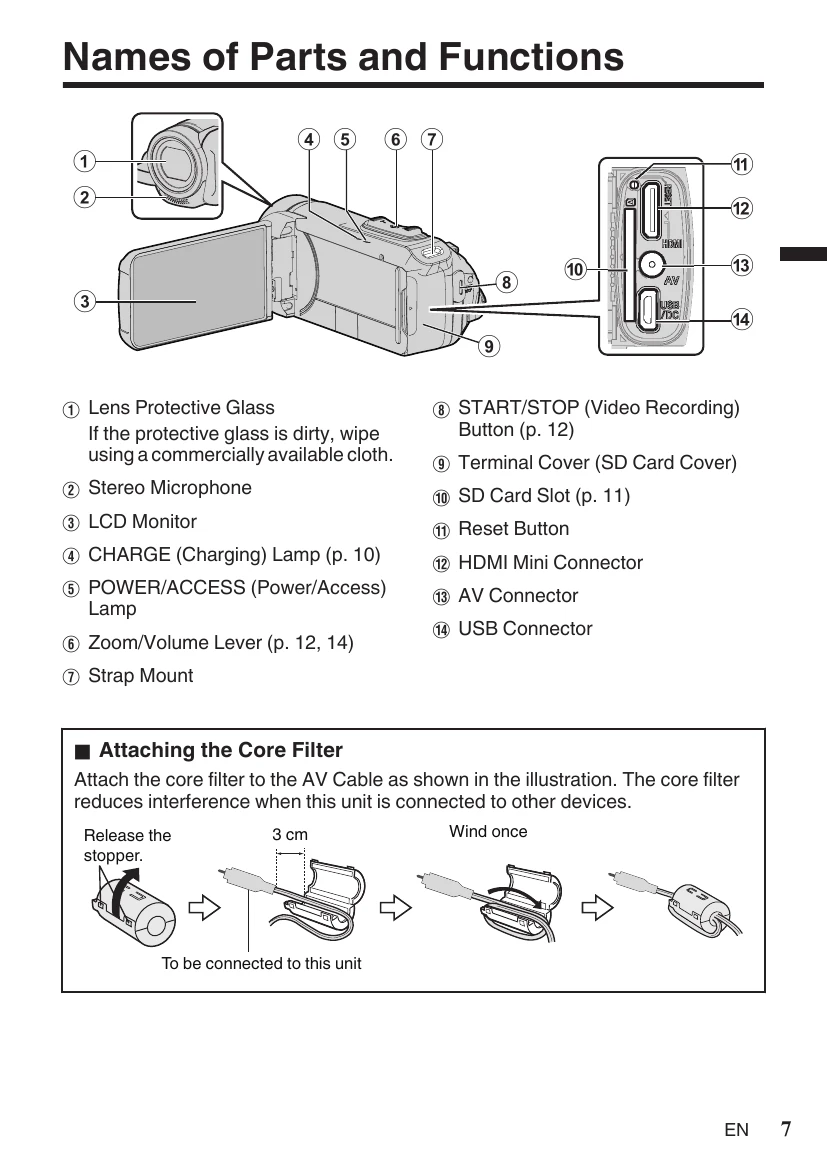
Inserting an SD Card: Open the terminal cover, insert an SD card, and close the cover. The unit can record to its built-in memory or an SD card.
Video Recording: Check recording mode (video, i.A.), start recording with the START/STOP button or REC button. Use the zoom lever for zooming.
Video Quality: Access MENU > RECORD SETTING > VIDEO QUALITY to select desired quality (UXP, XP, EP).
Playback: Select video/still image mode, tap PLAY, select media (SD), and tap the file to play. Pause with II. Delete unwanted files by selecting them and confirming.
| Troubleshooting | Possible Cause/Solution |
|---|---|
| Unit does not function | 1. Refer to "Troubleshooting" in the "Detailed User Guide." |
| 2. Reset the unit: Remove all cables, press the "Reset button" inside the terminal cover (LCD monitor should be off), then reattach the AC adapter and turn the unit on. | |
| 3. If problems persist, contact your JVC dealer or service center. | |
| Built-in Battery | |
| Hazards | Do not burn. |
| Do not modify or disassemble. | |
| Do not expose to temperatures exceeding 60 °C. | |
| To prevent damage and prolong service life: | |
| Do not subject to unnecessary shock. | |
| Charge within 10°C to 35°C. | |
| Store in a cool, dry place. Keep battery at 30% for long storage, fully charge/discharge every 6 months. | |
| Recording Medium | |
| Prevent corruption or damage | Do not bend, drop, or subject to pressure, jolts or vibrations. |
| Do not spill water. | |
| Avoid strong static electricity or electrical noise. | |
| Do not turn off power during recording/playback/access. | |