Brand: JVC
Category: Camcorder
Document Type: Manual
Language: EN
Brand: JVC
Category: Camcorder
Document Type: Manual
Language: EN
Uploaded: Nov. 21, 2025, 6:54 p.m.
OFF: Camera is off.
Standby/On:
Mode: Hold for 3 seconds to switch between video and still image mode. Press 'Snap Shot' button for a picture.
Use the switch on the lens side to open and close.
Navigate to Menu > Media Settings > Format, select SDHC card slot, then File > Yes. Always format a card before first use to erase all data.
Press A/B button to toggle between Card A and Card B. Camera auto-switches to Card B if Card A runs out of recording time.
Use MP4 for file format unless editing on a Mac, then use MOV. For CCMC editing, use System Select: 720-60/30 and Rec Mode: 1280/30p (HQ or SP). HQ offers 56 min on 16GB, SP offers 1 hr 43 min.
Toggles between full auto and full manual mode.
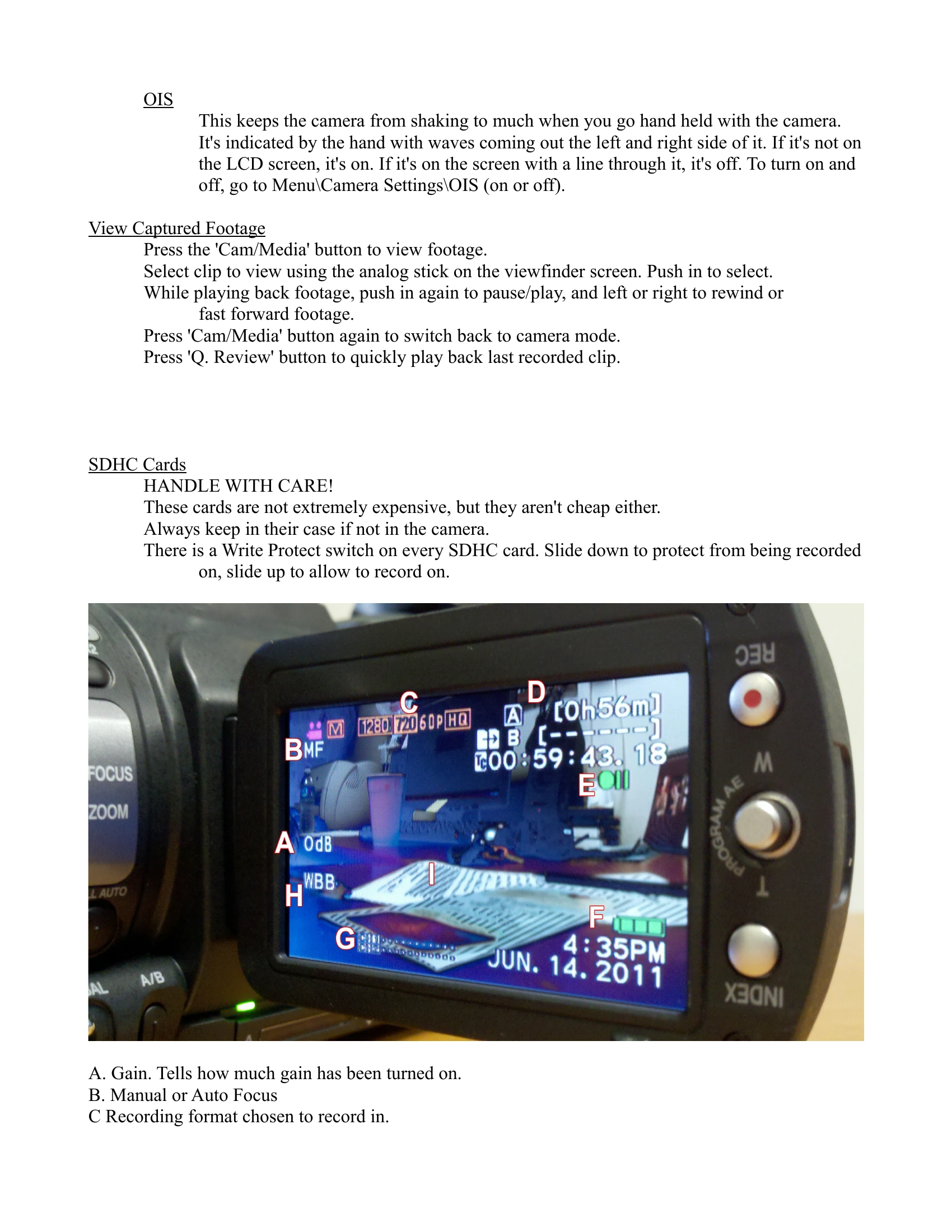
Press Index button on viewfinder to see remaining time on both cards and battery life.
Fully charged battery lasts approximately 2 hours.
Pressure sensitive. 'T' zooms in, 'W' zooms out.
Input1 to Channel 1. Input2 to Channel 2. Select Line for non-mic audio, Mic for microphones, Mic+48v for condenser microphones.
Press the red 'REC' button to start/stop recording. Footage is saved in 'clips' (individual files).
ND Filter: Use in bright sunlight.
Gain: Low (L) in good light, Medium (M) or High (H) in low light.
Focus: Use Focus/Zoom switch for ring function. AF/MF button switches between Auto and Manual focus.
White Balance: WHT.BAL for indoor (3200K). B & A are custom presets. Hold AWB button while zooming in on a white object in direct light to set B or A.
Iris: Press button to turn on/off. Use Adj/Vol knob to adjust. Press knob to lock. Press button again to cycle settings. Double press turns Iris to auto.
Shutter: Press button to turn on/off. Use Adj/Vol knob to adjust. Press knob to lock. Press button again to cycle settings. Double press turns Shutter to auto.
Zebra: Menu > Camera Process > Zebra to turn on/off. Indicates overexposed areas.
Menu > Camera Settings > OIS to turn on/off. Helps reduce camera shake when handheld.
Press 'Cam/Media' to view. Use analog stick to select clips. Push stick to play/pause. Left/right to rewind/fast forward. Press 'Cam/Media' again to return to camera mode. 'Q. Review' plays the last clip.
Handle with care. Keep cards in their cases. Use the Write Protect switch to prevent recording.
| Indicator | Meaning | Action |
|---|---|---|
| F [number] | Iris setting | Use Adj/Vol knob to adjust when black; press to lock (white). |
| [fraction number] | Shutter speed | Use Adj/Vol knob to adjust when black; press to lock (white). |
| Zebra lines | Overexposed areas | Turn on ND filter or lower iris. If extensive, footage may be unfixable. |