Manual for GR-DVL9000

Manual for GR-DVL9000

Brand: JVC

Category: Camcorder

Document Type: Manual

Language: EN
Uploaded: Aug. 10, 2025, 12:37 a.m.

Manual Publish Date: 1998-01-01

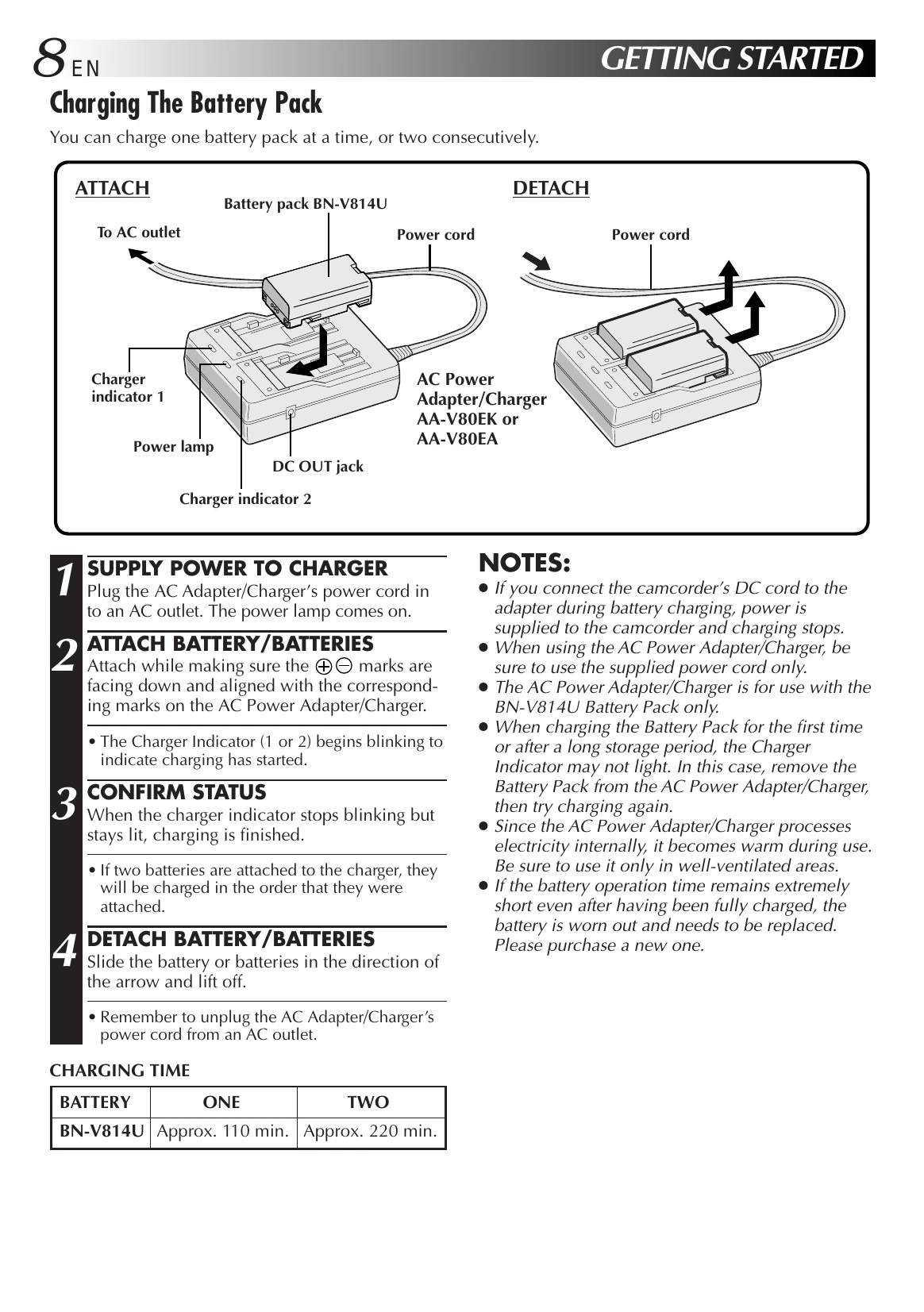
  • Charging the Battery: Plug in the AC adapter, attach the battery pack, wait for the charger indicator to stop blinking and stay lit.
  • Installing the Battery: Open the battery cover, insert the charged battery until it clicks, then close the cover.
  • Indoor Use: Use the AC adapter by connecting it to the camcorder and an AC outlet.
  • Date/Time Settings: Select the operation mode, access the Recording Menu, then the Date/Time Menu, and input the date and time.
  • Loading a Cassette: Open the LCD monitor, slide the OPEN/EJECT switch, open the cassette cover, insert the tape, and press PUSH HERE to close the holder.
  • Recording Mode: Select the operation mode, access the Recording Menu, select 'REC MODE', and choose 'SP' or 'LP'.
  • Grip Strap Attachment: Open the pad, adjust for comfortable access to controls, position for hand contact, and re-attach.
  • Tripod Mounting: Align the tripod screw with the mounting socket on the camcorder's bottom.
  • Dioptre Adjustment: Select the operation mode, turn on the camcorder, and adjust the dioptre lever on the viewfinder until the display is clear.
  • Remote Control: Point the remote at the camcorder's remote sensor. Install a CR2025 lithium battery.
  • Operation Mode: Turn the Power Dial to select Full Auto (A), Manual (M), 5 sec. recording (5S), Self-Timer (S), or PLAY.
  • Basic Recording: Select mode 'A', pull out viewfinder or open LCD, press START/STOP to begin recording, press again to stop.

Troubleshooting and error codes

INDICATIONSFUNCTION
Displays the battery remaining power. Remaining power level: high.
Remaining power level: exhausted. As the battery power comes close to nil, the battery indicator blinks. When the battery power is exhausted, power turns off automatically.
Appears when no tape is loaded, or when the erase protection tab is set to "SAVE". (pg. 12)
Appears if dirt is detected on the heads during recording. (pg. 83)
Appears if condensation occurs. When this indication is displayed, the camcorder turns off automatically.
TAPE! Appears for 10 seconds after power is turned on if there's no tape loaded.
TAPE END Appears when the tape ends during recording or playback. (pg. 22)
SET DATE/TIME!
  • Appears when the date/time is not set. (pg. 11)
  • Appears when the built-in rechargeable battery is discharged and the previously set date/time is erased. (pg. 11)
ERROR! REFER MANUAL
  • Appears when Audio Dubbing is unavailable. (pg. 68)
  • Appears when Insert Editing is unavailable. (pg. 69)
E01 – E07 The error indications (E01 – E07) show what type of malfunction has occurred. When an error indication appears, the camcorder turns off automatically. Press the reset button after removing the power supply (battery, etc.), and wait a few minutes for the indication to clear. When it does, you can resume using the camcorder. If the indication remains, consult your nearest JVC dealer. (pg. 74)
Privacy Policy