Brand: JVC
Category: Audio System
Document Type: Manual
Language: EN
Brand: JVC
Category: Audio System
Document Type: Manual
Language: EN
Uploaded: Nov. 21, 2025, 8:34 p.m.
Contact your dealer for specific warranty information. No data loss is guaranteed for USB devices.
Power On/Off: Press the /I AUDIO button to turn the system on. The STANDBY lamp goes off. Press /I AUDIO again to turn the system off (standby mode); the STANDBY lamp lights red.
Source Selection: Press buttons like DVD/CD, USB MEMORY, FM/AM/AUX, or TV/VIDEO to select the desired source. Playback may start automatically.
Volume Adjustment: Use the VOL +/- buttons on the remote or the VOLUME +/- controls on the main unit to adjust the volume level.
Tuning Radio: Select TUNER FM or TUNER AM. Use the tuning buttons to search for stations or use preset buttons to recall stored stations.
Disc/USB Playback: Insert a disc or connect a USB device. Press the corresponding source button (e.g., DVD/CD, USB MEMORY) to start playback. Use playback control buttons (Play, Pause, Stop, Skip, etc.) as needed.
| Problem | Solution |
|---|---|
| Adjustments or settings are suddenly canceled | There is a time limit. Repeat procedure again. |
| Operations are disabled | The built-in microprocessor may malfunction due to external electrical interference. Unplug the AC power cord and then plug it back in. |
| Unable to operate the System from the remote control | The path between the remote control and the remote sensor on the System is blocked. The batteries are exhausted. |
| No sound is heard | Speaker connections are incorrect or loose. Headphones are connected. |
| No picture appears on the screen | The video cord connections are incorrect or loose. |
| No picture displayed on the TV screen, picture blurred, or divided into two parts | The System is connected to a TV which does not support progressive video input. Incorrect color system selected. |
| Left and right edges of the picture are missing | Select "4:3 LB /4:3 MULTI LB" for "MONITOR TYPE". |
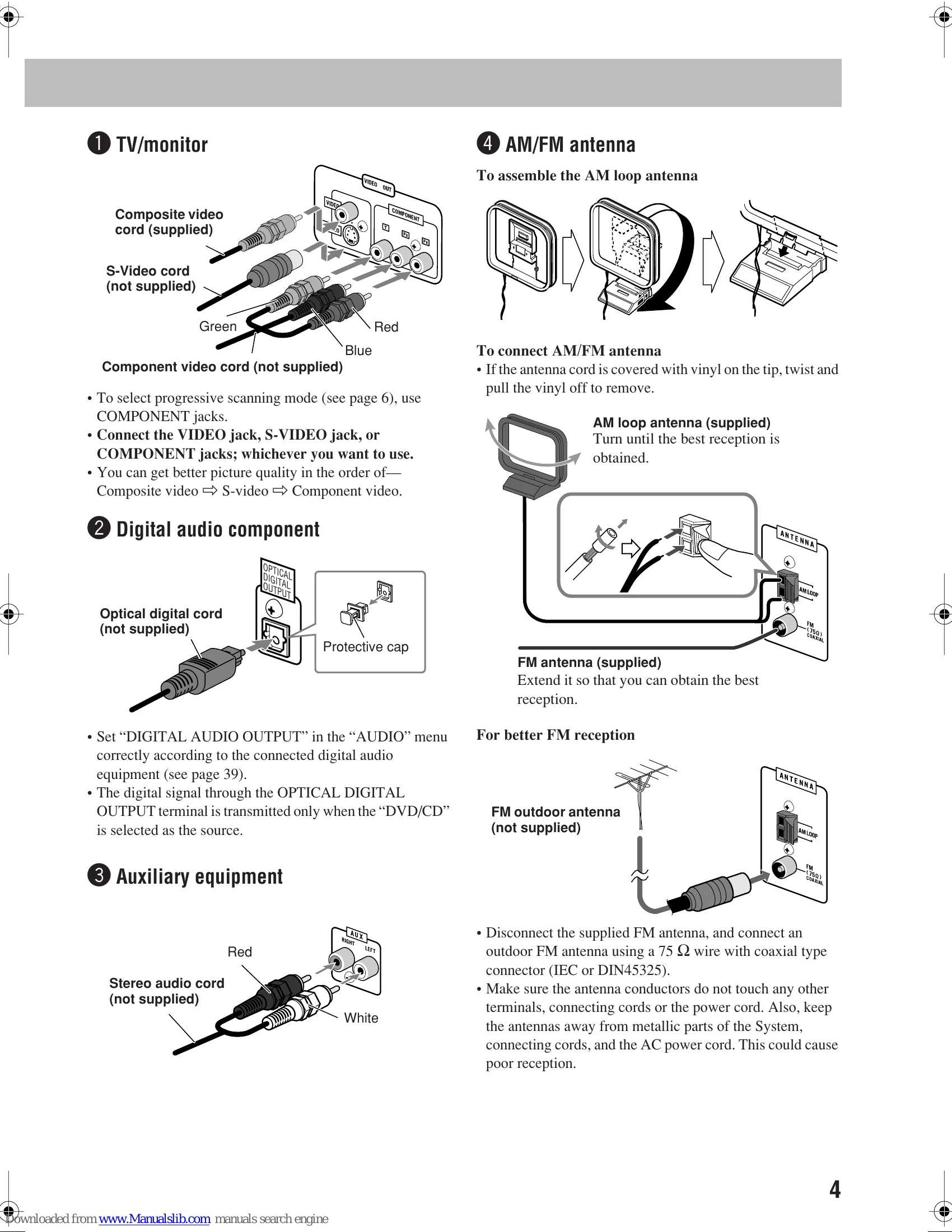
| Hard to hear broadcasts because of noise | Antennas connections are incorrect or loose. AM loop antenna too close to the System. FM antenna not properly extended/positioned. |
| The disc does not play | Incorrect Region Code inserted. Disc placed upside down. |
| ID3 Tag on MP3 disc cannot be shown | Only Version 1 is supported. |
| Groups and files are not played back as expected | Playback order depends on recording application. |
| AV files are not played back | Ensure "FILE TYPE" setting matches the file type. Reload disc/reconnect USB device. |
| Disc sound is discontinuous | Disc is scratched or dirty. |
| Playback sounds strange | Cancel Vocal Masking or Key adjustment. |
| No subtitle appears | Some discs always display no subtitle initially. Press SUB TITLE after starting play. |
| Audio language is different from selected | Some discs use original language initially. Press AUDIO/MPX after starting play. |
| Disc tray does not open/close | AC power cord not plugged in. Child Lock in use. Program Play in use. |
| Cassette holder cannot be opened | System needs to be turned on. |
| "CANNOT REC" appears | System cannot perform recording. |
| Impossible to record | Protective tabs on cassette removed. Karaoke Scoring in use. |
| Karaoke function cannot be activated | Microphone not connected, or Mic Mixing not activated. |
| Karaoke Scoring cannot be activated | Cannot use during recording, or when DVD/SVCD/VCD menu is shown. |
| Scoring result wrong or "– –" | Playback/singing time too short. Input level too low. Sung too quietly. |
| Daily Timer or Recording Timer does not work | System must be turned off (standby) when on-time comes. |