Brand: Infinix
Category: Smartphone
Document Type:
Language: EN
Brand: Infinix
Category: Smartphone
Document Type:
Language: EN
Uploaded: Aug. 10, 2025, 12:03 a.m.
No warranty information found in the document.
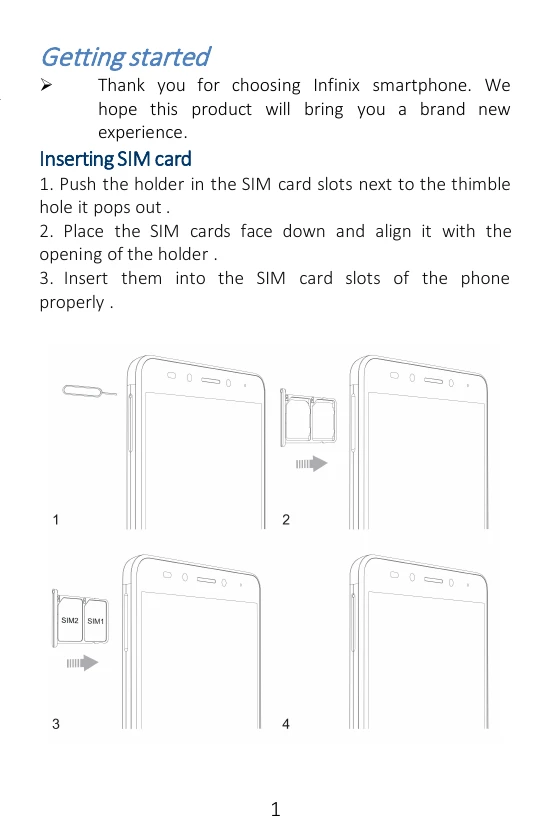
Insert SIM card by pushing the holder to pop out, placing SIM cards face down, and inserting them into the slots.
Charge using a charger or USB cable connected to a computer.
On the start screen, tap the call icon and enter a phone number.
View call history, add contacts, and send messages from the call records interface.
Enter the Messaging interface to create new messages. Attach files, select contacts, capitalize text, and use suggestions.
| Header 1 | Header 2 | Header 3 | Header 4 |
|---|---|---|---|
| Row 1, Cell 1 | Row 1, Cell 2 | Row 1, Cell 3 | Row 1, Cell 4 |
| Row 2, Cell 1 | Row 2, Cell 2 | Row 2, Cell 3 | Row 2, Cell 4 |
| Row 3, Cell 1 | Row 3, Cell 2 | Row 3, Cell 3 | Row 3, Cell 4 |