Brand: HUAWEI
Category: Other
Document Type: Manual
Language: EN
Brand: HUAWEI
Category: Other
Document Type: Manual
Language: EN
Uploaded: Nov. 21, 2025, 7:42 p.m.
This document applies to associated devices. Read carefully before use. Components may be sold separately. Figures are for reference only.
i: Highlights important information and tips.
!: Indicates potential problems such as device damage or data loss.
Identifies panel, support, base, function buttons, power button/indicator, power port, HDMI port, and VGA port.
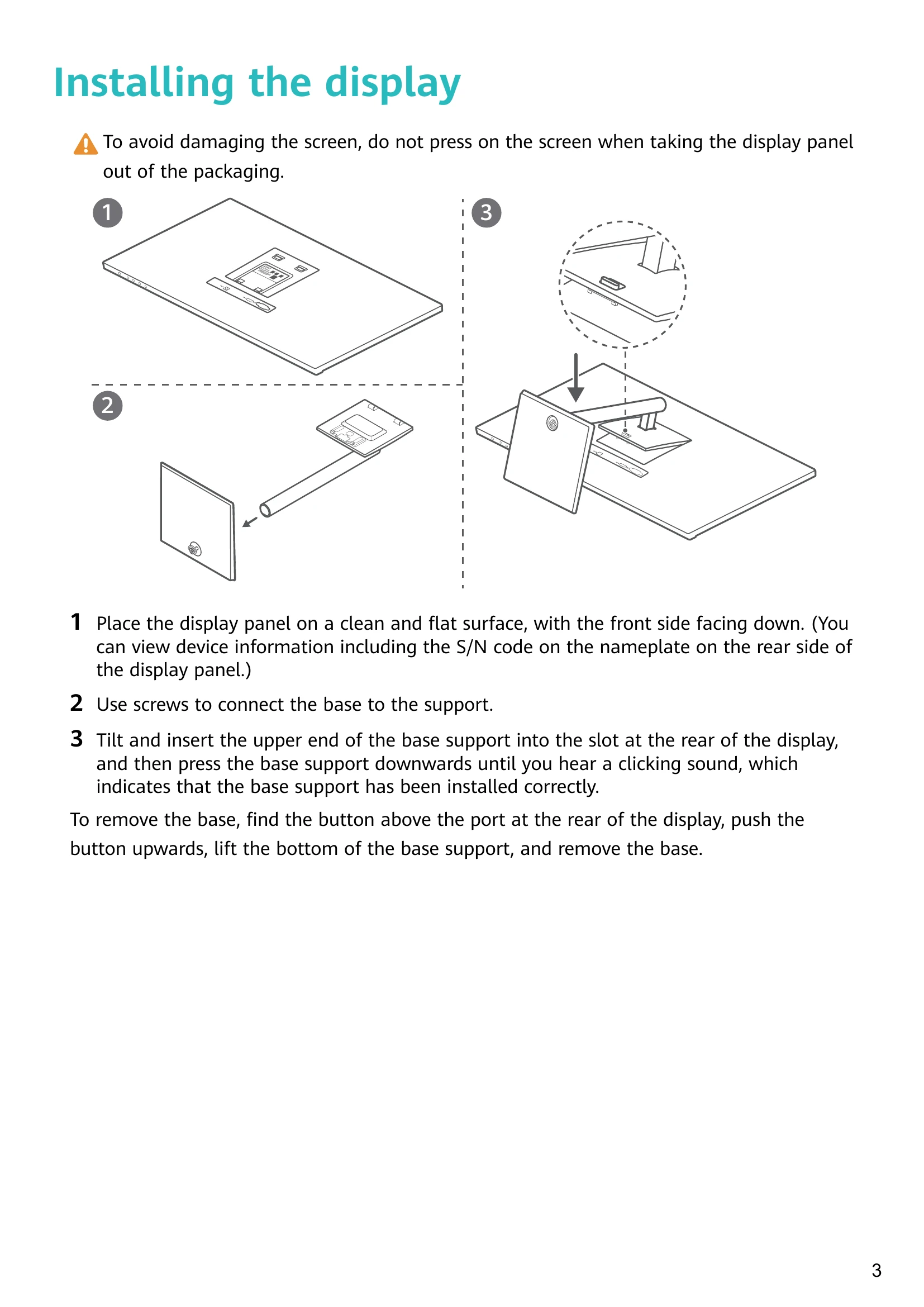
Place panel face down. Connect base to support with screws. Attach base support to display until it clicks. Removal involves pressing a button.
Place display on flat surface. Connect display to computer using HDMI or VGA. Connect power cable. Power on devices. Adjust pitch angle as needed. Turn off when not in use.
System auto-configures. Access settings menu by pressing buttons 1-4. Adjust parameters using buttons. Change language and other settings. Menu closes automatically after inactivity.
Adjust brightness/contrast, select input signal, switch color temperature modes (including low blue light), adjust display mode, select scenario, access more settings (language, transparency, reset).
Troubleshoot power issues, no images, screen brightness, and abnormal colors by checking connections, power, and adjusting settings.
| Issue | Solution |
|---|---|
| Unable to power on the display | Check if the display is powered on. Check power adapter connection to the display and power supply. |
| There are no images on the display | Check all cable connections. Check if the display and tower are powered on. Check if the VGA or HDMI signal cable is damaged. Restart the display and tower if issues persist. |
| The screen is too dark or too bright | Open the settings menu and adjust screen brightness and contrast. Use specific keys if available for brightness adjustment. |
| The screen colour is abnormal | Check if the VGA or HDMI signal cable is damaged (e.g., bent pins). Open the settings menu and adjust the colour temperature. |