Brand: HUAWEI
Category: Other
Document Type: Quick Start Guide
Language: EN
Brand: HUAWEI
Category: Other
Document Type: Quick Start Guide
Language: EN
Uploaded: Nov. 21, 2025, 7:38 p.m.
Manual Publish Date: 2016-09-30
The document illustrates a basic application scenario for the OceanStor 2600 V3 storage system, focusing on CIFS (Common Internet File System) protocol for file sharing in a Windows environment. It shows how users can manage and maintain the storage system using a maintenance terminal, how the file system provides high-performance and secure data storage, and how CIFS shares can be configured for both public and private access.
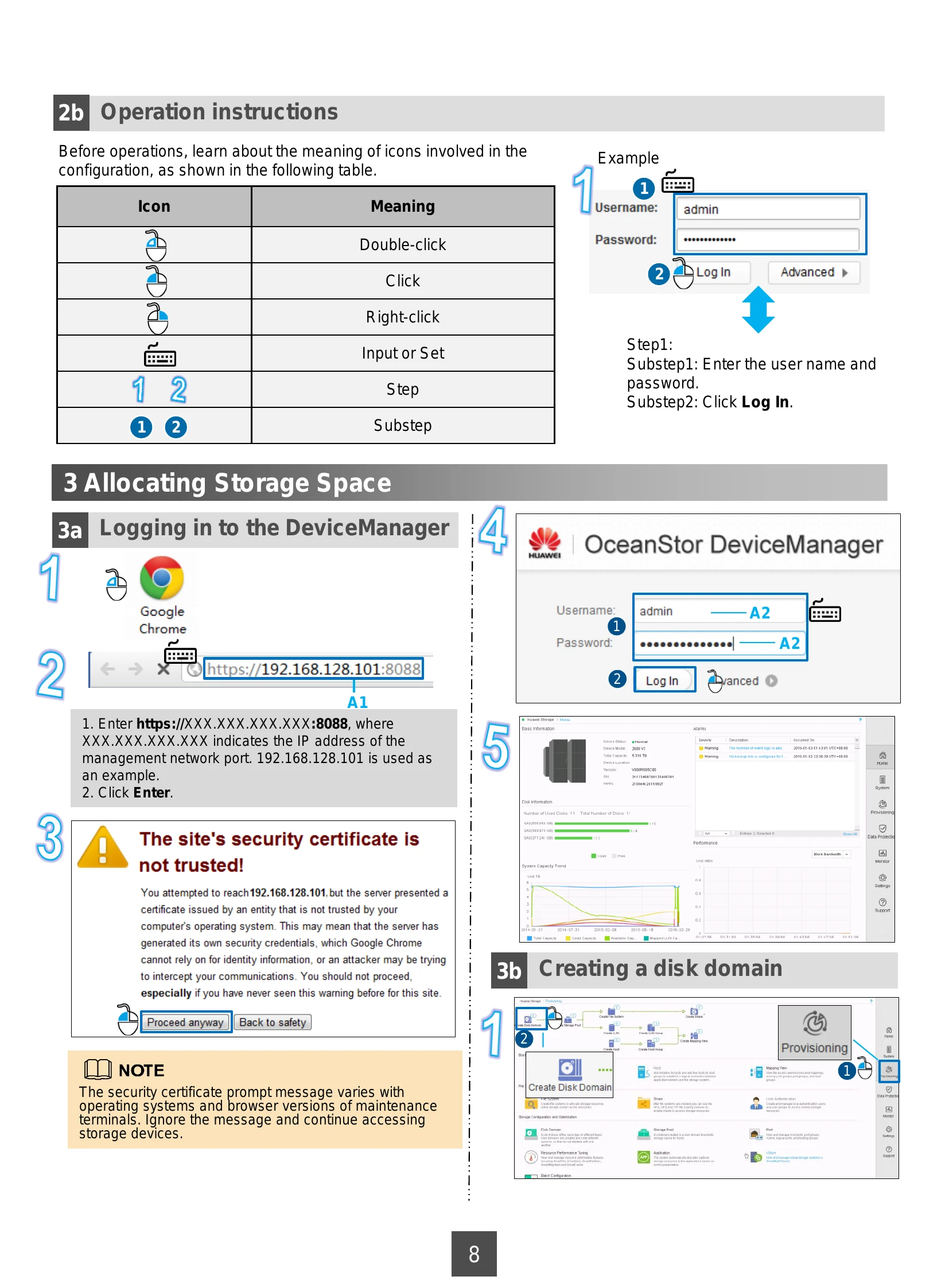
Instructions on how to log in to the OceanStor DeviceManager using a web browser. This involves entering the management network port IP address and then the username and password. It also warns about untrusted security certificates, advising users to proceed anyway.
Steps to create a disk domain, which involves selecting disks and defining their type (e.g., SSD, SAS, NL-SAS) and hot spare policy. This is a prerequisite for creating storage pools.
Guide to creating a storage pool within a disk domain. This involves specifying the pool name, usage (File Storage Service), associating it with a disk domain, and defining storage tiers (Performance Tier, Capacity Tier) with their respective RAID policies and capacities.
Steps to create a file system from a storage pool. This includes naming the file system, configuring thin provisioning, specifying capacity, application scenario, and quantity. The owning storage pool needs to be selected.
This section outlines the necessary data preparation before configuring the CIFS service. It details specific items like management network port IP addresses, user credentials for DeviceManager, disk domain names, disk types, storage pool names, and file system parameters. It uses a table format to map example values to actual values for configuration.
Instructions for accessing a CIFS share from a Windows Server 2008 client. This includes mapping the network drive using the share path and authenticating with appropriate credentials, considering both non-domain and AD domain environments.
Instructions for accessing a Homedir share from a Windows Server 2008 client. Similar to accessing a CIFS share, but specifically for Homedir, which provides private directories per user.