Brand: HUAWEI
Category: Mobile Phone
Document Type: Manual
Language: EN
Brand: HUAWEI
Category: Mobile Phone
Document Type: Manual
Language: EN
Uploaded: Nov. 21, 2025, 7:35 p.m.
No warranty is provided for the manual's content, but consumer laws may apply.
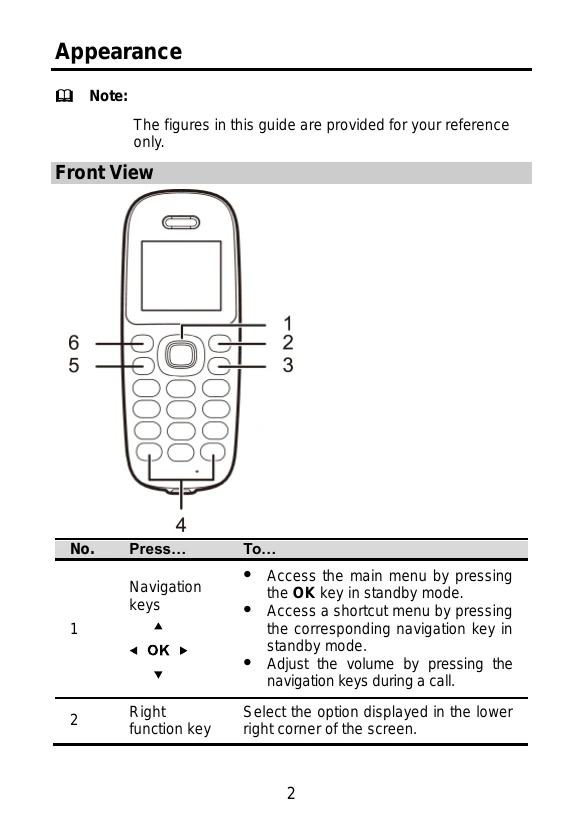
The figures in this guide are provided for your reference only.
The phone has several keys and buttons for operation:
Icons indicate:
| Problem | Solution |
|---|---|
| Phone Cannot Be Powered On | 1. Check if the battery is installed properly. 2. Charge the battery and try again. |
| No Information Is Displayed on the Phone Screen | If the battery is low, charge it for a while and then power on. |
| Battery Cannot Be Charged | 1. Check connections between phone, power adapter, and socket. 2. Replace power adapter or battery if necessary. |
| Signal Strength Is Weak | 1. Check UIM card installation. 2. Move to an area with better signal reception. |
| Call Volume is Too High or Too Low | During a call, use navigation keys to adjust volume. |