Brand: HUAWEI
Category: Laptop
Document Type: Quick Start Guide
Language: EN
Brand: HUAWEI
Category: Laptop
Document Type: Quick Start Guide
Language: EN
Uploaded: Nov. 21, 2025, 7:11 p.m.
None
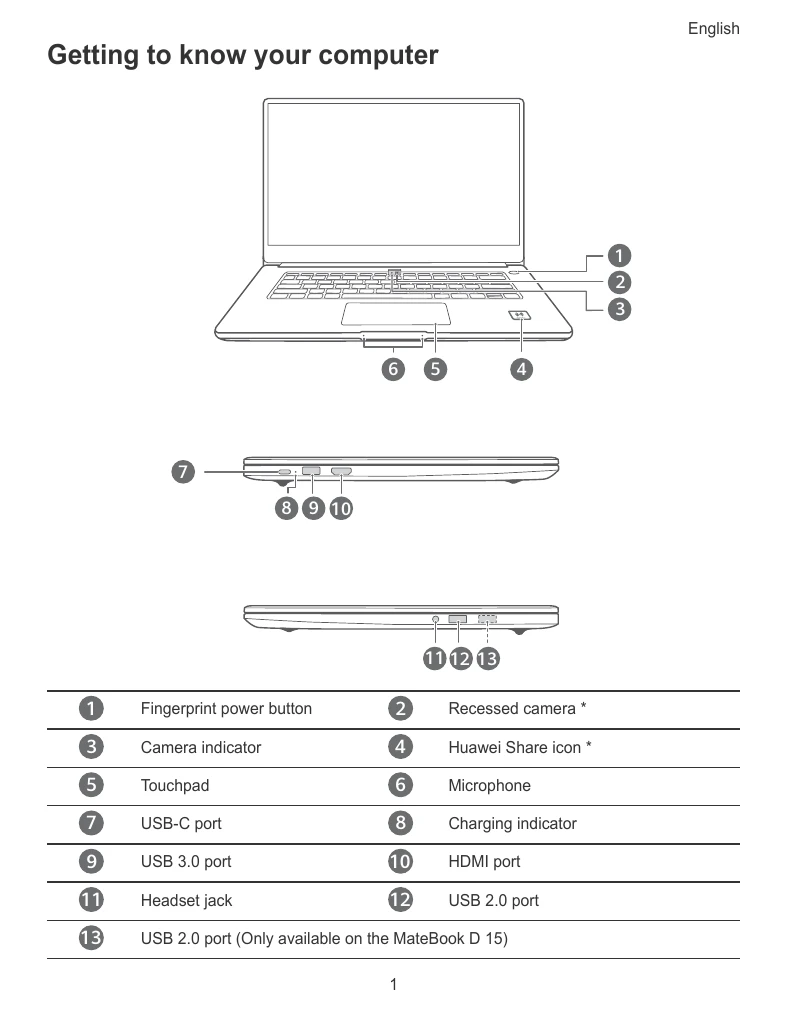
Familiarize yourself with the components of your laptop, including the fingerprint power button, recessed camera, touchpad, microphone, and various ports.
Connect your computer to the power adapter and follow the on-screen instructions to set up your device. This includes connecting to a wireless network, logging in with a Microsoft account, and setting up Windows Hello with fingerprint recognition.
Learn how to use the Start menu to access settings, turn off, restart, or sleep your computer. The Action Center allows quick access to settings and frequently used functions.
Charge your computer using the provided adapter and USB-C cable. The indicator light will blink white during charging.
Enjoy one-touch login with the fingerprint sensor. You can restore your computer to factory settings by pressing and holding F10 during power-on.