Brand: HTC
Category: Smartphone
Document Type:
Language: EN
Brand: HTC
Category: Smartphone
Document Type:
Language: EN
Uploaded: Aug. 10, 2025, 12:04 a.m.
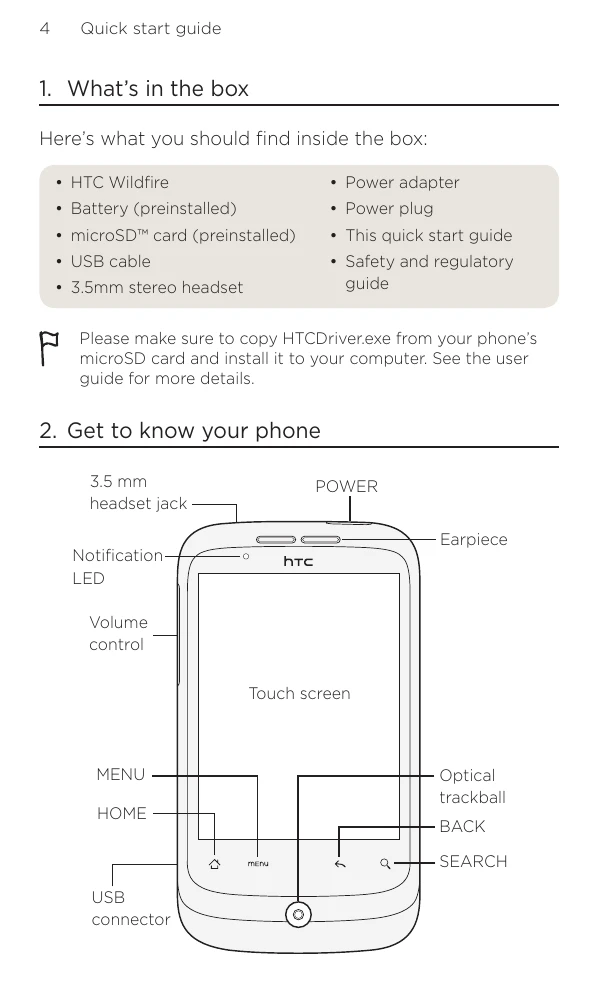
This guide helps you get started with your HTC Wildfire phone.
Key operations include:
| Problem | Solution |
|---|---|
| Phone unresponsive | Remove battery, wait 3 seconds, reinsert, and turn on. Or back up data and factory reset. |
| No automatic data connection | Check data connection is turned on (Settings > Wireless & networks > Mobile network). Check right mobile network is selected (Settings > Wireless & networks > Mobile networks > Network operators or Access Point Names). |
| Insufficient free space | Check free space (Settings > SD card & phone storage). |
| Application issues | Clear data and cache (Settings > Applications > Manage applications). Uninstall third-party applications. |