Brand: HTC
Category: Smartphone
Document Type:
Language: EN
Brand: HTC
Category: Smartphone
Document Type:
Language: EN
Uploaded: Aug. 10, 2025, 12:04 a.m.
None
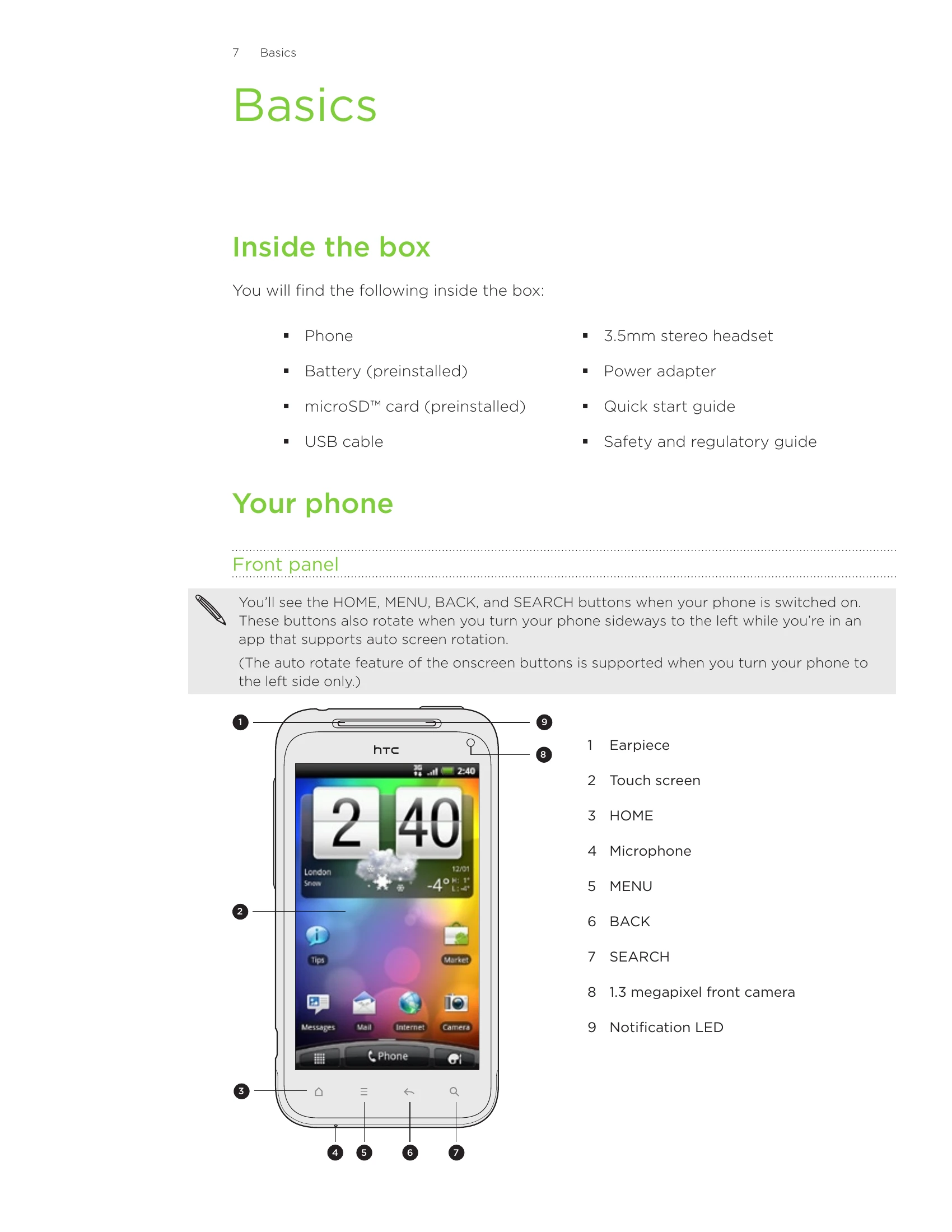
This user guide for the HTC Incredible S covers basic operations and setup. It details how to get started with your phone, including initial setup, navigating the home screen, and understanding status and notification icons. The guide also explains how to connect your phone to a computer, search for information on your phone and the web, and customize various settings like sound and language. It further elaborates on managing memory, updating software, and performing resets. Finally, it touches upon basic phone functions like calls, messages, and using various applications.
| Issue | Solution |
|---|---|
| Phone running slower than normal, application not performing properly, or phone becomes unresponsive | Restart your phone (soft reset) by pressing and holding the POWER button, then tapping Restart. If that doesn't work, remove the battery, wait a few seconds, reinsert it, and turn the phone on. |
| Persistent problem that cannot be solved | Perform a factory reset (hard reset) to return the phone to its original state. This will permanently delete data and installed applications. Back up important data first. |
| Cannot turn on phone or access settings | Perform a factory reset using phone buttons: remove battery, reinsert it, then press and hold VOLUME DOWN and briefly press POWER. Select FACTORY RESET and press POWER. |