Manual for Desire Z

Manual for Desire Z

Brand: HTC

Category: Smartphone

Document Type:

Language: EN
Uploaded: Aug. 10, 2025, 12:04 a.m.

Warranty Information

None

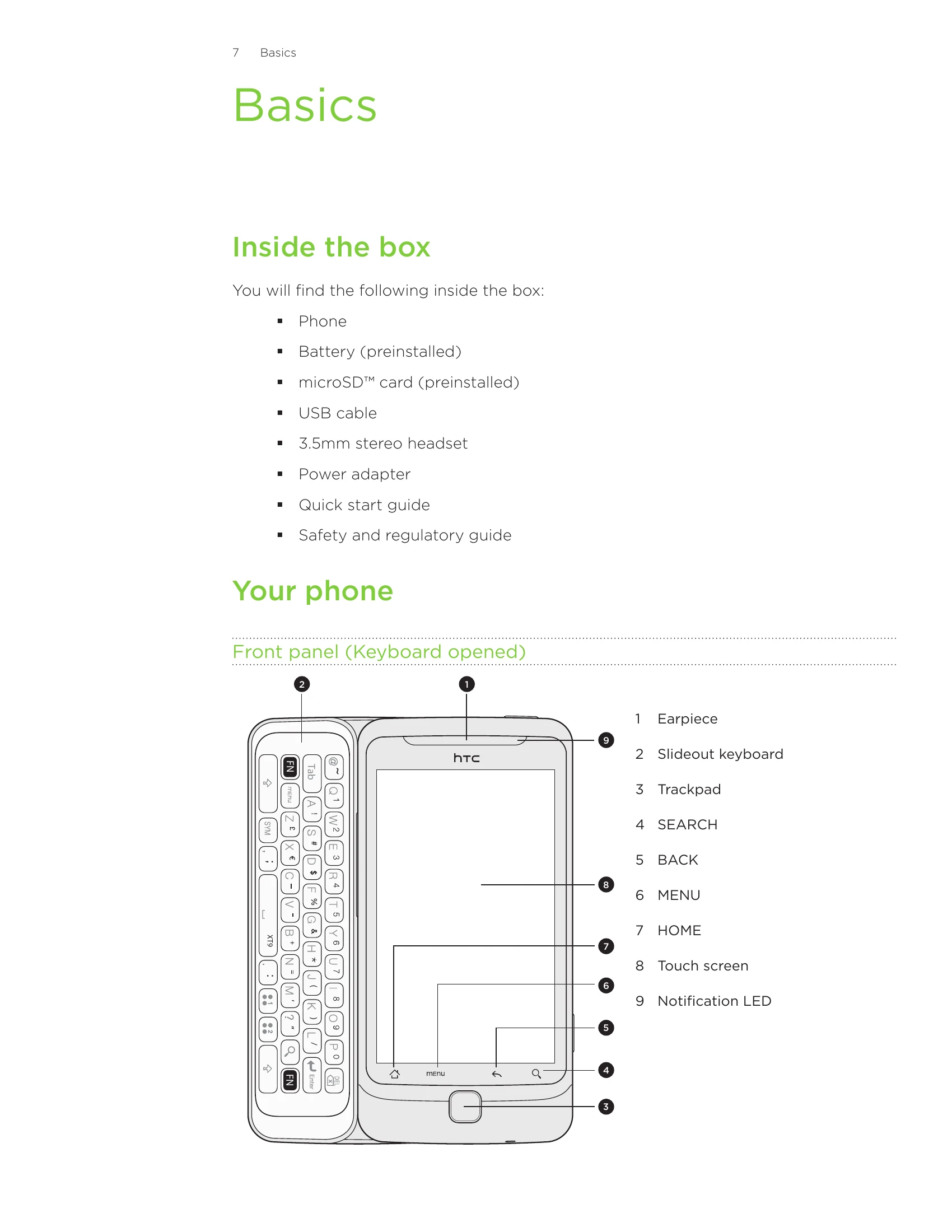
  • Basics: Learn about your phone's components, how to insert SIM and storage cards, and battery usage.
  • Getting Started: Set up your phone for the first time, explore the Home screen, and understand status icons.
  • Personalizing: Customize your phone with scenes, wallpapers, widgets, and ringtones.
  • Phone Calls: Make, receive, and manage calls, including using Caller ID and blocking callers.
  • People: Manage contacts, contact groups, and view people widgets.
  • Keyboard: Use the slideout and onscreen keyboards, including predictive text and voice input.
  • Messages: Send and receive text and multimedia messages.
  • Accounts and Sync: Sync your phone with online accounts and your computer.
  • Social: Connect with social networks like Facebook and Twitter.
  • Email: Use Gmail/Google Mail and other email accounts.
  • Calendar: Manage calendar events and reminders.
  • Clock and Weather: Use clock features, alarms, and check the weather.
  • Internet connections: Connect to the internet via Wi-Fi or mobile data.
  • Web browser: Browse the web, manage bookmarks, and view pages.
  • Bluetooth: Connect to Bluetooth devices and share information.
  • Camera: Take photos and record videos.
  • Photos, videos, and music: Browse your gallery, listen to music, and share media.
  • HTCSense.com: Access HTC services and manage your account.
  • Maps and location: Use Google Maps and manage location services.
  • More apps: Explore various applications like YouTube, Flashlight, and Android Market.
  • Security: Protect your SIM card and phone with a screen lock.
  • Settings: Customize various phone settings, including display, sound, and battery life.
  • Update and reset: Update your phone's software and perform factory resets.

Troubleshooting and error codes

Header 1 Header 2 Header 3 Header 4
Row 1 Data 1 Row 1 Data 2 Row 1 Data 3 Row 1 Data 4
Row 2 Data 1 Row 2 Data 2 Row 2 Data 3 Row 2 Data 4
Row 3 Data 1 Row 3 Data 2 Row 3 Data 3 Row 3 Data 4
Privacy Policy