Brand: HP
Category: Digital Camera
Document Type:
Language: EN
Brand: HP
Category: Digital Camera
Document Type:
Language: EN
Uploaded: Aug. 9, 2025, 11:54 p.m.
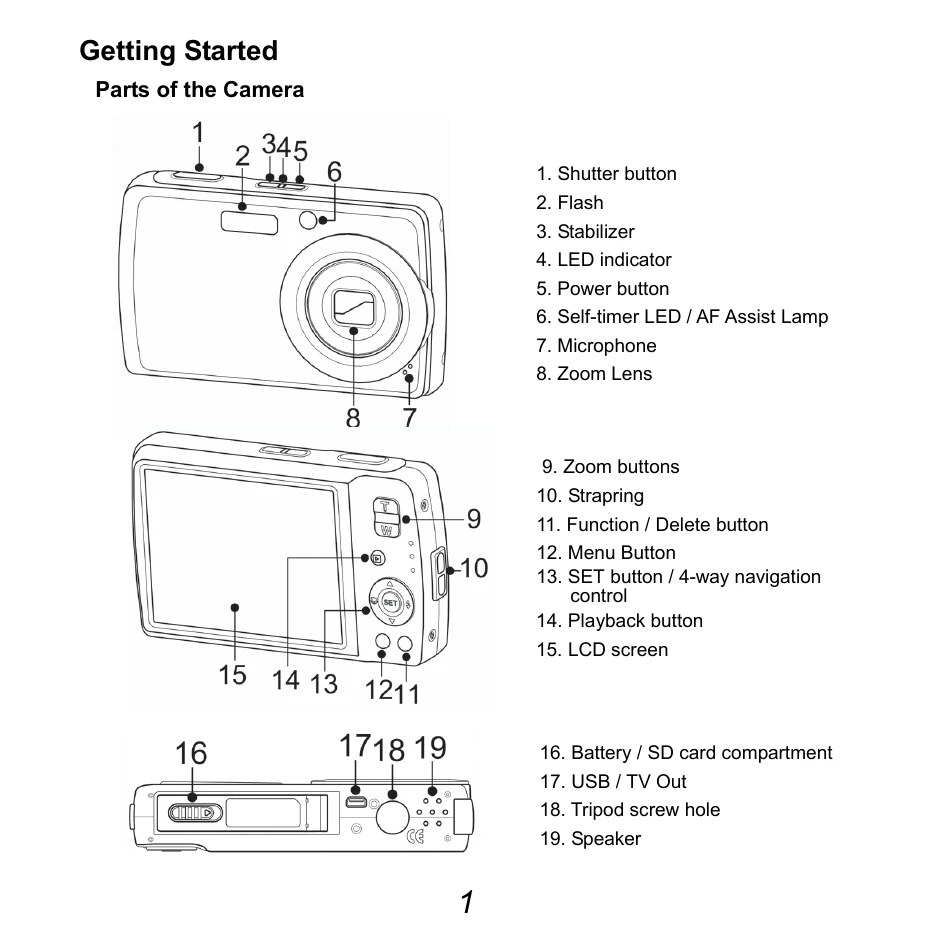
Parts of the Camera: The manual identifies various parts of the HP SB360 digital camera, including the shutter button, flash, zoom lens, LCD screen, and battery compartment.
Language Setup: Turn on the camera, navigate to the Setup Menu, select 'Language', choose a language using the navigation buttons, and press SET to confirm.
Date & Time Setup: In the Setup Menu, select 'Date & Time'. Use the navigation buttons to adjust the date and time values, and press SET to apply.
Shooting Menu: Press the MENU button to access Shooting Mode options like Saturation and Contrast. Use the navigation controls to select and adjust settings, pressing SET to save.
Setup Menu: Access the Setup Menu to configure general settings like LCD Brightness and Memory Kit. Navigate and set options similarly.
Function Menu: Press the FUNC button for quick adjustments to capture settings such as Resolution, Quality, and White Balance. Use navigation and SET to apply changes.