Manual for R827

Manual for R827

Brand: HP

Category: Digital Camera

Document Type:

Language: EN
Uploaded: Aug. 9, 2025, 11:53 p.m.

Getting Started

To begin, familiarize yourself with the camera controls, set it up, and start taking pictures.

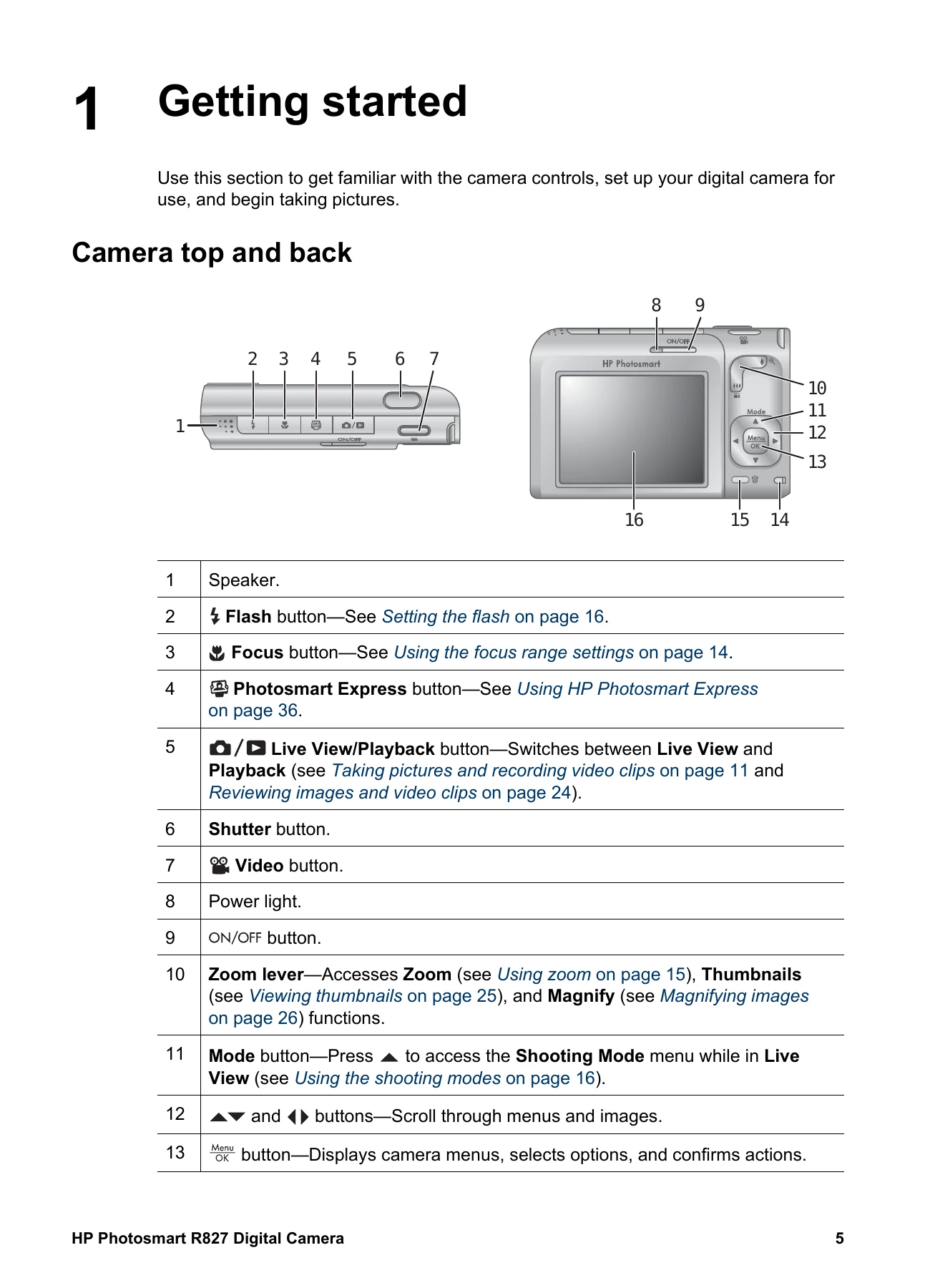
Camera Top and Back Overview

  • 1. Speaker: For audio output.
  • 2. Flash button: Controls the flash settings.
  • 3. Focus button: Adjusts focus range.
  • 4. Photosmart Express button: Accesses HP Photosmart Express features.
  • 5. Live View/Playback button: Switches between viewing the scene and reviewing images/videos.
  • 6. Shutter button: Takes pictures or starts/stops video recording.
  • 7. Video button: Records video clips.
  • 8. Power light: Indicates the camera's power status.
  • 9. ON/OFF button: Turns the camera on or off.
  • 10. Zoom lever: Controls zoom, thumbnails, and magnification.
  • 11. Mode button: Accesses shooting mode menu.
  • 12. Arrow buttons: Navigates menus and images.
  • 13. Menu/OK button: Displays menus, selects options, and confirms actions.
  • 14. Battery Charging light: Indicates battery charging status.
  • 15. Delete button: Deletes images in Playback mode.
  • 16. Image Display: Shows the scene or reviewed images/videos.

Before Taking Pictures

  1. Install the battery: Open the battery/memory card door, insert the battery, and close the door. Ensure the battery is fully charged before first use.
  2. Charge the battery: Use the AC power adapter or an optional dock. The charging light indicates the status.
  3. Turn on the camera: Press the ON/OFF button.
  4. Choose the language: Use the arrow buttons and OK to select a language.
  5. Set the region: Select your region for appropriate date and video formats.
  6. Set the date and time: Accurately set the date and time for image imprinting and organization.
  7. Install and format memory card: Insert an SD card and format it to ensure proper function.

Troubleshooting and error codes

Issue Solution
My image is grainy.
  • Add indirect lighting, use the flash, or wait for natural lighting.
  • Use a lower ISO Speed setting.
  • Avoid excessive digital zoom.
  • Avoid storing the camera in hot locations.
  • Use Image Advice for guidance.
Images are missing on my camera.
  • Remove the memory card and check internal memory.
  • Transfer images from internal memory to the memory card.
The Power light is on but the Image Display is off, or the camera seems stuck and won't operate.
  • Press the Live View/Playback button.
  • Reset the camera.
The camera responds sluggishly when trying to review images.
  • Refer to Storage and Memory capacity sections for memory card tips.
Video recording terminates abruptly. The video is saved successfully, but it is shorter than expected.
  • Choose a lower resolution/compression for video.
  • Replace memory card with a faster card.
Video recording terminates abruptly and the video will not play back.
  • Reformat the card.
The camera gets warm (or even hot) to the touch.
  • This is normal. Turn off the camera and let it cool if unusual.
  • Turn off the camera when not in use for best image quality.
  • Store the camera in a cool place.
My camera stalls when establishing a connection to the computer.
  • Ensure the USB cable is properly connected.
  • Try a different USB port.
  • Turn the camera off and on again. Reset if necessary.
  • Contact HP Support if the problem persists.
Privacy Policy