Manual for 430

Manual for 430

Brand: HP

Category: Digital Camera

Document Type:

Language: EN
Uploaded: Aug. 9, 2025, 11:53 p.m.

Warranty Information

90-day limited warranty in the US, 1-year limited warranty internationally.

Getting Started
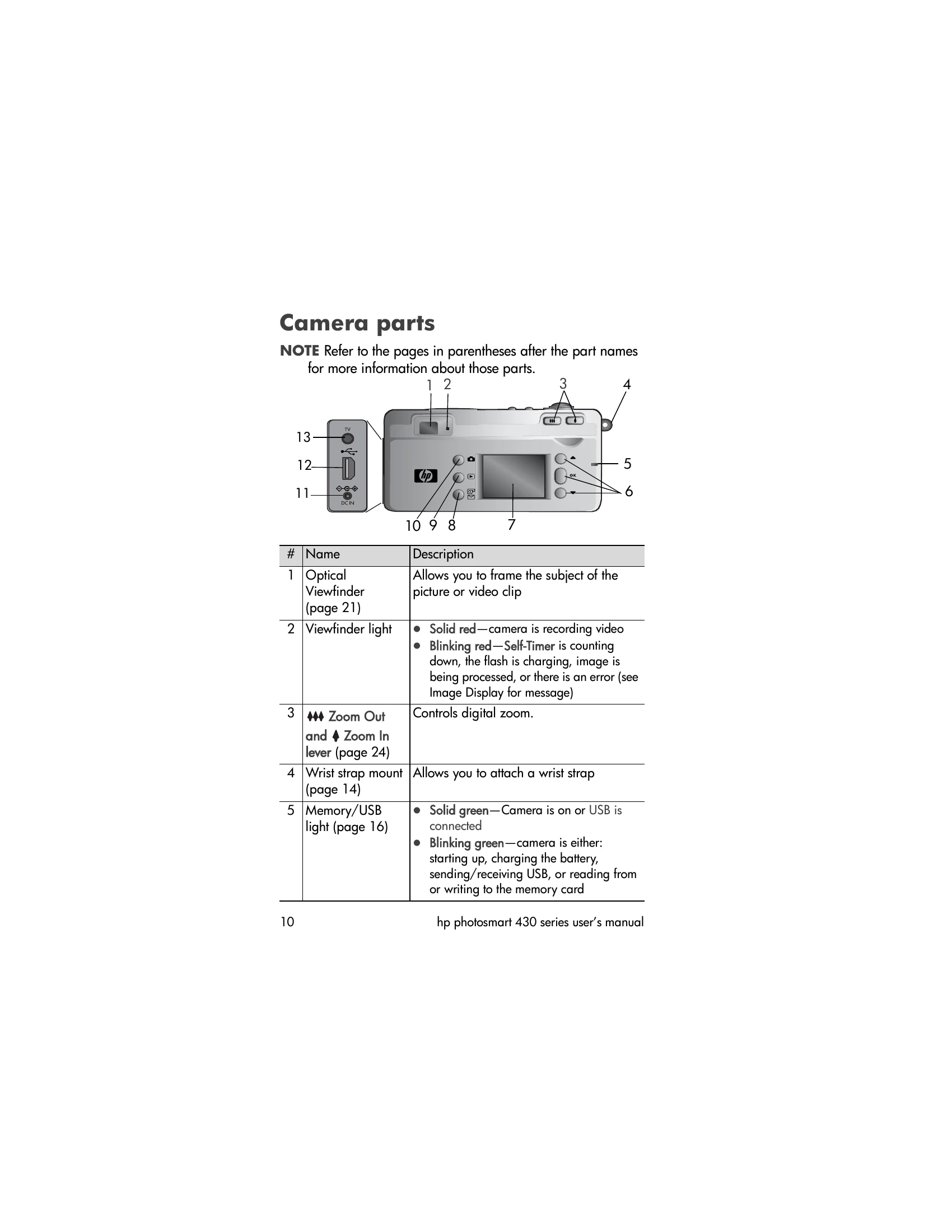
  • Attaching the wrist strap: Attach the wrist strap to the wrist strap mount on the side of the camera.
  • Installing the batteries: Open the battery/memory card door, insert batteries as indicated, and close the door.
  • Installing a memory card: Turn off the camera, open the battery/memory card door, insert the memory card until it clicks, and close the door.
  • Turning on power: Slide the lens cover/power switch to expose the camera lens.
  • Setting date and time: Follow on-screen prompts to set the date and time.
  • Installing software: Insert the HP Photo & Imaging software CD and follow on-screen instructions.
  • Understanding the status screen: Familiarize yourself with icons indicating camera settings and status.
Taking Pictures and Recording Video Clips
  • Taking still pictures: Frame subject in viewfinder, press shutter button fully.
  • Recording video clips: Frame subject, press the Video button to start and stop recording.

Troubleshooting and error codes

Feature Description
Error messages on the camera 72
Error messages on the computer 79
Privacy Policy