Manual for Pavilion Notebook PC

Manual for Pavilion Notebook PC

Brand: HP

Category: Computer

Document Type: Manual

Language: EN
Uploaded: Nov. 21, 2025, 7:49 p.m.

Manual Publish Date: 2000-09-01

Warranty Information

Information about Hewlett-Packard Limited Warranty Statement and obtaining support is provided.

  • Introducing the Pavilion Notebook PC: Covers taking inventory of included items, understanding bundled software, purchasing accessories, and finding additional information sources.
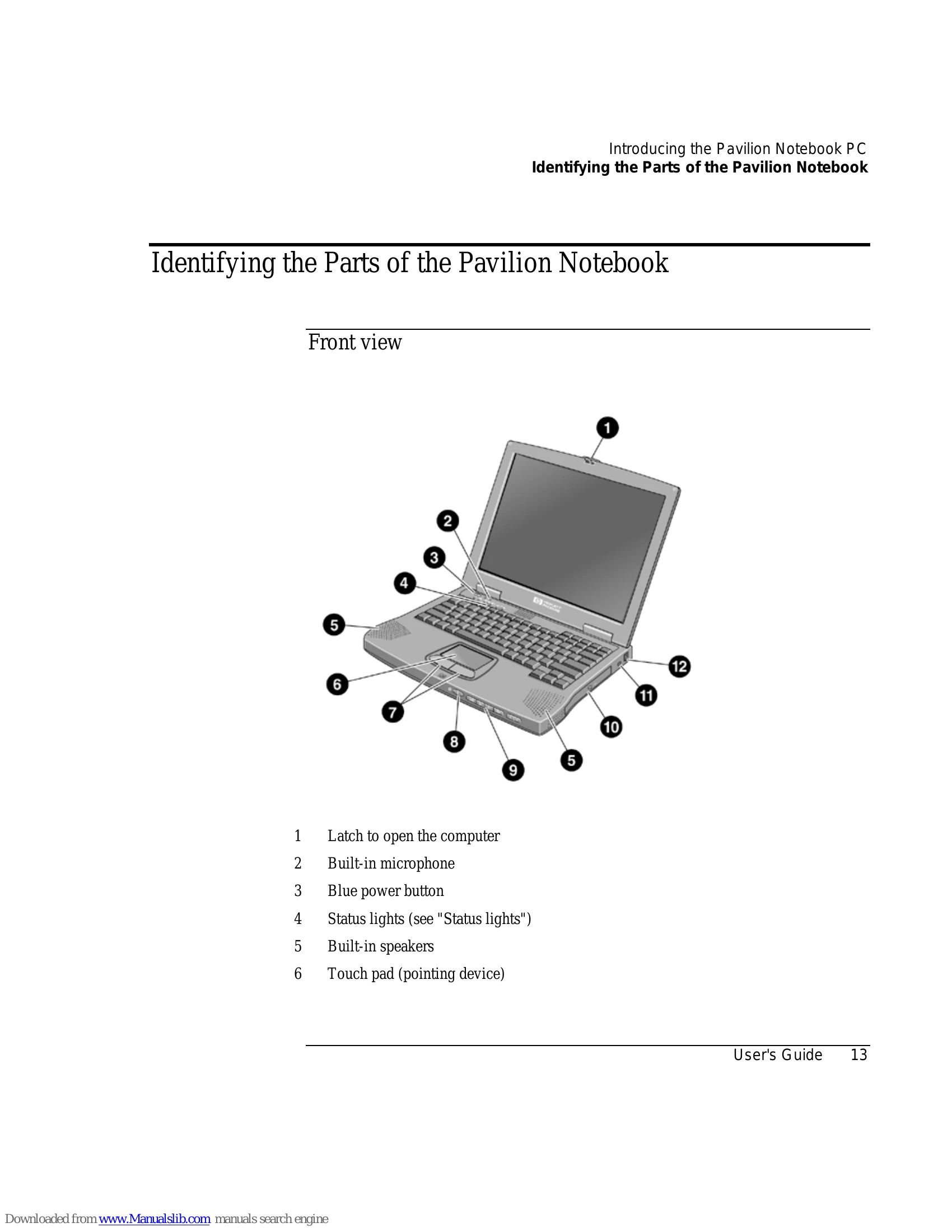
  • Identifying the Parts of the Pavilion Notebook: Provides detailed visual guides to the front, side, rear, and bottom views, including status lights and CD-ROM buttons.
  • Setting Up the Computer: Guides through installing the battery, connecting AC power, connecting a phone line, turning on the computer, and setting up Windows.
  • Using the Pavilion Notebook PC: Explains operating the computer, using special keys, adjusting display and volume, and using the touchpad.
  • Securing the Computer: Details setting up password protection, attaching a security cable, and using antivirus software.
  • Working in Comfort: Offers advice on repetitive strain injury, preparing the work environment, and a comfort and safety checklist.
  • Caring for Your Computer: Covers general care, safeguarding data, extending display life, battery care, and cleaning.
  • Traveling with Your Computer: Focuses on managing power consumption and using battery power.
  • Making Connections: Explains using the modem, connecting to the internet, sending/receiving email and faxes, and connecting PC Cards and external components.
  • Configuring and Expanding Your Computer: Covers BIOS setup, installing/removing RAM, replacing the hard disk drive, and expanding the hibernate partition.
  • Service and Support: Provides information on warranty, obtaining support, repair services, and shipping the computer.
  • Solving Problems with Your Computer: Offers troubleshooting techniques for various issues like audio, CD-ROM, display, hard disk, memory, modem, and more.
  • Specifications and Regulatory Information: Details hardware and software specifications, safety information including battery and laser safety, and regulatory compliance.

Troubleshooting and error codes

Troubleshooting Area Page Number
Audio Problems 98
CD-ROM Drive Problems 98
Display Problems 99
DVD Problems 100
Hard Disk Drive Problems 102
Heat Problems 102
Keyboard, Touch Pad, and Mouse Problems 102
Memory Problems 103
MIDI Problems 104
Modem Problems 104
PC Card (PCMCIA) Problems 105
Performance Problems 106
Port Replicator Problems 107
Power and Battery Problems 107
Printing Problems 109
Recovery CD Problems 109
Serial, Parallel, and USB Problems 110
Startup Problems 111
Suspending and Resuming Problems 112
Privacy Policy