Brand: Honeywell
Category: Other
Document Type: Manual
Language: EN
Brand: Honeywell
Category: Other
Document Type: Manual
Language: EN
Uploaded: Nov. 21, 2025, 7:03 p.m.
POWER: Press the button U to turn the unit on. The cooler will start automatically at medium speed. After a few seconds the speed will switch to low. To turn the unit off, press the button again.
SPEED &: Press the SPEED & button repeatedly to change the speed between I - II - III.
SWING: Press the SWING button until is illuminated on the display. The louvers will begin to move left to right automatically. You can manually adjust the louvers to change vertical air flow.
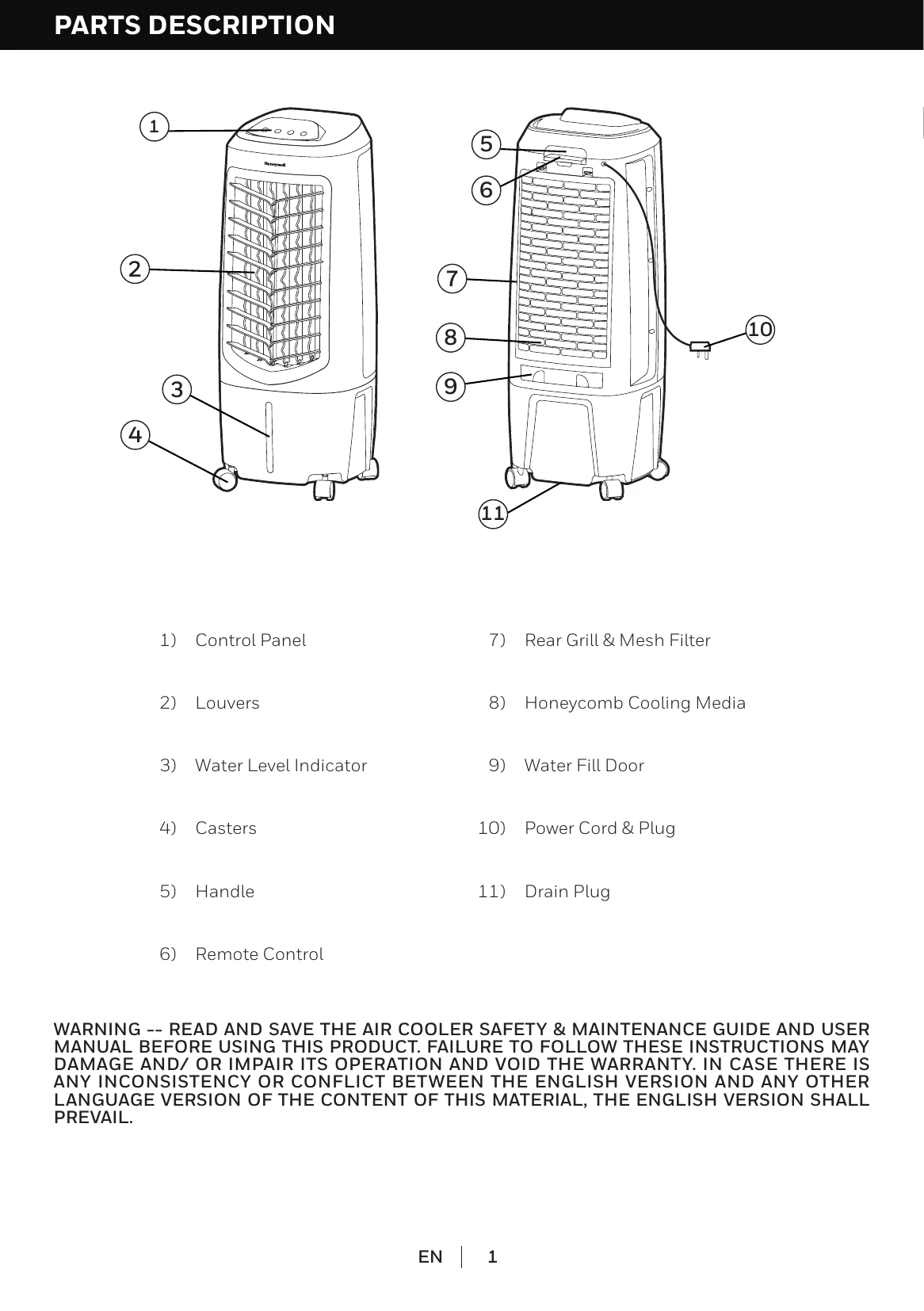
COOL: You must add water before operating the unit in Cool mode. Press the button until is illuminated on the display screen. The water pump will operate and you will feel the cooler air after the Honeycomb Cooling Media is completely wet.
POWER: ON/OFF
SPEED: Low / Medium / High
COOL: Evaporative Cooling ON / OFF
SWING: Controls the motion of the louvers
Open the Water Fill Door. Refill the water tank when water level is low. Do not fill water above the "Max." water level mark. Check the water level in the tank before running the COOL function. Make sure that the water in the tank is above the minimum water level mark.
In Cooling Mode, when water is below the minimum level, a beeping sound will be heard and the GREEN LED will flash. The unit will pause evaporative cooling. Refill the water tank to deactivate the alarm.
Power OFF and disconnect the unit. Remove the cap from the drain plug and allow the tank to empty. Refill with clean water and drain completely. Clean the unit surface with a damp cloth.
Remove the rear grill/mesh filter. Rinse with clean water. Remove the Honeycomb Media from the frame. Clean with water and a damp cloth. Allow the Honeycomb Cooling Media to dry after each use.