Manual for VIP2000

Manual for VIP2000

Brand: HITACHI

Category: TV

Document Type: Manual

Language: EN
Uploaded: Nov. 21, 2025, 6:03 p.m.

Warranty Information

None

Installation

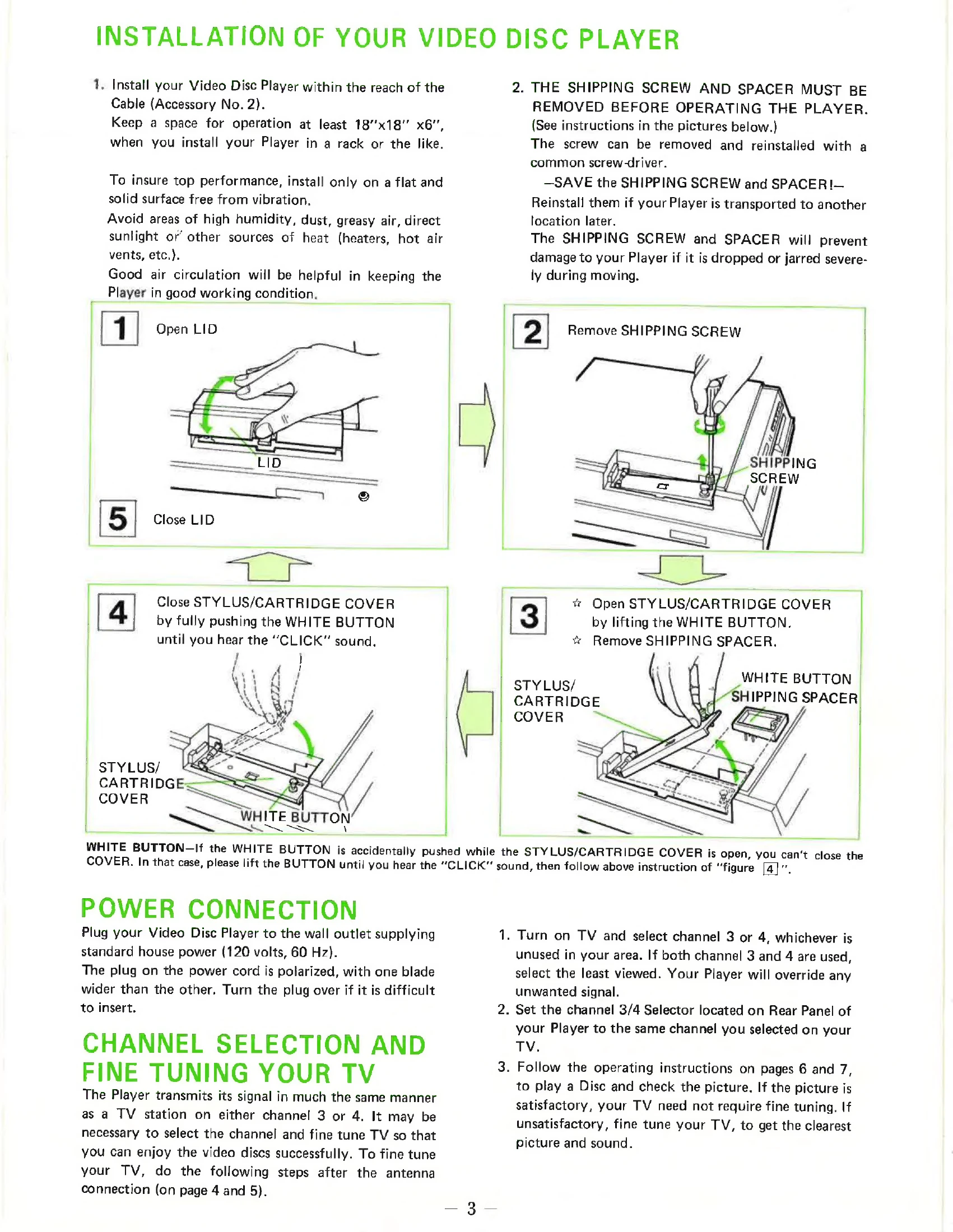
  1. Install the player on a flat, stable surface away from heat, dust, and humidity.
  2. Ensure good air circulation.
  3. Remove the shipping screw and spacer before operation. Save them for future transport.
  4. Connect the player to a power outlet.
  5. Connect to your TV using either antenna connection (channels 3 or 4) or optional cable connections (projection/monitor TV).
  6. Select the appropriate TV channel and fine-tune if necessary.

Operation

  • Playing a Disc: Insert the disc caddy into the player. Press PLAY.
  • Pausing: Press PAUSE/PLAY. The PLAYTIME INDICATOR will flash. Press again to resume.
  • Returning to Standby: Press RETURN.
  • Searching: Use NORMAL or FAST modes for forward or reverse search. Note: Picture quality may be affected during search.
  • Repeat Playback: Press FORWARD NORMAL and REVERSE NORMAL simultaneously for frame-by-frame repeat.
  • Removing a Disc: Press RETURN, then insert an empty caddy to remove the disc caddy.

Additional Information

  • CED discs are housed in protective caddies and should never be removed from them.
  • In case of power failure, resume playback with PAUSE/PLAY.
  • Connection with a VCR is possible for recording TV signals, but not for copying discs.

Troubleshooting and error codes

Interference to radio or television reception Equipment not installed or used properly.
  • Reorient the receiving antenna.
  • Relocate the Player with respect to the receiver.
  • Move the Player away from the receiver.
  • Plug the Player into a different outlet on a different branch circuit.
  • Consult dealer or technician.
Privacy Policy