Brand: HITACHI
Category: TV
Document Type: Parts/Service
Language: EN
Brand: HITACHI
Category: TV
Document Type: Parts/Service
Language: EN
Uploaded: Nov. 21, 2025, 7:27 p.m.
Manual Publish Date: 2006-09-01
| No sound | 1. Mute is ON. | Press the MUTE button to cancel mute. |
|---|---|---|
| 2. Volume is set to minimum. | Adjust volume UP. | |
| 3. Audio cable is not connected properly. | Check audio cable connection. | |
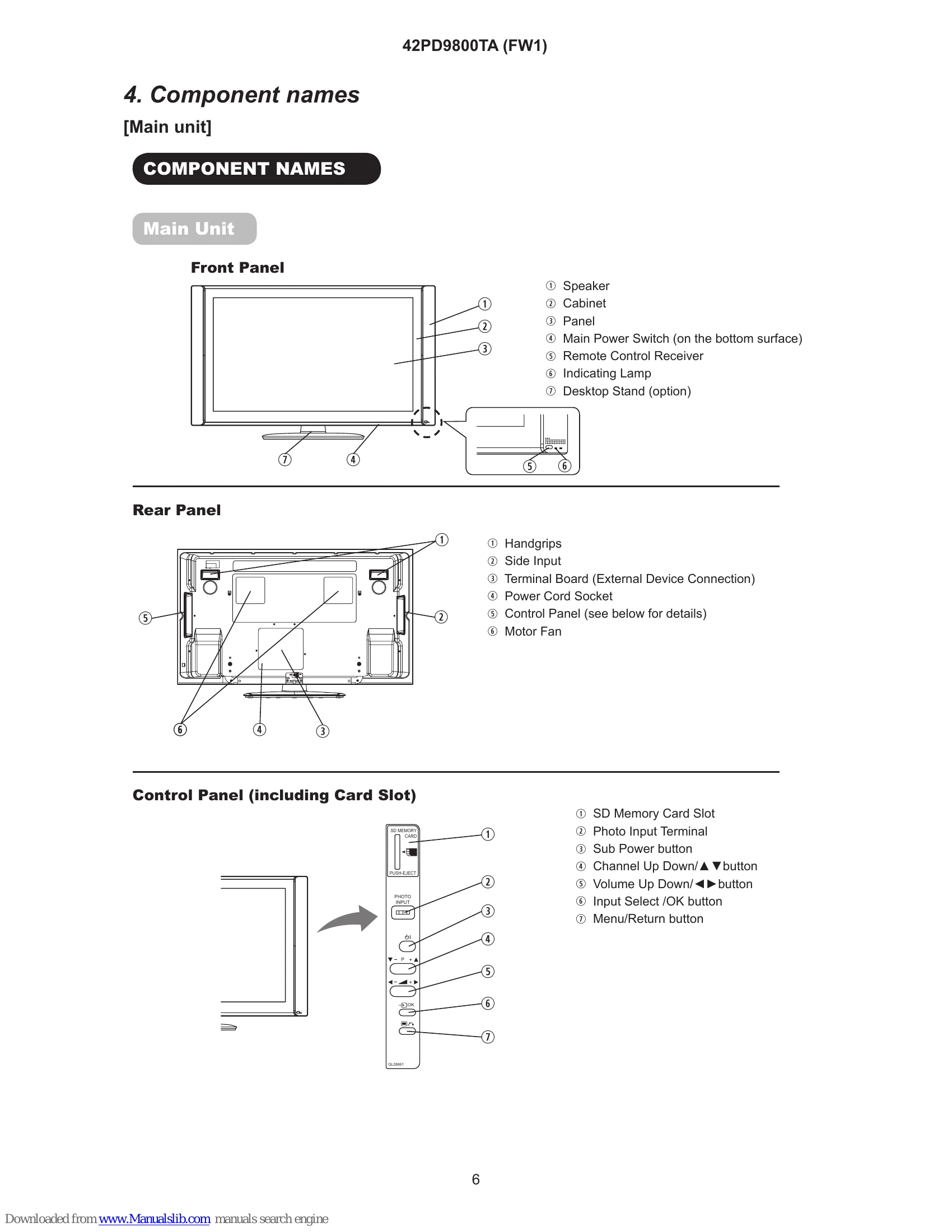
| No picture | 1. The set is not turned ON. | Press the SUB POWER button. |
| 2. Input source is selected incorrectly. | Press the Input Select button and choose the correct input source. | |
| 3. No signal is being received. | Check the signal source connection and signal reception. | |
| Picture is distorted or has unusual colors | 1. Incorrect picture settings. | Reset picture settings to default or select an appropriate Picture Mode. |
| 2. Signal cable is damaged or loose. | Check and replace the signal cable if necessary. | |
| 3. Panel module issue. | Refer to the service manual for panel module troubleshooting. |