Brand: HITACHI
Category: Other
Document Type: Parts/Service
Language: EN
Brand: HITACHI
Category: Other
Document Type: Parts/Service
Language: EN
Uploaded: Nov. 21, 2025, 8:18 p.m.
Manual Publish Date: 2006-01-01
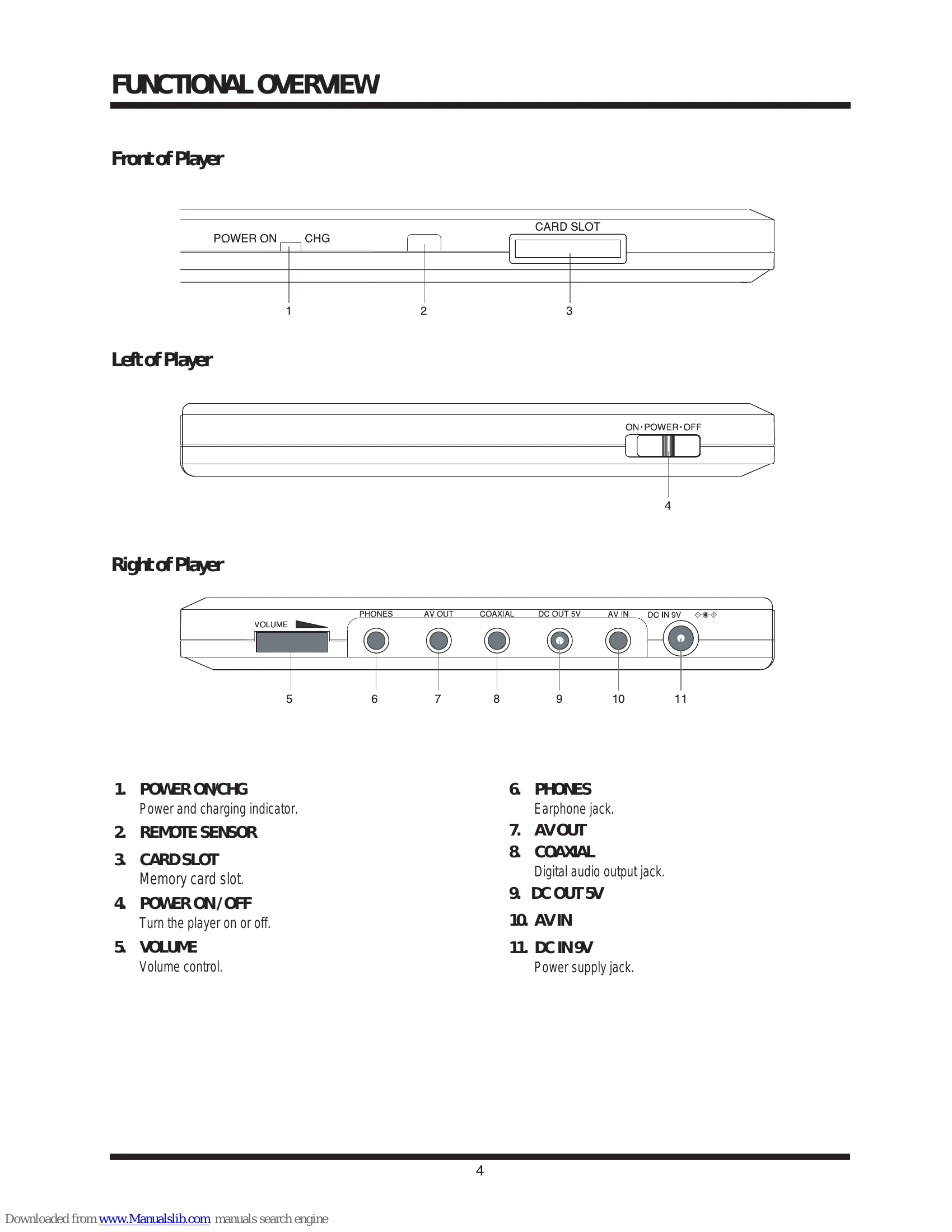
Front of Player: POWER ON/CHG (Power and charging indicator), REMOTE SENSOR, CARD SLOT (Memory card slot).
Left of Player: POWER ON/OFF (Turn the player on or off).
Right of Player: VOLUME (Volume control), PHONES (Earphone jack), AV OUT, COAXIAL (Digital audio output jack), DC OUT 5V, AV IN, DC IN 9V (Power supply jack).
Top of Player: LCD SCREEN, SPEAKER, OPEN, DISC DOOR, PLAY, PAUSE, STOP, DIRECTION BUTTONS, ENTER, PREV/NEXT, TOP MENU, OSD (ON-SCREEN DISPLAY), MENU, CARD, MONITOR, SOURCE.
Remote Control: Various buttons for playback control, menu navigation, setup, subtitle, audio mode, etc.
| SYMPTOM | DIAGNOSTIC STEPS | ACTION |
|---|---|---|
| NO POWER, NO GREEN LED | Check power cable and AC adapter. | Replace cable/adapter. |
| Check power and play button. | Replace connector and switch unit. | |
| Replace MAIN BOARD. | ||
| THE INITIAL SCREEN IS NOT DISPLAYED ON THE LCD | Check if LED on front lights up. | Refer to NO POWER, NO GREEN LED symptom. |
| Check backlight. | Replace broken component. | |
| Check LCD lighting. | Open top/bottom assembly to check connector harness. | |
| Is connector harness broken? | Yes: Repair connector. No: Remove LCD cover/plate to check FL harness connection. | |
| Is connector OK? | Yes: Replace LCD unit or main board. No: Replace LCD harness or main board. | |
| THE DVD DRIVE DOES NOT WORK | Press DISC cover switch, turn on power, check optical pick-up lens light. | Replace DVD drive. |
| Pick-up lens light up dim. | Replace DVD drive. | |
| Pick-up lens does not light up at all. | Check connectors of DVD drive and main board. | |
| Secure connection of DVD drive and main board. | ||
| Pick-up lens light up OK. | Insert DVD disc, turn on power. | |
| DVD drive works, but initializing operation doesn't start or abnormal noise. | Replace DVD drive or main board. | |
| Operation stops at initializing display. | Check display for messages like 'Loading?displayed' or 'CHECK DISK?displayed'. | |
| Nothing on display. | Check DVD disc for fingerprints/dirt. | |
| 'CHECK DISK?' displayed. | Check DVD disc. | |
| DVD disc OK. | No defect, return to customer. | |
| DVD disc dirty. | No defect, return to customer. | |
| NO IMAGE OR SOUND COMES OUT FROM THE EXTERNAL OUTPUT | Check operation of the DVD drive. Does DVD drive work? | Yes: Replace main board or connector. No: Replace DVD drive. |