Brand: Hewlett Packard Enterprise
Category: Networking
Document Type: Installation Guide
Language: EN
Brand: Hewlett Packard Enterprise
Category: Networking
Document Type: Installation Guide
Language: EN
Uploaded: Nov. 21, 2025, 8:43 p.m.
Manual Publish Date: 2016-05-19
This section covers safety recommendations, site examination, and environmental requirements such as temperature, humidity, and cleanliness. It also addresses ESD prevention, EMI, and lightning protection. Rack-mounting requirements and installation accessories are detailed.
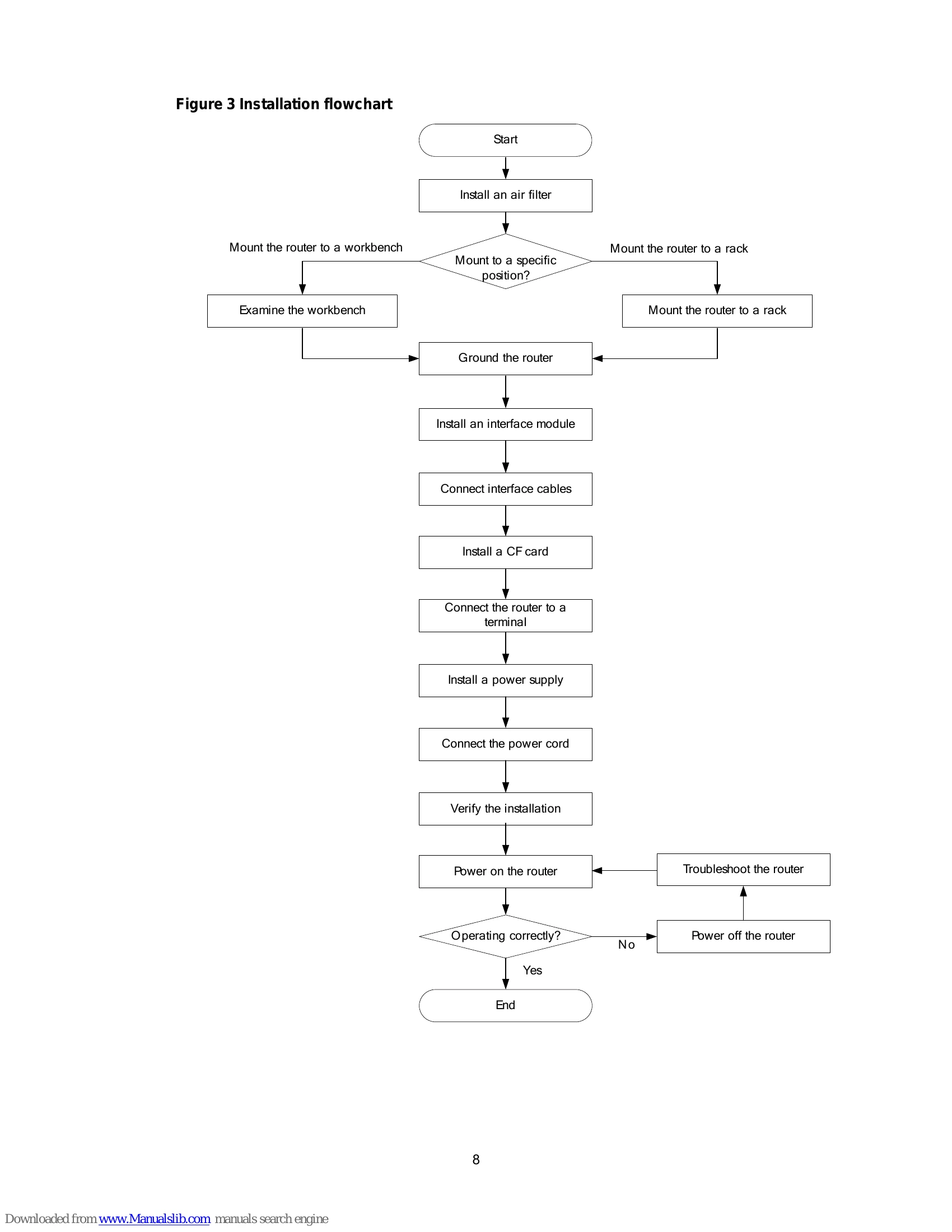
This section guides you through the installation process, including prerequisites, a flowchart, and specific steps for installing an air filter, mounting the router on a workbench, and mounting it in a rack. It also covers grounding, installing interface modules, connecting network and power cables, and verifying the installation.
Covers procedures for replacing internal modules like power supplies and removing chassis covers.
Provides guidance for troubleshooting common issues such as power supply failures, fan failures, configuration system failures, and user password loss.
Includes chassis views, technical specifications, LED descriptions, and slot arrangements.
| Trouble | Possible Cause | Solution |
|---|---|---|
| Power supply system failure | • Power cord loose or faulty • Power supply unit failure |
• Check if the power cord is properly connected and functioning. • Replace the power supply unit if it is faulty. |
| Fan failures | • Fan unit failure | • Replace the fan unit. |
| Configuration system failures | • System software corruption • Hardware failure |
• Reinstall the system software. • Contact customer support. |
| No display on the configuration terminal | • Terminal connection issue • Terminal configuration error |
• Check the terminal connection. • Verify the terminal configuration settings. |
| Garbled characters on the configuration terminal | • Terminal configuration error • Cable issue |
• Correct the terminal configuration. • Replace the cable. |
| No response from the serial port | • Serial port configuration error • Cable issue |
• Check the serial port configuration. • Verify the cable connection. |
| User password loss | • Lost or forgotten password | • Follow the password recovery procedure or contact customer support. |