Brand: Haier
Category: Televisions
Document Type: Manual
Language: EN
Brand: Haier
Category: Televisions
Document Type: Manual
Language: EN
Uploaded: Nov. 21, 2025, 6:24 p.m.
Refer all servicing to the customer helpline for any problems with the product.
Main features:
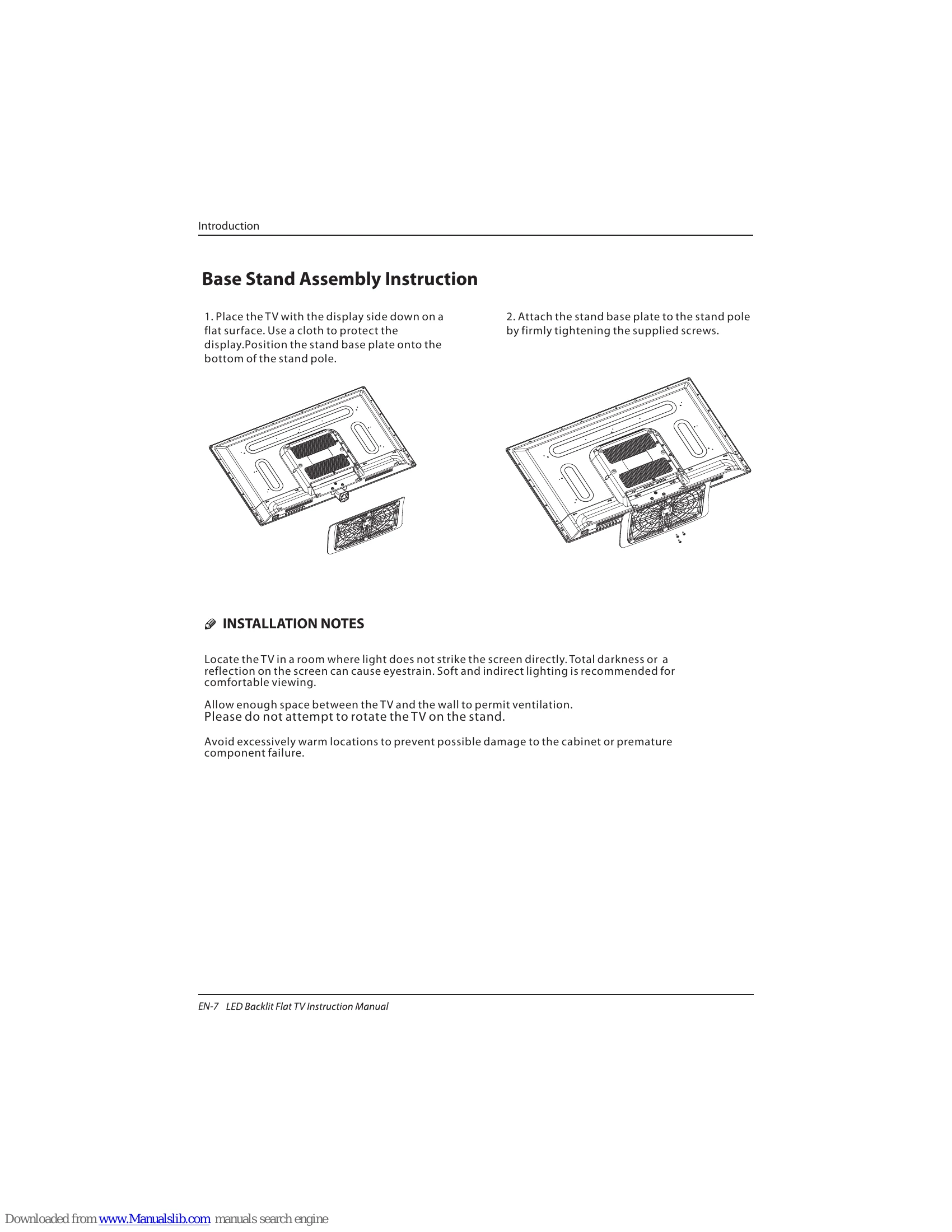
Installation Notes:
Connecting your Haier TV:
Various connection options are available including SCART, HDMI, AV, Component, VGA, and USB for DVD players, satellite receivers, game consoles, PCs, and laptops.
First Time Setup: Guides you through initial TV setup including language, mode, country, and antenna type selection. It also performs an automatic channel scan (DVB-T/DVB-C).
CHANNEL MENU: Allows for Auto Tuning (DVB-T/DVB-C), Manual Tuning (DVB-T/DVB-C), Program Edit, Common Interface management, Signal Information display, and Software Update via USB.
PICTURE MENU: Adjusts picture settings like brightness, contrast, sharpness, color, etc.
AUDIO MENU: Adjusts sound settings like treble, bass, balance, and sound modes.
CLOCK MENU: Adjusts clock, power on/off times, and sleep timer.
SETUP MENU: Configures OSD language, audio languages, subtitle language, country, PVR file system, timeshift record time, auto standby, and HDMI CEC control.
LOCK MENU: Manages system lock, parental ratings, and program blocking.
EPG Menu: Provides detailed broadcast program information and allows for scheduling recordings and setting reminders.
PVR File System: Manages recorded programs, device lists, and scheduled recordings.
| Trouble | Possible Cause | Solution |
|---|---|---|
| No picture or sound | The TV is not switched on. | Press the POWER button on the remote control or on the TV set. |
| No picture | The wrong input source is selected. | Press the SOURCE button on the remote control and select the correct input source. |
| No sound | The volume is set to zero or muted. | Press the VOLUME + button or the MUTE button on the remote control. |
| Poor picture quality | Poor signal reception or incorrect settings. | Check the antenna connection. Perform a channel scan. Adjust picture settings in the Picture Menu. |
| Remote control is not working | Batteries are exhausted or incorrectly inserted. | Replace the batteries. Ensure correct polarity. |
| The TV does not respond to remote control | Obstruction between the remote and the sensor. | Ensure there is a clear line of sight between the remote and the TV's remote control sensor. |