Brand: GoPro
Category: Electronics
Document Type: Manual
Language: EN
Brand: GoPro
Category: Electronics
Document Type: Manual
Language: EN
Uploaded: Aug. 10, 2025, 12:49 a.m.
Powering On/Off: Press the Mode button to turn the camera on. Press and hold the Mode button for 3 seconds to turn it off.
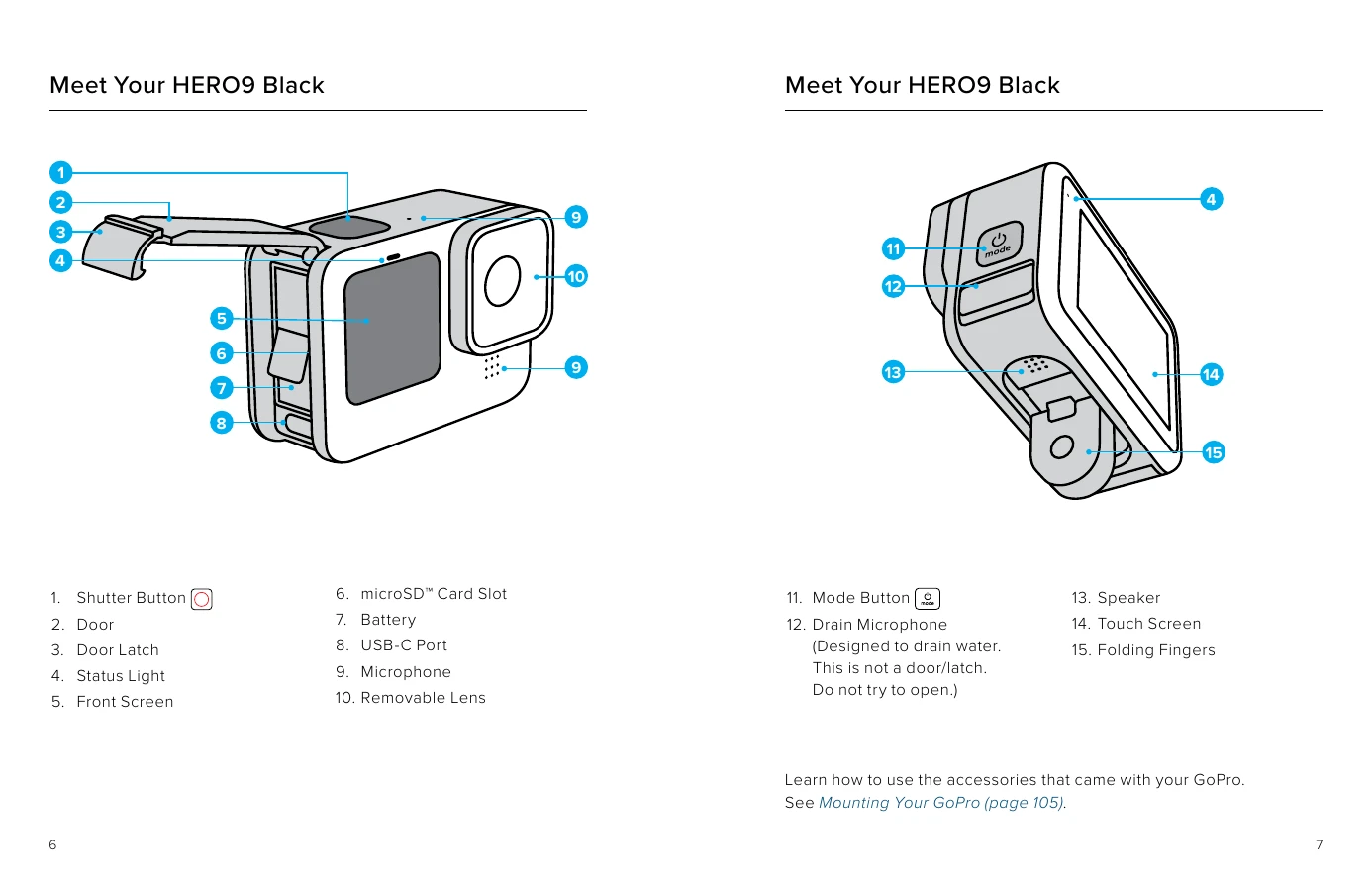
Front Screen: Displays a live view, useful for framing shots. Swipe down for the Dashboard, and tap icons to access settings.
Rear Touch Screen: Navigate modes (Video, Photo, Time Lapse) by swiping left or right. Swipe down from the edge to open the Dashboard. Swipe up to view captured media.
Capture Modes: Features Video, Photo, and Time Lapse modes with various presets. Customize settings by tapping the gear icon.
Customizing Presets: Adjust settings like resolution, frame rate, and lens. Create and save custom presets for different activities.
Power Tools: Utilize features like HindSight (captures video before the Shutter button is pressed), LiveBurst (burst of photos), Scheduled Capture (automatic recording), and Duration Capture (set recording length).