Quick Start Guide for HERO4 SESSION

Quick Start Guide for HERO4 SESSION

Brand: GoPro

Category: Electronics

Document Type: Quick Start Guide

Language: EN
Uploaded: Aug. 10, 2025, 12:49 a.m.

SETUP

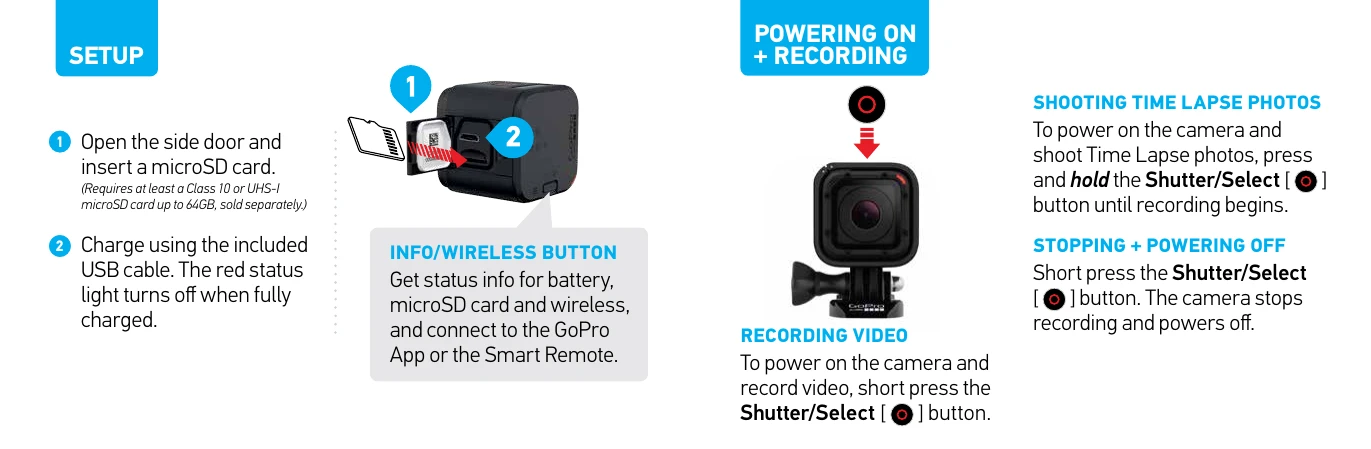
  1. Open the side door and insert a microSD card (Class 10 or UHS-I, up to 64GB).
  2. Charge the camera using the USB cable until the red status light turns off.

POWERING ON + RECORDING

  • RECORDING VIDEO: Short press the Shutter/Select button to power on and record video.
  • SHOOTING TIME LAPSE PHOTOS: Press and hold the Shutter/Select button until recording begins.
  • STOPPING + POWERING OFF: Short press the Shutter/Select button.

MODES

  • DEFAULT MODES: Video (1080p30), Time Lapse (photo every 0.5 sec).
  • ACCESS ADDITIONAL MODES: Use the GoPro App or Smart Remote for Video Resolutions (1080p60, 960p60, 720p100, etc.), Photo Modes (Single, Time Lapse, Burst), and Settings adjustments.

CONNECTING TO GOPRO APP

  1. Download and open the GoPro App on your phone or tablet.
  2. Follow the on-screen instructions. (Default password: goprohero)

MOUNTING TIPS

  • Use the included Low-Profile Frame or Standard Frame to attach the camera to any GoPro mount.
  • SECURING CAMERA IN FRAME: Open latch, slide camera in, ensure flush fit, close latch.

FLEXIBLE MOUNTING

  • VARIABLE ORIENTATION: Position camera with Shutter/Select button up or down.
  • BALL JOINT BUCKLE: Use to easily change capture angles.

VIEWING, EDITING, AND SHARING

  • GOPRO APP: View, share photos and videos.
  • GOPRO STUDIO: Import, play back, and edit videos (download at gopro.com/getstarted).

HELPFUL TIPS

  • Keep lens clean, avoid fingerprints.
  • Ensure camera is clean and dry before opening side door.
  • Shake or blow on mic to remove water/debris; rinse if needed, dry with cloth.
  • HERO4 Session is waterproof to 33' (10m) - ensure side door is securely closed.

HELP AND RESOURCES

  • Update your camera, create a GoPro account, download the user manual, watch tutorial videos, contact customer support.
  • Visit gopro.com/getstarted for more information.

JOIN THE GOPRO MOVEMENT

  • Find inspiration and share your own photos/videos.

Important: Read Important Product + Safety Information before use.

Privacy Policy