Brand: GoPro
Category: Electronics
Document Type: Manual
Language: EN
Brand: GoPro
Category: Electronics
Document Type: Manual
Language: EN
Uploaded: Aug. 10, 2025, 12:48 a.m.
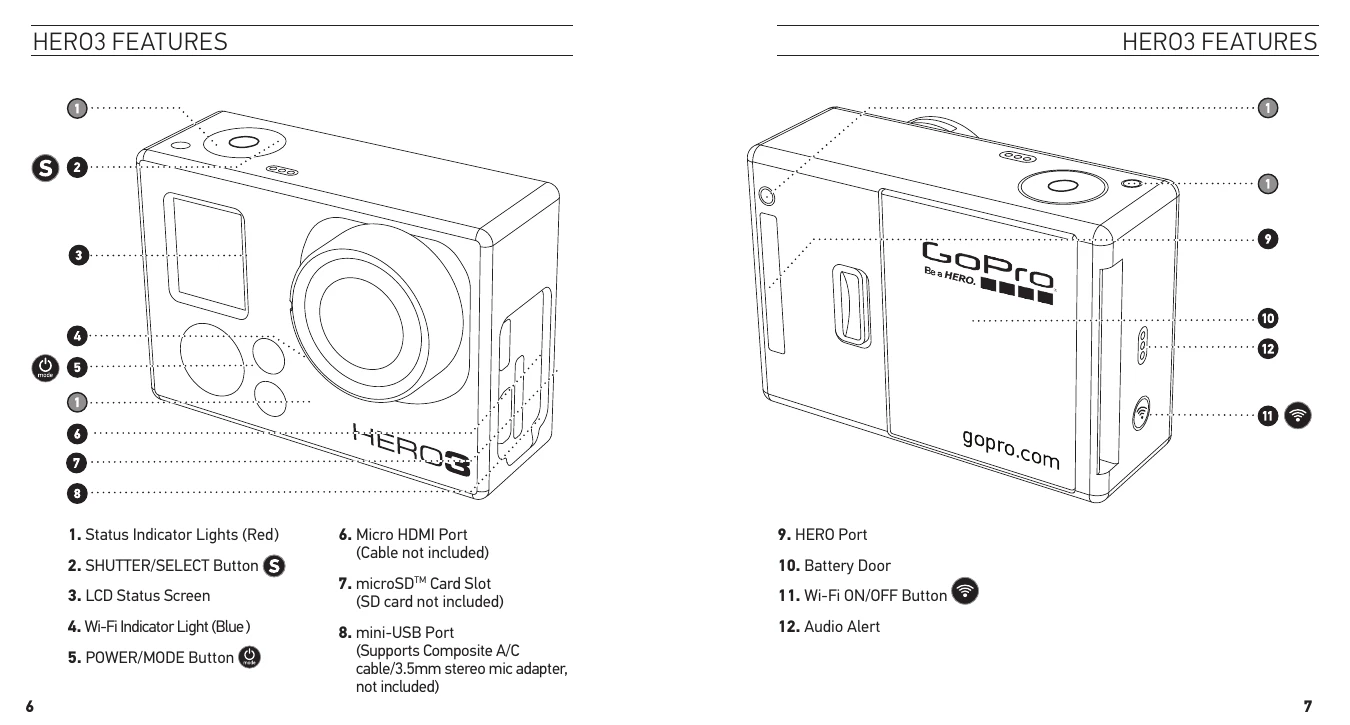
Press the POWER/MODE button to turn the camera ON. Press and hold for two seconds to turn OFF.
Cycle through modes (Video, Photo, Photo Burst, Time Lapse, Playback) using the POWER/MODE button.
Access the Settings menu to adjust various camera options like Resolution, FOV, Wi-Fi, and more.
| Message | Description |
|---|---|
| NO SD | No card present. The camera requires a microSD, microSDHC or microSDXC card to record Video or take Photos. |
| SD FULL | Card is full. Delete files or swap card. |
| SD ERROR | Camera unable to access card. |