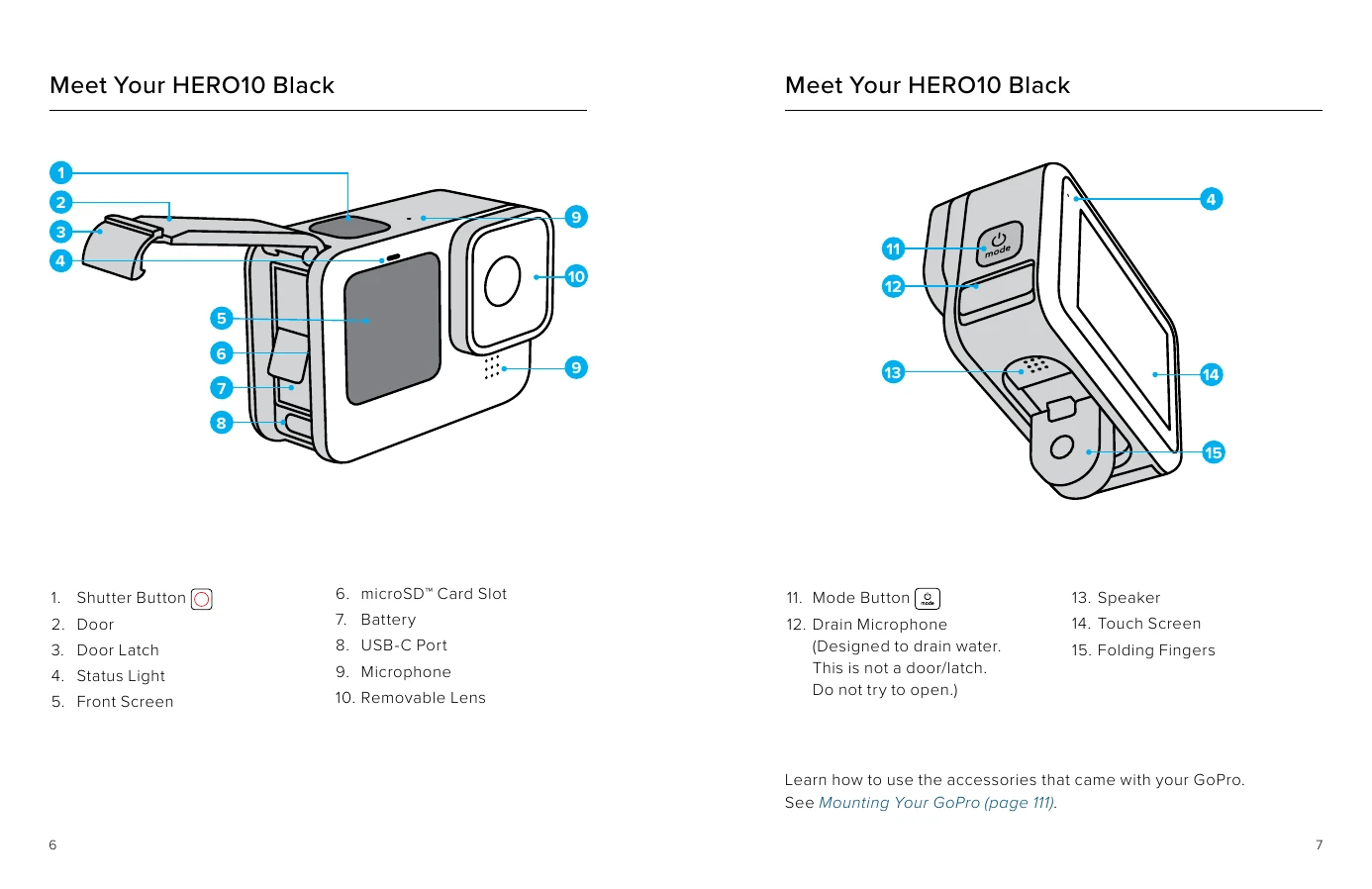
Powering On: Press the Mode button to turn on your HERO10 Black. Powering Off: Press and hold the Mode button for 3 seconds to turn it off. Display Options: Swipe down on the rear screen to access the Dashboard. Tap the button to access the front screen settings. Tap the icon of the setting that you want. Rear Touch Screen: Tap to select an item to turn it on or off. Swipe left or right to switch between Video, Photo, and Time Lapse modes. Swipe down from the edge of the screen to open the Dashboard. Swipe up from the edge of the screen to see the last photo or video captured and access the Media Gallery. Press and hold the capture screen to turn on and adjust Exposure Control. Capture Modes: Swipe left or right on the rear touch screen to the mode you want: Video, Photo, or Time Lapse. Getting the Shot: Simply press the Shutter button to start recording. Press the Shutter button again to stop recording (Video, Time Lapse, and Live Streaming only).