Manual for A56W

Manual for A56W

Brand: Generic

Category: Mobile Phone

Document Type: Manual

Language: EN
Uploaded: Nov. 21, 2025, 6:46 p.m.

Getting Started

Insert (U)SIM Card and Battery

Power off the phone. Remove the back cover, then the battery. Insert the SIM card with the golden chip facing down. Reinstall the battery and back cover.

Recharging the Battery

Connect the charger to the phone. The battery icon will indicate charging status. Full charge takes approximately 2.5 hours.

Powering the Phone On and Off

Turning the Phone On

Press and hold the END/POWER Key. Enter lock code if prompted. The homescreen will appear.

Turning the Phone Off

Press and hold the END/POWER key for approximately 4 seconds.

Display Screen

The display shows Status Indication (signal strength, battery, messages), Standby information (network supplier, date, time, messages), and Wallpaper.

Keys

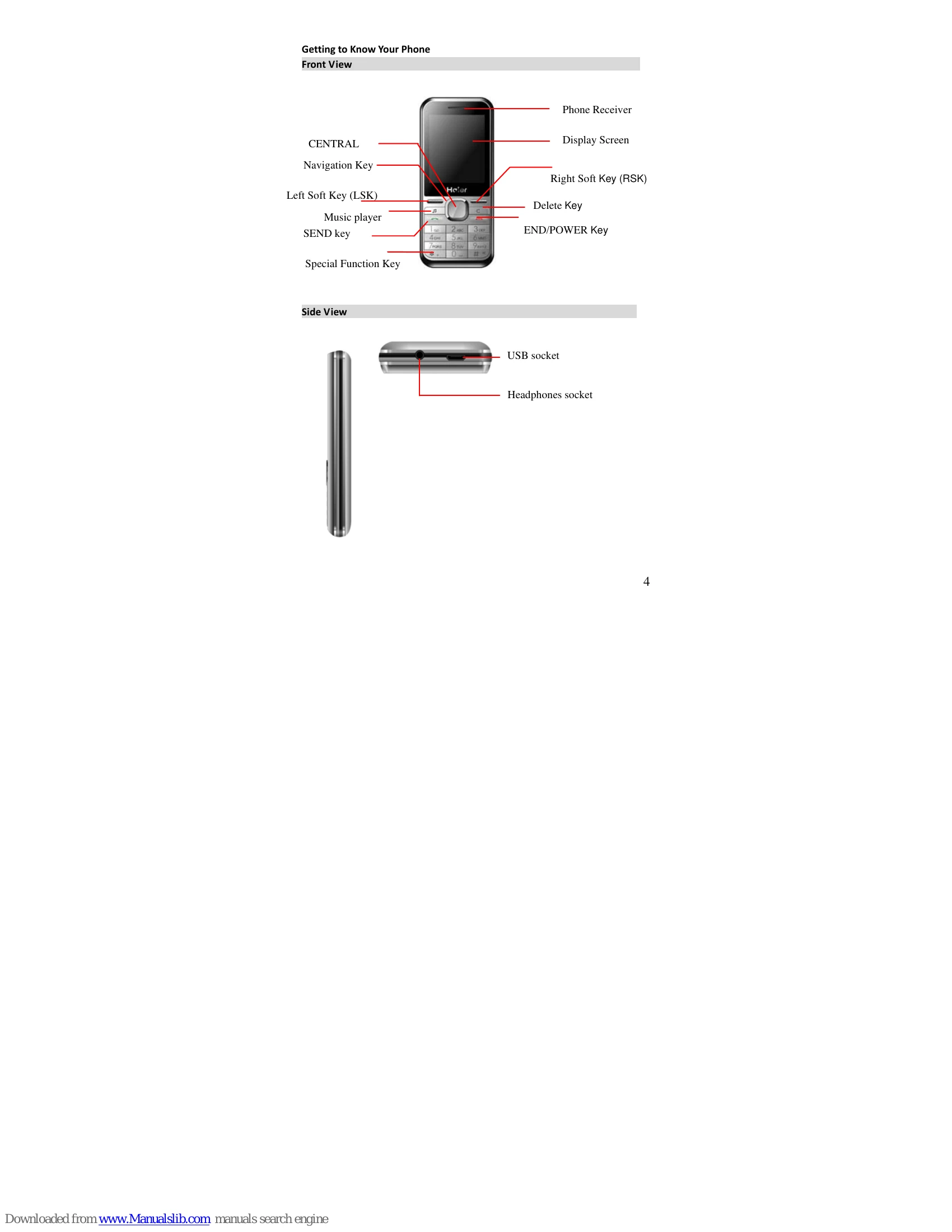
Various keys perform different functions: CENTRAL KEY for menu/confirmation, Navigation Key for scrolling, SEND key for calls, END/POWER key for ending calls/powering on/off, numeric keys for dialing and input.

Troubleshooting and error codes

Issue Solution
The phone cannot be started up
  • Check if the power key is pressed and held continuously.
  • Check battery contact. Remove and refit the battery.
  • Recharge the battery if it is run out.
There is a lock screen displayed upon powering on the phone
  • Input the phone lock password.
  • Input PIN when prompted.
  • Input PUK if PIN is entered incorrectly 3 times.
(U)SIM Card is Error
  • Clean the metal contacts of the (U)SIM card.
  • Install the (U)SIM card correctly.
  • Contact network service supplier if damaged.
The network cannot be accessed
  • Move to a location with a strong signal.
  • Ensure you are within the network coverage area.
  • Verify the (U)SIM card is valid.
Cannot Dial Out
  • Confirm the dial key is pressed.
  • Confirm the (U)SIM card is valid.
  • Check call restriction and fixed dial functions.
Bad call quality
  • Check volume adjustment.
  • Avoid areas with poor signal reception (basements, near buildings).
  • Avoid peak calling times when the channel is congested.
Contact cannot call you
  • Ensure the phone is powered on and connected to the network.
  • Check if calls are barred.
  • Verify (U)SIM card validity and fixed dial function.
Contact cannot hear you
  • Ensure the microphone area is clear of debris.
  • Keep the microphone close to your mouth.
Short standby time
  • Move to an area with a strong signal.
  • Power off the phone temporarily when in areas with bad signal.
  • The battery may require replacement.
Cannot charge
  • Check plug connection.
  • Wipe phone and battery interfaces.
  • Replace battery or adapter if damaged.
Privacy Policy